



本篇文章给大家详细的介绍了关于Mac下安装PHP调试工具Xdebug的详细步骤,若是有需要的小伙伴可以参考一下
Mac下安装PHP调试工具Xdebug
安装步骤
brew install php70brew install php70-xdebugphp -i | grep xdebug.ini找到xdebug.ini的配置文件我的是/usr/local/etc/php/7.0/conf.d/ext-xdebug.ini-
vim /usr/local/etc/php/7.0/conf.d/ext-xdebug.ini配置如下: [xdebug] zend_extension="/usr/local/opt/php70-xdebug/xdebug.so" xdebug.remote_enable = On xdebug.remote_handler = dbgp xdebug.remote_host= localhost xdebug.remote_port = 9001 #这个端口不要被占用即可,可以自行指定 xdebug.idekey = PHPSTORM xdebug.remote_autostart=1 xdebug.remote_log=/var/tmp/xdebug.log
-
在PHPStorm中配置
立即学习“PHP免费学习笔记(深入)”;
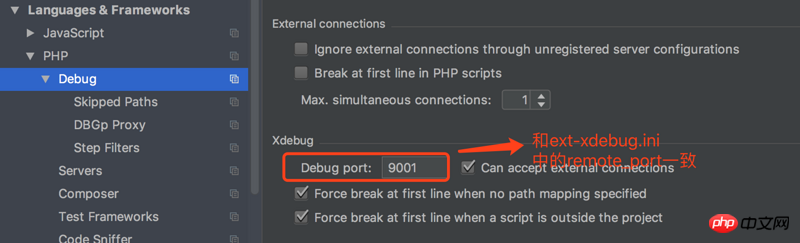
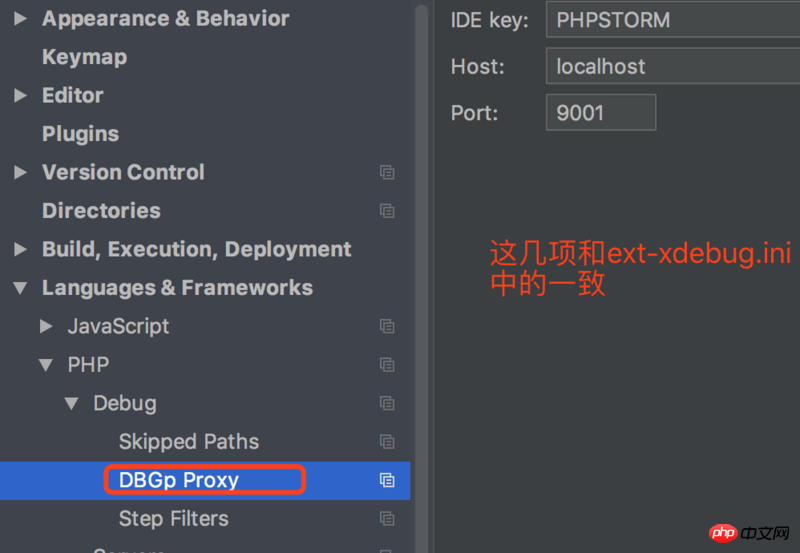
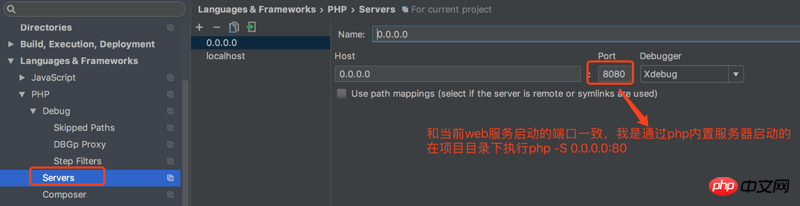
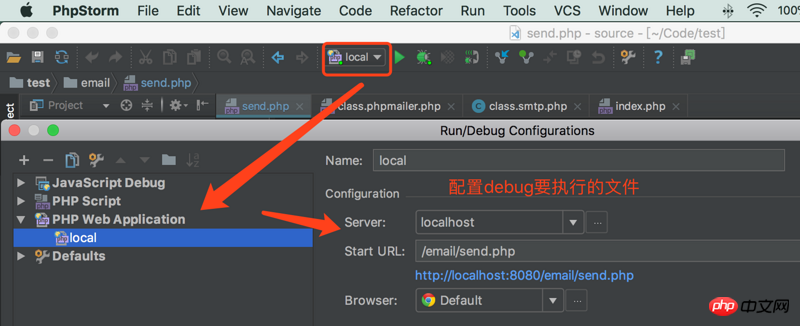
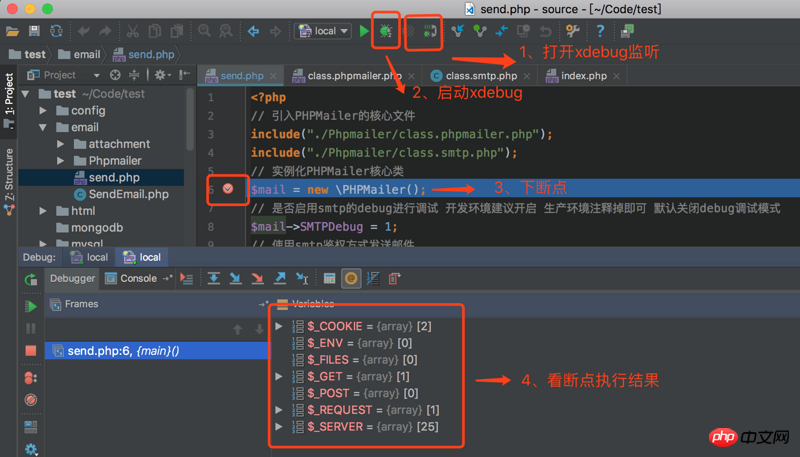
我的调试地址:http://localhost:8080/email/send.php?XDEBUG_SESSION_START=15550 愉快的调试吧,哈哈

Mac下安装PHP调试工具Xdebug
安装步骤
brew install php70brew install php70-xdebugphp -i | grep xdebug.ini找到xdebug.ini的配置文件我的是/usr/local/etc/php/7.0/conf.d/ext-xdebug.ini-
vim /usr/local/etc/php/7.0/conf.d/ext-xdebug.ini配置如下: [xdebug] zend_extension="/usr/local/opt/php70-xdebug/xdebug.so" xdebug.remote_enable = On xdebug.remote_handler = dbgp xdebug.remote_host= localhost xdebug.remote_port = 9001 #这个端口不要被占用即可,可以自行指定 xdebug.idekey = PHPSTORM xdebug.remote_autostart=1 xdebug.remote_log=/var/tmp/xdebug.log
-
在PHPStorm中配置
立即学习“PHP免费学习笔记(深入)”;
我的调试地址:http://localhost:8080/email/send.php?XDEBUG_SESSION_START=15550 愉快的调试吧,哈哈




