



本篇文章向大家介绍了php下ckeditor在线编辑器的使用,感兴趣的小伙伴们可以参考一下本篇文章。
CKeditor是一款在线编辑器,可用于博客、新闻发布等的文本编辑框,利用它可以很方便地实现对文章的排版。它是一款开源工具,可以在我们的网站中使用它增强编辑功能,显得专业和装B。原来它叫FCKeditor,后来改名叫CKeiditor,感谢开源软件的开发者,他们是最帅的!
一、下载
官网下载:http://ckeditor.com/download/
解压之后直接放在网站根目录里就可以使用了。
在_samples目录下,可以找到很多做好的样例,这些可以用来学习编辑器的用法。
二、用js的方式调用
官方演示样例:
<html><head>
    <title>Sample CKEditor Site</title>
    <script type="text/javascript" src="ckeditor/ckeditor.js"></script></head><body>
    <form method="post">
        <p>
            My Editor:<br />
            <textarea id="editor1" name="editor1"><p>Initial value.</p></textarea>
            <script type="text/javascript">
                CKEDITOR.replace( 'editor1' );            </script>
        </p>
        <p>
            <input type="submit" />
        </p>
    </form></body></html>
我是把ckeditor目录和test.html放在同个目录下,注意第四行原来是src="/ckeditor/ckeditor.js",要把前面的斜杠去掉,改为src="ckeditor/ckeditor.js"才能正确指向文件ckeditor.js。这时候不启用wamp服务器也能正确显示ckeditor。
三、用PHP的方法引入
<p>Title:</p><input name="subject" type="text" >

<?phpinclude 'ckeditor/ckeditor.php'; //include ckeditor.php$ckeditor = new CKEditor;$ckeditor->editor('content');?>

<input name="submit" type="submit" value="提交"  />
这样也能引入ckeditor,这时候editor的位置就在中间那段php代码的地方,两种方法都可以,不过我还不明白两种方法有什么区别。
还可以在textarea标签中嵌入ckeditor:
<?php

if(!empty($_POST["sub"]))
{
    echo $_POST["title"];
    echo "<br>";
    echo $_POST["content"];
}?><html><head>
    <title>Sample CKEditor Site</title></head><body>
    <form method="post">
        <p>
            My Editor:<br />
            <input type="text" name="title">
            <textarea name="content">
            <?php
                include 'ckeditor/ckeditor.php'; //include ckeditor.php
                $ckeditor = new CKEditor;
                $ckeditor->editor('content');
            ?>
            </textarea>
        </p>
        <p>
            <input type="submit" name="sub"/>
        </p>
    </form></body></html>
不过这样做有点小问题,
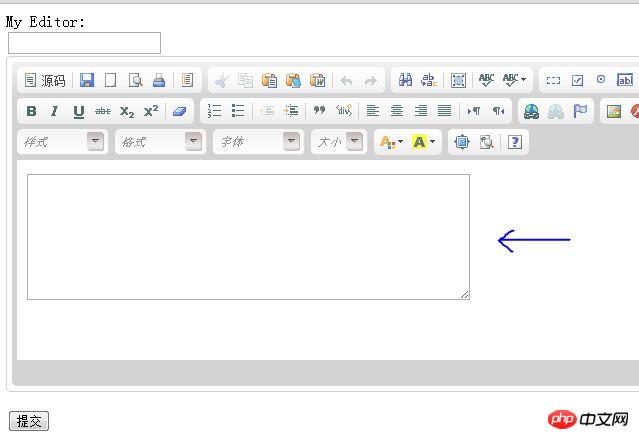
刚刷新页面的时候编辑器里面会出现个小框框,略不爽,开始输入之后它会自动消失,改成这样子就不会了:
<?php
if(!empty($_POST["sub"]))
{
    echo $_POST["title"];
    echo "<br>";
    echo $_POST["content"];
}?><html><head>
    <title>Sample CKEditor Site</title>
    <script type="text/javascript" src="ckeditor/ckeditor.js"></script>
    <script type="text/javascript">
    window.onload = function()
    {
        CKEDITOR.replace( 'content' );     //content是textarea的名称
    };</script></head><body>
    <form method="post">
        <p>
            My Editor:<br />
            <input type="text" name="title">
            <textarea name="content"></textarea>
        </p>
        <p>
            <input type="submit" name="sub"/>
        </p>
    </form></body></html>
四、配置编辑器
本段摘自网上一片文章,已忘记了原来出处。
ckeditor的配置都集中在 ckeditor/config.js 文件中,下面是一些常用的配置参数:
// 界面语言,默认为 'en'
config.language = 'zh-cn';
// 设置宽高
config.width = 400;
config.height = 400;
// 编辑器样式,有三种:'kama'(默认)、'office2003'、'v2'
config.skin = 'v2';
// 背景颜色
config.uiColor = '#FFF';
// 工具栏(基础'Basic'、全能'Full'、自定义)plugins/toolbar/plugin.js
config.toolbar = 'Basic';
config.toolbar = 'Full';
这将配合:
config.toolbar_Full = [
['Source','-','Save','NewPage','Preview','-','Templates'],
['Cut','Copy','Paste','PasteText','PasteFromWord','-','Print', 'SpellChecker', 'Scayt'],
['Undo','Redo','-','Find','Replace','-','SelectAll','RemoveFormat'],
['Form', 'Checkbox', 'Radio', 'TextField', 'Textarea', 'Select', 'Button', 'ImageButton', 'HiddenField'],
'/',
['Bold','Italic','Underline','Strike','-','Subscript','Superscript'],
['NumberedList','BulletedList','-','Outdent','Indent','Blockquote'],
['JustifyLeft','JustifyCenter','JustifyRight','JustifyBlock'],
['Link','Unlink','Anchor'],
['Image','Flash','Table','HorizontalRule','Smiley','SpecialChar','PageBreak'],
'/',
['Styles','Format','Font','FontSize'],
['TextColor','BGColor']
];
//工具栏是否可以被收缩
config.toolbarCanCollapse = true;
//工具栏的位置
config.toolbarLocation = 'top';//可选:bottom
//工具栏默认是否展开
config.toolbarStartupExpanded = true;
// 取消 “拖拽以改变尺寸”功能 plugins/resize/plugin.js
config.resize_enabled = false;
//改变大小的最大高度
config.resize_maxHeight = 3000;
//改变大小的最大宽度
config.resize_maxWidth = 3000;
//改变大小的最小高度
config.resize_minHeight = 250;
//改变大小的最小宽度
config.resize_minWidth = 750;
// 当提交包含有此编辑器的表单时,是否自动更新元素内的数据
config.autoUpdateElement = true;
// 设置是使用绝对目录还是相对目录,为空为相对目录
config.baseHref = ''
// 编辑器的z-index值
config.baseFloatZIndex = 10000;
//设置快捷键
config.keystrokes = [
[ CKEDITOR.ALT + 121 /*F10*/, 'toolbarFocus' ], //获取焦点
[ CKEDITOR.ALT + 122 /*F11*/, 'elementsPathFocus' ], //元素焦点
[ CKEDITOR.SHIFT + 121 /*F10*/, 'contextMenu' ], //文本菜单
[ CKEDITOR.CTRL + 90 /*Z*/, 'undo' ], //撤销
[ CKEDITOR.CTRL + 89 /*Y*/, 'redo' ], //重做
[ CKEDITOR.CTRL + CKEDITOR.SHIFT + 90 /*Z*/, 'redo' ], //
[ CKEDITOR.CTRL + 76 /*L*/, 'link' ], //链接
[ CKEDITOR.CTRL + 66 /*B*/, 'bold' ], //粗体
[ CKEDITOR.CTRL + 73 /*I*/, 'italic' ], //斜体
[ CKEDITOR.CTRL + 85 /*U*/, 'underline' ], //下划线
[ CKEDITOR.ALT + 109 /*-*/, 'toolbarCollapse' ]
]
//设置快捷键 可能与浏览器快捷键冲突 plugins/keystrokes/plugin.js.
config.blockedKeystrokes = [
CKEDITOR.CTRL + 66 /*B*/,
CKEDITOR.CTRL + 73 /*I*/,
CKEDITOR.CTRL + 85 /*U*/
]
//设置编辑内元素的背景色的取值 plugins/colorbutton/plugin.js.
config.colorButton_backStyle = {
element : 'span',
styles : { 'background-color' : '#(color)' }
}
//设置前景色的取值 plugins/colorbutton/plugin.js
config.colorButton_colors = '000,800000,8B4513,2F4F4F,008080,000080,4B0082,696969,B22222,A52A2A,DAA520,
006400,40E0D0,0000CD,800080,808080,F00,FF8C00,FFD700,008000,0FF,00F,EE82EE,
A9A9A9,FFA07A,FFA500,FFFF00,00FF00,AFEEEE,ADD8E6,DDA0DD,D3D3D3,FFF0F5,
FAEBD7,FFFFE0,F0FFF0,F0FFFF,F0F8FF,E6E6FA,FFF’
//是否在选择颜色时显示“其它颜色”选项 plugins/colorbutton/plugin.js
config.colorButton_enableMore = false
//区块的前景色默认值设置 plugins/colorbutton/plugin.js
config.colorButton_foreStyle = {
element : 'span',
styles : { 'color' : '#(color)' }
};
//所需要添加的CSS文件 在此添加 可使用相对路径和网站的绝对路径
config.contentsCss = './contents.css';
//文字方向
config.contentsLangDirection = 'rtl'; //从左到右
//CKeditor的配置文件 若不想配置 留空即可
CKEDITOR.replace( 'myfiled', { customConfig : './config.js' } );
//界面编辑框的背景色 plugins/dialog/plugin.js
config.dialog_backgroundCoverColor = '#fffefd'; //可设置参考
config.dialog_backgroundCoverColor = 'white' //默认
//背景的不透明度 数值应该在:0.0~1.0 之间 plugins/dialog/plugin.js
config.dialog_backgroundCoverOpacity = 0.5
//移动或者改变元素时 边框的吸附距离 单位:像素 plugins/dialog/plugin.js
config.dialog_magnetDistance = 20;
//是否拒绝本地拼写检查和提示 默认为拒绝 目前仅firefox和safari支持 plugins/wysiwygarea/plugin.js.
config.disableNativeSpellChecker = true
//进行表格编辑功能 如:添加行或列 目前仅firefox支持 plugins/wysiwygarea/plugin.js
config.disableNativeTableHandles = true; //默认为不开启
//是否开启 图片和表格 的改变大小的功能 config.disableObjectResizing = true;
config.disableObjectResizing = false //默认为开启

//设置HTML文档类型
config.docType = '<!DOCTYPE html PUBLIC "-//W3C//DTD XHTML 1.0 Transitional//EN" "http://www.w3.org/TR/xhtml1/DTD/xhtml1-transitional.dtd%22' ;
//是否对编辑区域进行渲染 plugins/editingblock/plugin.js
config.editingBlock = true;
//编辑器中回车产生的标签
config.enterMode = CKEDITOR.ENTER_P; //可选:CKEDITOR.ENTER_BR或CKEDITOR.ENTER_p
//是否使用HTML实体进行输出 plugins/entities/plugin.js
config.entities = true;
//定义更多的实体 plugins/entities/plugin.js
config.entities_additional = '#39'; //其中#代替了&
//是否转换一些难以显示的字符为相应的HTML字符 plugins/entities/plugin.js
config.entities_greek = true;
//是否转换一些拉丁字符为HTML plugins/entities/plugin.js
config.entities_latin = true;
//是否转换一些特殊字符为ASCII字符 如"This is Chinese: 汉语."转换为"This is Chinese: 汉语." plugins/entitie s/plugin.js
config.entities_processNumerical = false;
//添加新组件
config.extraPlugins = 'myplugin'; //非默认 仅示例
//使用搜索时的高亮色 plugins/find/plugin.js
config.find_highlight = {
element : 'span',
styles : { 'background-color' : '#ff0', 'color' : '#00f' }
};
//默认的字体名 plugins/font/plugin.js
config.font_defaultLabel = 'Arial';
//字体编辑时的字符集 可以添加常用的中文字符:宋体、楷体、黑体等 plugins/font/plugin.js
config.font_names = 'Arial;Times New Roman;Verdana';
//文字的默认式样 plugins/font/plugin.js
config.font_style = {
element : 'span',
styles : { 'font-family' : '#(family)' },
overrides : [ { element : 'font', attributes : { 'face' : null } } ]
};
//字体默认大小 plugins/font/plugin.js
config.fontSize_defaultLabel = '12px';
//字体编辑时可选的字体大小 plugins/font/plugin.js
config.fontSize_sizes ='8/8px;9/9px;10/10px;11/11px;12/12px;14/14px;16/16px;18/18px;20/20px;22/22px;24/24px;26/26px;28/28px;36/36px;48/48px;72/72px'
//设置字体大小时 使用的式样 plugins/font/plugin.js
config.fontSize_style = {
element : 'span',
styles : { 'font-size' : '#(size)' },
overrides : [ { element : 'font', attributes : { 'size' : null } } ]
};
//是否强制复制来的内容去除格式 plugins/pastetext/plugin.js
config.forcePasteAsPlainText =false //不去除
//是否强制用“&”来代替“&”plugins/htmldataprocessor/plugin.js
config.forceSimpleAmpersand = false;
//对address标签进行格式化 plugins/format/plugin.js
config.format_address = { element : 'address', attributes : { class : 'styledAddress' } };
//对p标签自动进行格式化 plugins/format/plugin.js
config.format_p = { element : 'p', attributes : { class : 'normalp' } };
//对H1标签自动进行格式化 plugins/format/plugin.js
config.format_h1 = { element : 'h1', attributes : { class : 'contentTitle1' } };
//对H2标签自动进行格式化 plugins/format/plugin.js
config.format_h2 = { element : 'h2', attributes : { class : 'contentTitle2' } };
//对H3标签自动进行格式化 plugins/format/plugin.js
config.format_h1 = { element : 'h3', attributes : { class : 'contentTitle3' } };
//对H4标签自动进行格式化 plugins/format/plugin.js
config.format_h1 = { element : 'h4', attributes : { class : 'contentTitle4' } };
//对H5标签自动进行格式化 plugins/format/plugin.js
config.format_h1 = { element : 'h5', attributes : { class : 'contentTitle5' } };
//对H6标签自动进行格式化 plugins/format/plugin.js
config.format_h1 = { element : 'h6', attributes : { class : 'contentTitle6' } };
//对P标签自动进行格式化 plugins/format/plugin.js
config.format_p = { element : 'p', attributes : { class : 'normalPara' } };
//对PRE标签自动进行格式化 plugins/format/plugin.js
config.format_pre = { element : 'pre', attributes : { class : 'code' } };
//用分号分隔的标签名字 在工具栏上显示 plugins/format/plugin.js
config.format_tags = 'p;h1;h2;h3;h4;h5;h6;pre;address;p';
//是否使用完整的html编辑模式如使用,其源码将包含:<html><body></body></html>等标签
config.fullPage = false;
//是否忽略段落中的空字符 若不忽略 则字符将以“”表示 plugins/wysiwygarea/plugin .js
config.ignoreEmptyParagraph = true;
//在清除图片属性框中的链接属性时 是否同时清除两边的<a>标签 plugins/image/plugin.js
config.image_removeLinkByEmptyURL = true;
//一组用逗号分隔的标签名称,显示在左下角的层次嵌套中 plugins/menu/plugin.js.
config.menu_groups ='clipboard,form,tablecell,tablecellproperties,tablerow,tablecolumn,table,anchor,link,image,flash,checkbox,radio,textfield,hiddenfield,imagebutton,button,select,textarea';
//显示子菜单时的延迟,单位:ms plugins/menu/plugin.js
config.menu_subMenuDelay = 400;
//当执行“新建”命令时,编辑器中的内容 plugins/newpage/plugin.j s
config.newpage_html = '';
//当从word里复制文字进来时,是否进行文字的格式化去除 plugins/pastefromword/plugin.js
config.pasteFromWordIgnoreFontFace = true; //默认为忽略格式
//是否使用<h1><h2>等标签修饰或者代替从word文档中粘贴过来的内容 plugins/pastefromword/plugin.js
config.pasteFromWordKeepsStructure = false;
//从word中粘贴内容时是否移除格式 plugins/pastefromword/plugin.js
config.pasteFromWordRemoveStyle = false;
//对应后台语言的类型来对输出的HTML内容进行格式化,默认为空
config.protectedSource.push( /<"?["s"S]*?"?>/g ); // PHP Code
config.protectedSource.push( //g ); // ASP Code
config.protectedSource.push( /(]+>["s|"S]*?<"/asp:[^">]+>)|(]+"/>)/gi ); // ASP.Net Code
//当输入:shift+Enter时插入的标签
config.shiftEnterMode = CKEDITOR.ENTER_P; //可选:CKEDITOR.ENTER_BR或CKEDITOR.ENTER_p
//可选的表情替代字符 plugins/smiley/plugin.js.
config.smiley_descriptions = [
':)', ':(', ';)', ':D', ':/', ':P',
'', '', '', '', '', '',
'', ';(', '', '', '', '',
'', ':kiss', '' ];
//对应的表情图片 plugins/smiley/plugin.js
config.smiley_images = [
'regular_smile.gif','sad_smile.gif','wink_smile.gif','teeth_smile.gif','confused_smile.gif','tounge_smile.gif',
'embaressed_smile.gif','omg_smile.gif','whatchutalkingabout_smile.gif','angry_smile.gif','angel_smile.gif','shades_smile.gif',
'devil_smile.gif','cry_smile.gif','lightbulb.gif','thumbs_down.gif','thumbs_up.gif','heart.gif',
'broken_heart.gif','kiss.gif','envelope.gif'];
//表情的地址 plugins/smiley/plugin.js
config.smiley_path = 'plugins/smiley/images/';
//页面载入时,编辑框是否立即获得焦点 plugins/editingblock/plugin.js plugins/editingblock/plugin.js.
config.startupFocus = false;
//载入时,以何种方式编辑 源码和所见即所得 "source"和"wysiwyg" plugins/editingblock/plugin.js.
config.startupMode ='wysiwyg';
//载入时,是否显示框体的边框 plugins/showblocks/plugin.js
config.startupOutlineBlocks = false;
//是否载入样式文件 plugins/stylescombo/plugin.js.
config.stylesCombo_stylesSet = 'default';
//以下为可选
config.stylesCombo_stylesSet = 'mystyles';
config.stylesCombo_stylesSet = 'mystyles:/editorstyles/styles.js';
config.stylesCombo_stylesSet = 'mystyles:http://www.example.com/editorstyles/styles.js';
//起始的索引值
config.tabIndex = 0;
//当用户键入TAB时,编辑器走过的空格数,( ) 当值为0时,焦点将移出编辑框 plugins/tab/plugin.js
config.tabSpaces = 0;
//默认使用的模板 plugins/templates/plugin.js.
config.templates = 'default';
//用逗号分隔的模板文件plugins/templates/plugin.js.
config.templates_files = [ 'plugins/templates/templates/default.js' ]
//当使用模板时,“编辑内容将被替换”框是否选中 plugins/templates/plugin.js
config.templates_replaceContent = true;
//主题
config.theme = 'default';
//撤销的记录步数 plugins/undo/plugin.js
config.undoStackSize =20;
// 在 CKEditor 中集成 CKFinder,注意 ckfinder 的路径选择要正确。
//CKFinder.SetupCKEditor(null, '/ckfinder/')
相关推荐:




