



这次给大家带来FTP的文件管理,对FTP文件进行管理的注意事项有哪些,下面就是实战案例,一起来看一下。
因为网站有下载文件需要和网站分离,使用到了FTP管理文件,这里做一个简单的整理。
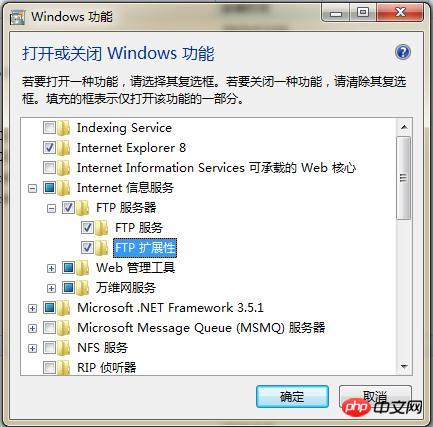
1.安装FTP
和安装iis一样。全部勾选。
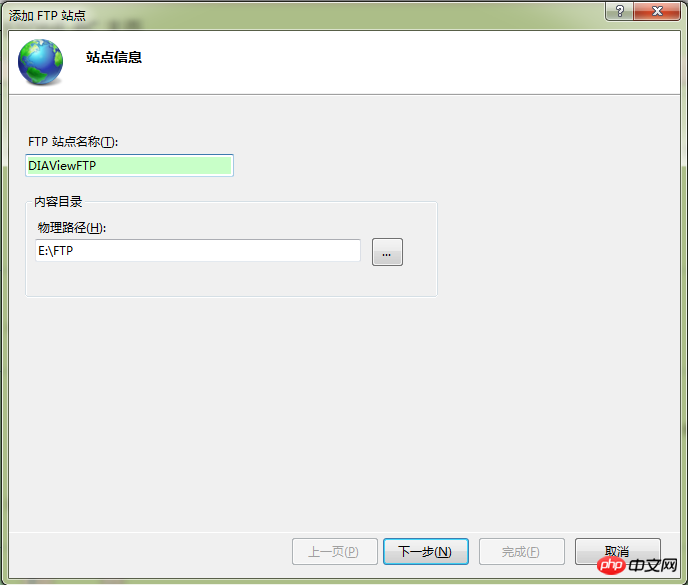
设置站点名称和路径。
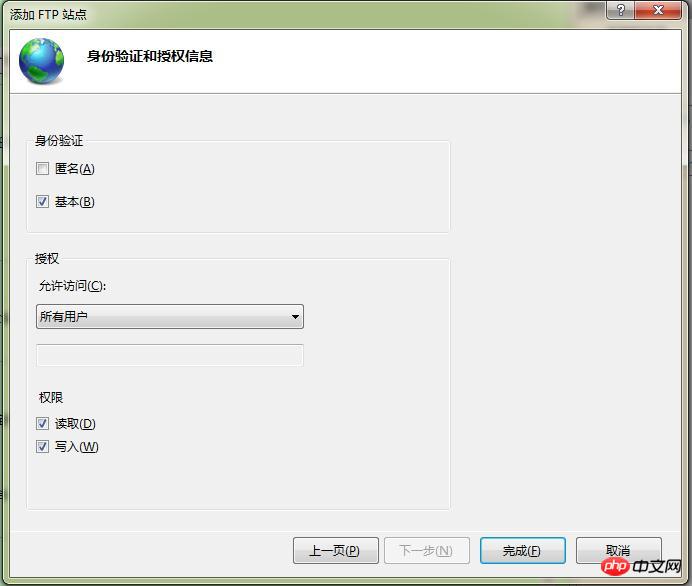
设置ip。

身份授权选择所有用户,可以读写。
完成之后 IIS就会出现:

2.添加FTP用户
计算机-->管理-->本地用户和组。 添加用户,描述为FTP。
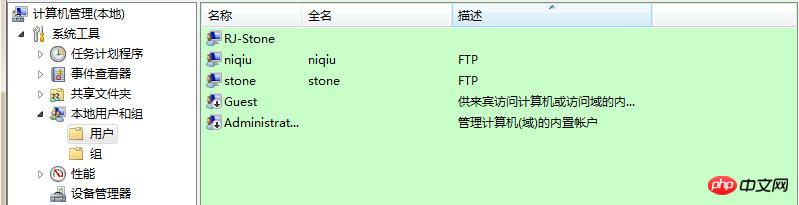
这里要设置用户的密码方式,去掉“用户下次登录时必须更改密码”的选项。
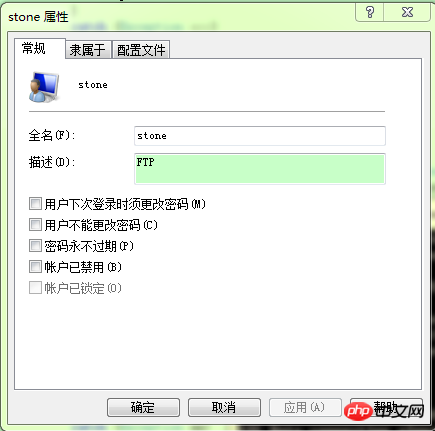
不然会登录不成功。报530错误。
3.测试登录
ftp ip 就可以访问。显示230 user logged in 表示登录成功。
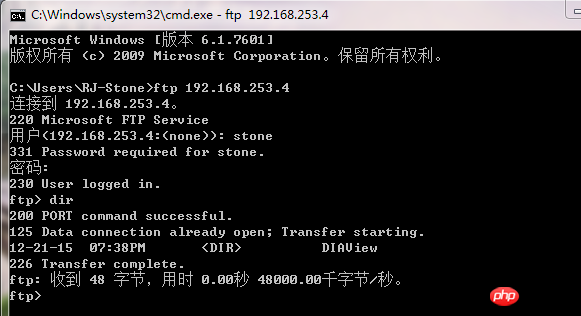
4.上传下载
FtpHelper:
public static class FtpHelper
{ //基本设置
private const string Path = @"ftp://192.168.253.4:21/"; //目标路径
private const string Ftpip = "192.168.253.4"; // GetAppConfig("obj"); //ftp IP地址
private const string Username = "stone"; //GetAppConfig("username"); //ftp用户名
private const string Password = "111111"; //GetAppConfig("password"); //ftp密码 // 2M 可能不够
private const int bufferSize = 2048; ///
/// 获取自定义配置的值 ///
/// 键值
/// 键值对应的值
public static string GetAppConfig(string strKey)
{ foreach (string key in ConfigurationManager.AppSettings)
{ if (key == strKey)
{ return ConfigurationManager.AppSettings[strKey];
}
} return null;
} //获取ftp上面的文件和文件夹
public static string[] GetFileList(string dir)
{ var result = new StringBuilder(); try
{ var ftpRequest = FtpRequest(Path, WebRequestMethods.Ftp.ListDirectory);
WebResponse response = ftpRequest.GetResponse(); var reader = new StreamReader(response.GetResponseStream()); string line = reader.ReadLine(); while (line != null)
{
result.Append(line);
result.Append("\n");
Console.WriteLine(line);
line = reader.ReadLine();
} // to remove the trailing '\n'
result.Remove(result.ToString().LastIndexOf('\n'), 1);
reader.Close();
response.Close(); return result.ToString().Split('\n');
} catch (Exception ex)
{
Console.WriteLine("获取ftp上面的文件和文件夹:" + ex.Message); return new[] {""};
}
} ///
/// 获取文件大小 ///
/// ip服务器下的相对路径
/// 文件大小
public static int GetFileSize(string file)
{ var result = new StringBuilder();
FtpWebRequest request; try
{
request = (FtpWebRequest) WebRequest.Create(new Uri(Path + file));
request.UseBinary = true;
request.Credentials = new NetworkCredential(Username, Password); //设置用户名和密码
request.Method = WebRequestMethods.Ftp.GetFileSize; var dataLength = (int) request.GetResponse().ContentLength; return dataLength;
} catch (Exception ex)
{
Console.WriteLine("获取文件大小出错:" + ex.Message); return -1;
}
} ///
/// 文件上传 ///
/// 原路径(绝对路径)包括文件名
/// 目标文件夹:服务器下的相对路径 不填为根目录
public static bool UpLoad(string localFile, string remoteFile = "")
{ try
{ string url = Path; if (remoteFile != "")
url += remoteFile + "/"; try
{ //待上传的文件 (全路径)
try
{ var fileInfo = new FileInfo(localFile); using (FileStream fs = fileInfo.OpenRead())
{ long length = fs.Length;
FtpWebRequest reqFtp = FtpRequest(url + fileInfo.Name,WebRequestMethods.Ftp.UploadFile); using (Stream stream = reqFtp.GetRequestStream())
{ //设置缓冲大小
int BufferLength = 5120; var b = new byte[BufferLength]; int i; while ((i = fs.Read(b, 0, BufferLength)) > 0)
{
stream.Write(b, 0, i);
}
Console.WriteLine("上传文件成功"); return true;
}
}
} catch (Exception ex)
{
Console.WriteLine("上传文件失败错误为" + ex.Message);
} finally
{
}
} catch (Exception ex)
{
Console.WriteLine("上传文件失败错误为" + ex.Message);
} finally
{
}
} catch (Exception ex)
{
Console.WriteLine("上传文件失败错误为" + ex.Message);
} return false;
} public static bool UpLoad(Stream localFileStream, string remoteFile)
{ bool result = true; try
{ var ftpRequest = FtpRequest(Path + remoteFile, WebRequestMethods.Ftp.UploadFile); var ftpStream = ftpRequest.GetRequestStream(); var byteBuffer = new byte[bufferSize]; int bytesSent = localFileStream.Read(byteBuffer, 0, bufferSize); try
{ while (bytesSent != 0)
{
ftpStream.Write(byteBuffer, 0, bytesSent);
bytesSent = localFileStream.Read(byteBuffer, 0, bufferSize);
}
} catch (Exception ex)
{
Console.WriteLine(ex.ToString());
result = false;
}
localFileStream.Close();
ftpStream.Close();
} catch (Exception ex)
{
Console.WriteLine(ex.ToString());
result = false;
} return result;
} public static FtpWebRequest FtpRequest(string requstUrl,string method,bool closedResponse=false)
{ var reqFtp = (FtpWebRequest) WebRequest.Create(new Uri(requstUrl)); //设置连接到FTP的帐号密码
reqFtp.Credentials = new NetworkCredential(Username, Password); //设置请求完成后是否保持连接
reqFtp.KeepAlive = false; //指定执行命令
reqFtp.Method = method; //指定数据传输类型
reqFtp.UseBinary = true; if (closedResponse)
{ var resp=reqFtp.GetResponse();
resp.Close();
} return reqFtp;
} ///
/// 下载 ///
/// 目的位置
/// 服务器相对位置
///
/// 删除文件 ///
/// 服务器下的相对路径 包括文件名
public static void DeleteFileName(string fileName)
{ try
{
FtpRequest(Path + fileName, WebRequestMethods.Ftp.DeleteFile,true);
} catch (Exception ex)
{
Console.WriteLine("删除文件出错:" + ex.Message);
}
} ///
/// 新建目录 上一级必须先存在 ///
/// 服务器下的相对路径
public static void MakeDir(string dirName)
{ try
{
FtpRequest(Path + dirName, WebRequestMethods.Ftp.MakeDirectory, true);
} catch (Exception ex)
{
Console.WriteLine("创建目录出错:" + ex.Message);
}
} ///
/// 删除目录 上一级必须先存在 ///
/// 服务器下的相对路径
public static void DelDir(string dirName)
{ try
{
FtpRequest(Path + dirName, WebRequestMethods.Ftp.RemoveDirectory,true);
} catch (Exception ex)
{
Console.WriteLine("删除目录出错:" + ex.Message);
}
} ///
/// 从ftp服务器上获得文件夹列表 ///
/// 服务器下的相对路径
/// GetDirctory(string requedstPath)
{ var strs = new List(); try
{ var reqFtp = FtpRequest(Path + requedstPath, WebRequestMethods.Ftp.ListDirectoryDetails);
WebResponse response = reqFtp.GetResponse(); var reader = new StreamReader(response.GetResponseStream()); //中文文件名
string line = reader.ReadLine(); while (line != null)
{ if (line.Contains(""))
{ string msg = line.Substring(line.LastIndexOf("") + 5).Trim();
strs.Add(msg);
}
line = reader.ReadLine();
}
reader.Close();
response.Close(); return strs;
} catch (Exception ex)
{
Console.WriteLine("获取目录出错:" + ex.Message);
} return strs;
} ///
/// 从ftp服务器上获得文件列表 ///
/// 服务器下的相对路径
/// GetFile(string requedstPath)
{ var strs = new List(); try
{ var reqFtp = FtpRequest(Path + requedstPath, WebRequestMethods.Ftp.ListDirectoryDetails);
WebResponse response = reqFtp.GetResponse(); var reader = new StreamReader(response.GetResponseStream()); //中文文件名
string line = reader.ReadLine(); while (line != null)
{ if (!line.Contains(""))
{ string msg = line.Substring(39).Trim();
strs.Add(msg);
}
line = reader.ReadLine();
}
reader.Close();
response.Close(); return strs;
} catch (Exception ex)
{
Console.WriteLine("获取文件出错:" + ex.Message);
} return strs;
}
} View Code
主要是通过创建FtpRequest来处理Ftp相关请求。
  public static FtpWebRequest FtpRequest(string requstUrl,string method,bool closedResponse=false)
        {            var reqFtp = (FtpWebRequest) WebRequest.Create(new Uri(requstUrl));            //设置连接到FTP的帐号密码
            reqFtp.Credentials = new NetworkCredential(Username, Password);            //设置请求完成后是否保持连接
            reqFtp.KeepAlive = false;            //指定执行命令
            reqFtp.Method = method;            //指定数据传输类型
            reqFtp.UseBinary = true;            if (closedResponse)
            {                var resp=reqFtp.GetResponse();
                resp.Close();
            }            return reqFtp;
        }
因为在MVC网站中使用的文件流的方式。
下载:
   public static Stream Download(string remoteFile)
        {            var ftpRequest = FtpRequest(Path + remoteFile, WebRequestMethods.Ftp.DownloadFile);            var response = (FtpWebResponse)ftpRequest.GetResponse();
            Stream ftpStream = response.GetResponseStream();            return ftpStream;
        }
调用:
 public ActionResult DownloadFileFromFtp()
        {             var filepath = "DIAView//simple.png";              var stream = FtpHelper.Download(filepath);            return File(stream, FileHelper.GetContentType(".png"),"test.png");
        }
上传:
  public static bool UpLoad(Stream localFileStream, string remoteFile)
        {            bool result = true;            try
            {                var ftpRequest = FtpRequest(Path + remoteFile, WebRequestMethods.Ftp.UploadFile);                var ftpStream = ftpRequest.GetRequestStream();                var byteBuffer = new byte[bufferSize];                int bytesSent = localFileStream.Read(byteBuffer, 0, bufferSize);                try
                {                    while (bytesSent != 0)
                    {
                        ftpStream.Write(byteBuffer, 0, bytesSent);
                        bytesSent = localFileStream.Read(byteBuffer, 0, bufferSize);
                    }
                }                catch (Exception ex)
                {
                    Console.WriteLine(ex.ToString());
                    result = false;
                }
                localFileStream.Close();
                ftpStream.Close();
            }            catch (Exception ex)
            {
                Console.WriteLine(ex.ToString());
                result = false;
            }            return result;
        }
调用:
      [HttpPost]        public JsonResult UploadFile(HttpPostedFileBase fileData)
        {           if (fileData != null)
            {               string fileName = Path.GetFileName(fileData.FileName);// 原始文件名称
                string saveName = Encrypt.GenerateOrderNumber() +"_"+fileName;
                FtpHelper.UpLoad(fileData.InputStream, "DIAView" + "/" + saveName);                return Json(new { Success = true, FileName = fileName, SaveName = saveName}, JsonRequestBehavior.AllowGet);
            }            return Json(new { Success = false, Message = "请选择要上传的文件!" }, JsonRequestBehavior.AllowGet);
        }
Ftp还可以设置不同用户有不同的目录,是以为记
相信看了本文案例你已经掌握了方法,更多精彩请关注php中文网其它相关文章!
推荐阅读:




