



这次给大家带来前端开发中的svg动画,前端开发中使用svg动画的注意事项有哪些,下面就是实战案例,一起来看一下。
animate
svg中animate元素可以用于实现动画效果
attributeName
定义发生变化的元素属性名
attributeType
当attributeType="XML"时,attributeName被认为是XML的属性;当attributeType="CSS"时,attributeName被认为是css的属性;不指定attributeType时,默认为"auto",会先将attributeName作为css的属性,如果无效,再将attributeName作为XML的属性。
立即学习“前端免费学习笔记(深入)”;
from、to、by
from和to分别定义发生变化的属性的初始值和终止值。from可缺省,表示初始值即为animate父元素相应的属性值。可用by替换to,表示变化偏移量。可以理解为to = from + by。
begin、dur、end
begin定义动画开始时间;dur定义动画所需时间;end定义动画终止时间。时间单位h:小时;min:分钟;s:秒;ms:毫秒。默认时间单位为:s
fill
当fill="freeze"时,动画终止时,发生变化的元素属性值停留在动画终止时的状态;当fill="remove"时,动画终止时,发生变化的元素属性值回复到动画起始时的状态。fill属性默认值为:remove。
<rect x="10" y="10" width="200" height="20" stroke="green" fill="none">    <animate attributeName="width" attributeType="XML"
    from="20" to="200" begin="0s" dur="3s" fill="freeze" /></rect>
以上代码会实现一个绿色正方形逐渐拉长的动画。
animateTransform
实现transform属性改变的动画,使用animateTransform来替代animate元素。
animateTransform的attributeName指定为transform,用type属性指定需要改变的属性,如:translate,scale,rotate,skewX,skewY等。
animateTransform还有个additive属性。默认情况下additive属性值为replace,表示当前animateTransform的初始状态与之前的animateTransform变化结果无关,如果additive="sum",表示当前animateTransform的变化基于之前的animateTransform变化之上。
<rect x="10" y="10" width="20" height="20" style="fill: #ff9; stroke: black;">
    <animateTransform id="a1" attributeName="transform" attributeType="XML" type="scale" from="1" to="4 2" additive="sum" begin="0s" dur="4s" fill="freeze"></animateTransform>
    <animateTransform attributeName="transform" attributeType="XML" type="rotate" from="0" to="45" additive="sum" begin="a1.end" dur="4s" fill="freeze"></animateTransform></rect>
animateMotion

animateMotion可以实现单凭css动画属性无法实现的效果。
animateMotion可以让父元素沿着指定的路径运动,如:
<g>
    <rect x="0" y="0" width="50" height="30" style="fill: #ccc;"/>
    <circle cx="40" cy="30" r="10" style="fill: #fff; stroke: black;"/>
    <circle cx="10" cy="30" r="10" style="fill: #fff; stroke: black;"/>
    <animateMotion path="M50,125 C 100,25 150,225, 200, 125" dur="4s" fill="freeze"/></g>
animateMotion有个rotate属性,默认为0,元素在运动时不会旋转。当设置为auto时,元素对应的水平轴会始终与path路径保持水平。
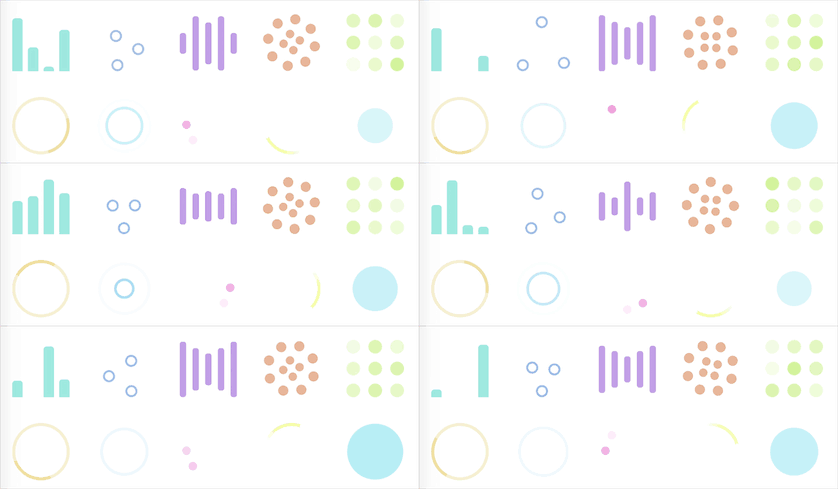
loading效果
利用background-image属性显示svg动画作为loading状态,注意url后需要添加数据说明:data:image/svg+xml,
公共css
.loading {    width: 100px;    height: 100px;    background-repeat: no-repeat;    background-size: cover;
}
html
<div class="loading loading-audio"></div><div class="loading loading-ball-triangle"></div><div class="loading loading-bars"></div><div class="loading loading-circles"></div><div class="loading loading-grid"></div><div class="loading loading-oval"></div><div class="loading loading-puff"></div><div class="loading loading-spinning-circles"></div><div class="loading loading-tail-spin"></div><div class="loading loading-three-dots"></div>
css
.loading-audio {
    background-image: url('data:image/svg+xml,<svg width="55" height="80" viewBox="0 0 55 80" xmlns="http://www.w3.org/2000/svg" fill="#9fe8e0"><g transform="matrix(1 0 0 -1 0 80)"><rect width="10" height="20" rx="3"><animate attributeName="height" begin="0s" dur="4.3s" values="20;45;57;80;64;32;66;45;64;23;66;13;64;56;34;34;2;23;76;79;20" calcMode="linear" repeatCount="indefinite" /></rect><rect x="15" width="10" height="80" rx="3"><animate attributeName="height" begin="0s" dur="2s" values="80;55;33;5;75;23;73;33;12;14;60;80" calcMode="linear" repeatCount="indefinite" /></rect><rect x="30" width="10" height="50" rx="3"><animate attributeName="height" begin="0s" dur="1.4s" values="50;34;78;23;56;23;34;76;80;54;21;50" calcMode="linear" repeatCount="indefinite" /></rect><rect x="45" width="10" height="30" rx="3"><animate attributeName="height" begin="0s" dur="2s" values="30;45;13;80;56;72;45;76;34;23;67;30" calcMode="linear" repeatCount="indefinite" /></rect></g></svg>')
}
.loading-ball-triangle {
    background-image: url('data:image/svg+xml,<svg width="57" height="57" viewBox="0 0 57 57" xmlns="http://www.w3.org/2000/svg" stroke="#9fbde8"><g fill="none" fill-rule="evenodd"><g transform="translate(1 1)" stroke-width="2"><circle cx="5" cy="50" r="5"><animate attributeName="cy" begin="0s" dur="2.2s" values="50;5;50;50" calcMode="linear" repeatCount="indefinite" /><animate attributeName="cx" begin="0s" dur="2.2s" values="5;27;49;5" calcMode="linear" repeatCount="indefinite" /></circle><circle cx="27" cy="5" r="5"><animate attributeName="cy" begin="0s" dur="2.2s" from="5" to="5" values="5;50;50;5" calcMode="linear" repeatCount="indefinite" /><animate attributeName="cx" begin="0s" dur="2.2s" from="27" to="27" values="27;49;5;27" calcMode="linear" repeatCount="indefinite" /></circle><circle cx="49" cy="50" r="5"><animate attributeName="cy" begin="0s" dur="2.2s" values="50;50;5;50" calcMode="linear" repeatCount="indefinite" /><animate attributeName="cx" from="49" to="49" begin="0s" dur="2.2s" values="49;5;27;49" calcMode="linear" repeatCount="indefinite" /></circle></g></g></svg>');
}
.loading-bars {
    background-image: url('data:image/svg+xml,<svg width="135" height="140" viewBox="0 0 135 140" xmlns="http://www.w3.org/2000/svg" fill="#c19fe8"><rect y="10" width="15" height="120" rx="6"><animate attributeName="height" begin="0.5s" dur="1s" values="120;110;100;90;80;70;60;50;40;140;120" calcMode="linear" repeatCount="indefinite" /><animate attributeName="y" begin="0.5s" dur="1s" values="10;15;20;25;30;35;40;45;50;0;10" calcMode="linear" repeatCount="indefinite" /></rect><rect x="30" y="10" width="15" height="120" rx="6"><animate attributeName="height" begin="0.25s" dur="1s" values="120;110;100;90;80;70;60;50;40;140;120" calcMode="linear" repeatCount="indefinite" /><animate attributeName="y" begin="0.25s" dur="1s" values="10;15;20;25;30;35;40;45;50;0;10" calcMode="linear" repeatCount="indefinite" /></rect><rect x="60" width="15" height="140" rx="6"><animate attributeName="height" begin="0s" dur="1s" values="120;110;100;90;80;70;60;50;40;140;120" calcMode="linear" repeatCount="indefinite" /><animate attributeName="y" begin="0s" dur="1s" values="10;15;20;25;30;35;40;45;50;0;10" calcMode="linear" repeatCount="indefinite" /></rect><rect x="90" y="10" width="15" height="120" rx="6"><animate attributeName="height" begin="0.25s" dur="1s" values="120;110;100;90;80;70;60;50;40;140;120" calcMode="linear" repeatCount="indefinite" /><animate attributeName="y" begin="0.25s" dur="1s" values="10;15;20;25;30;35;40;45;50;0;10" calcMode="linear" repeatCount="indefinite" /></rect><rect x="120" y="10" width="15" height="120" rx="6"><animate attributeName="height" begin="0.5s" dur="1s" values="120;110;100;90;80;70;60;50;40;140;120" calcMode="linear" repeatCount="indefinite" /><animate attributeName="y" begin="0.5s" dur="1s" values="10;15;20;25;30;35;40;45;50;0;10" calcMode="linear" repeatCount="indefinite" /></rect></svg>');
}
.loading-circles {
    background-image: url('data:image/svg+xml,<svg width="135" height="135" viewBox="0 0 135 135" xmlns="http://www.w3.org/2000/svg" fill="#e8b69a"><path d="M67.447 58c5.523 0 10-4.477 10-10s-4.477-10-10-10-10 4.477-10 10 4.477 10 10 10zm9.448 9.447c0 5.523 4.477 10 10 10 5.522 0 10-4.477 10-10s-4.478-10-10-10c-5.523 0-10 4.477-10 10zm-9.448 9.448c-5.523 0-10 4.477-10 10 0 5.522 4.477 10 10 10s10-4.478 10-10c0-5.523-4.477-10-10-10zM58 67.447c0-5.523-4.477-10-10-10s-10 4.477-10 10 4.477 10 10 10 10-4.477 10-10z"><animateTransform attributeName="transform" type="rotate" from="0 67 67" to="-360 67 67" dur="2.5s" repeatCount="indefinite"/></path><path d="M28.19 40.31c6.627 0 12-5.374 12-12 0-6.628-5.373-12-12-12-6.628 0-12 5.372-12 12 0 6.626 5.372 12 12 12zm30.72-19.825c4.686 4.687 12.284 4.687 16.97 0 4.686-4.686 4.686-12.284 0-16.97-4.686-4.687-12.284-4.687-16.97 0-4.687 4.686-4.687 12.284 0 16.97zm35.74 7.705c0 6.627 5.37 12 12 12 6.626 0 12-5.373 12-12 0-6.628-5.374-12-12-12-6.63 0-12 5.372-12 12zm19.822 30.72c-4.686 4.686-4.686 12.284 0 16.97 4.687 4.686 12.285 4.686 16.97 0 4.687-4.686 4.687-12.284 0-16.97-4.685-4.687-12.283-4.687-16.97 0zm-7.704 35.74c-6.627 0-12 5.37-12 12 0 6.626 5.373 12 12 12s12-5.374 12-12c0-6.63-5.373-12-12-12zm-30.72 19.822c-4.686-4.686-12.284-4.686-16.97 0-4.686 4.687-4.686 12.285 0 16.97 4.686 4.687 12.284 4.687 16.97 0 4.687-4.685 4.687-12.283 0-16.97zm-35.74-7.704c0-6.627-5.372-12-12-12-6.626 0-12 5.373-12 12s5.374 12 12 12c6.628 0 12-5.373 12-12zm-19.823-30.72c4.687-4.686 4.687-12.284 0-16.97-4.686-4.686-12.284-4.686-16.97 0-4.687 4.686-4.687 12.284 0 16.97 4.686 4.687 12.284 4.687 16.97 0z"><animateTransform attributeName="transform" type="rotate" from="0 67 67" to="360 67 67" dur="8s" repeatCount="indefinite"/></path></svg>');
}
.loading-grid {
    background-image: url('data:image/svg+xml,<svg width="105" height="105" viewBox="0 0 105 105" xmlns="http://www.w3.org/2000/svg" fill="#d4f39f"><circle cx="12.5" cy="12.5" r="12.5"><animate attributeName="fill-opacity" begin="0s" dur="1s" values="1;.2;1" calcMode="linear" repeatCount="indefinite" /></circle><circle cx="12.5" cy="52.5" r="12.5" fill-opacity=".5"><animate attributeName="fill-opacity" begin="100ms" dur="1s" values="1;.2;1" calcMode="linear" repeatCount="indefinite" /></circle><circle cx="52.5" cy="12.5" r="12.5"><animate attributeName="fill-opacity" begin="300ms" dur="1s" values="1;.2;1" calcMode="linear" repeatCount="indefinite" /></circle><circle cx="52.5" cy="52.5" r="12.5"><animate attributeName="fill-opacity" begin="600ms" dur="1s" values="1;.2;1" calcMode="linear" repeatCount="indefinite" /></circle><circle cx="92.5" cy="12.5" r="12.5"><animate attributeName="fill-opacity" begin="800ms" dur="1s" values="1;.2;1" calcMode="linear" repeatCount="indefinite" /></circle><circle cx="92.5" cy="52.5" r="12.5"><animate attributeName="fill-opacity" begin="400ms" dur="1s" values="1;.2;1" calcMode="linear" repeatCount="indefinite" /></circle><circle cx="12.5" cy="92.5" r="12.5"><animate attributeName="fill-opacity" begin="700ms" dur="1s" values="1;.2;1" calcMode="linear" repeatCount="indefinite" /></circle><circle cx="52.5" cy="92.5" r="12.5"><animate attributeName="fill-opacity" begin="500ms" dur="1s" values="1;.2;1" calcMode="linear" repeatCount="indefinite" /></circle><circle cx="92.5" cy="92.5" r="12.5"><animate attributeName="fill-opacity" begin="200ms" dur="1s" values="1;.2;1" calcMode="linear" repeatCount="indefinite" /></circle></svg>');
}
.loading-oval {
    background-image: url('data:image/svg+xml,<svg width="38" height="38" viewBox="0 0 38 38" xmlns="http://www.w3.org/2000/svg" stroke="#efe1a4"><g fill="none" fill-rule="evenodd"><g transform="translate(1 1)" stroke-width="2"><circle stroke-opacity=".5" cx="18" cy="18" r="18"/><path d="M36 18c0-9.94-8.06-18-18-18"><animateTransform attributeName="transform" type="rotate" from="0 18 18" to="360 18 18" dur="1s" repeatCount="indefinite"/></path></g></g></svg>');
}
.loading-puff {
    background-image: url('data:image/svg+xml,<svg width="44" height="44" viewBox="0 0 44 44" xmlns="http://www.w3.org/2000/svg" stroke="#a0d9f1"><g fill="none" fill-rule="evenodd" stroke-width="2"><circle cx="22" cy="22" r="1"><animate attributeName="r" begin="0s" dur="1.8s" values="1; 20" calcMode="spline" keyTimes="0; 1" keySplines="0.165, 0.84, 0.44, 1" repeatCount="indefinite" /><animate attributeName="stroke-opacity" begin="0s" dur="1.8s" values="1; 0" calcMode="spline" keyTimes="0; 1" keySplines="0.3, 0.61, 0.355, 1" repeatCount="indefinite" /></circle><circle cx="22" cy="22" r="1"><animate attributeName="r" begin="-0.9s" dur="1.8s" values="1; 20" calcMode="spline" keyTimes="0; 1" keySplines="0.165, 0.84, 0.44, 1" repeatCount="indefinite" /><animate attributeName="stroke-opacity" begin="-0.9s" dur="1.8s" values="1; 0" calcMode="spline" keyTimes="0; 1" keySplines="0.3, 0.61, 0.355, 1" repeatCount="indefinite" /></circle></g></svg>');
}
.loading-spinning-circles {
    background-image: url('data:image/svg+xml,<svg width="58" height="58" viewBox="0 0 58 58" xmlns="http://www.w3.org/2000/svg"><g fill="none" fill-rule="evenodd"><g transform="translate(2 1)" stroke="#FFF" stroke-width="1.5"><circle cx="42.601" cy="11.462" r="5" fill-opacity="1" fill="#efa2dd"><animate attributeName="fill-opacity" begin="0s" dur="1.3s" values="1;0;0;0;0;0;0;0" calcMode="linear" repeatCount="indefinite" /></circle><circle cx="49.063" cy="27.063" r="5" fill-opacity="0" fill="#efa2dd"><animate attributeName="fill-opacity" begin="0s" dur="1.3s" values="0;1;0;0;0;0;0;0" calcMode="linear" repeatCount="indefinite" /></circle><circle cx="42.601" cy="42.663" r="5" fill-opacity="0" fill="#efa2dd"><animate attributeName="fill-opacity" begin="0s" dur="1.3s" values="0;0;1;0;0;0;0;0" calcMode="linear" repeatCount="indefinite" /></circle><circle cx="27" cy="49.125" r="5" fill-opacity="0" fill="#efa2dd"><animate attributeName="fill-opacity" begin="0s" dur="1.3s" values="0;0;0;1;0;0;0;0" calcMode="linear" repeatCount="indefinite" /></circle><circle cx="11.399" cy="42.663" r="5" fill-opacity="0" fill="#efa2dd"><animate attributeName="fill-opacity" begin="0s" dur="1.3s" values="0;0;0;0;1;0;0;0" calcMode="linear" repeatCount="indefinite" /></circle><circle cx="4.938" cy="27.063" r="5" fill-opacity="0" fill="#efa2dd"><animate attributeName="fill-opacity" begin="0s" dur="1.3s" values="0;0;0;0;0;1;0;0" calcMode="linear" repeatCount="indefinite" /></circle><circle cx="11.399" cy="11.462" r="5" fill-opacity="0" fill="#efa2dd"><animate attributeName="fill-opacity" begin="0s" dur="1.3s" values="0;0;0;0;0;0;1;0" calcMode="linear" repeatCount="indefinite" /></circle><circle cx="27" cy="5" r="5" fill-opacity="0" fill="#efa2dd"><animate attributeName="fill-opacity" begin="0s" dur="1.3s" values="0;0;0;0;0;0;0;1" calcMode="linear" repeatCount="indefinite" /></circle></g></g></svg>');
}
.loading-tail-spin {
    background-image: url('data:image/svg+xml,<svg width="38" height="38" viewBox="0 0 38 38" xmlns="http://www.w3.org/2000/svg"><defs><linearGradient x1="8.042%" y1="0%" x2="65.682%" y2="23.865%" id="a"><stop stop-color="#f5fda9" stop-opacity="0" offset="0%"/><stop stop-color="#f5fda9" stop-opacity=".631" offset="63.146%"/><stop stop-color="#f5fda9" offset="100%"/></linearGradient></defs><g fill="none" fill-rule="evenodd"><g transform="translate(1 1)"><path d="M36 18c0-9.94-8.06-18-18-18" id="Oval-2" stroke="url(#a)" stroke-width="2"><animateTransform attributeName="transform" type="rotate" from="0 18 18" to="360 18 18" dur="0.9s" repeatCount="indefinite" /></path><circle fill="#fff" cx="36" cy="18" r="1"><animateTransform attributeName="transform" type="rotate" from="0 18 18" to="360 18 18" dur="0.9s" repeatCount="indefinite" /></circle></g></g></svg>');
}
.loading-three-dots{
    background-image: url('data:image/svg+xml,<svg width="120" height="30" viewBox="0 0 120 30" xmlns="http://www.w3.org/2000/svg" fill="#b5edf5"><circle cx="15" cy="15" r="15"><animate attributeName="r" from="15" to="15" begin="0s" dur="0.8s" values="15;9;15" calcMode="linear" repeatCount="indefinite" /><animate attributeName="fill-opacity" from="1" to="1" begin="0s" dur="0.8s" values="1;.5;1" calcMode="linear" repeatCount="indefinite" /></circle><circle cx="60" cy="15" r="9" fill-opacity="0.3"><animate attributeName="r" from="9" to="9" begin="0s" dur="0.8s" values="9;15;9" calcMode="linear" repeatCount="indefinite" /><animate attributeName="fill-opacity" from="0.5" to="0.5" begin="0s" dur="0.8s" values=".5;1;.5" calcMode="linear" repeatCount="indefinite" /></circle><circle cx="105" cy="15" r="15"><animate attributeName="r" from="15" to="15" begin="0s" dur="0.8s" values="15;9;15" calcMode="linear" repeatCount="indefinite" /><animate attributeName="fill-opacity" from="1" to="1" begin="0s" dur="0.8s" values="1;.5;1" calcMode="linear" repeatCount="indefinite" /></circle></svg>');
}
相信看了本文案例你已经掌握了方法,更多精彩请关注php中文网其它相关文章!
推荐阅读:




