



本文主要和大家介绍bootstrap实现的表格合并单元格,涉及bootstrap界面布局相关操作技巧,需要的朋友可以参考下,希望能帮助到大家。
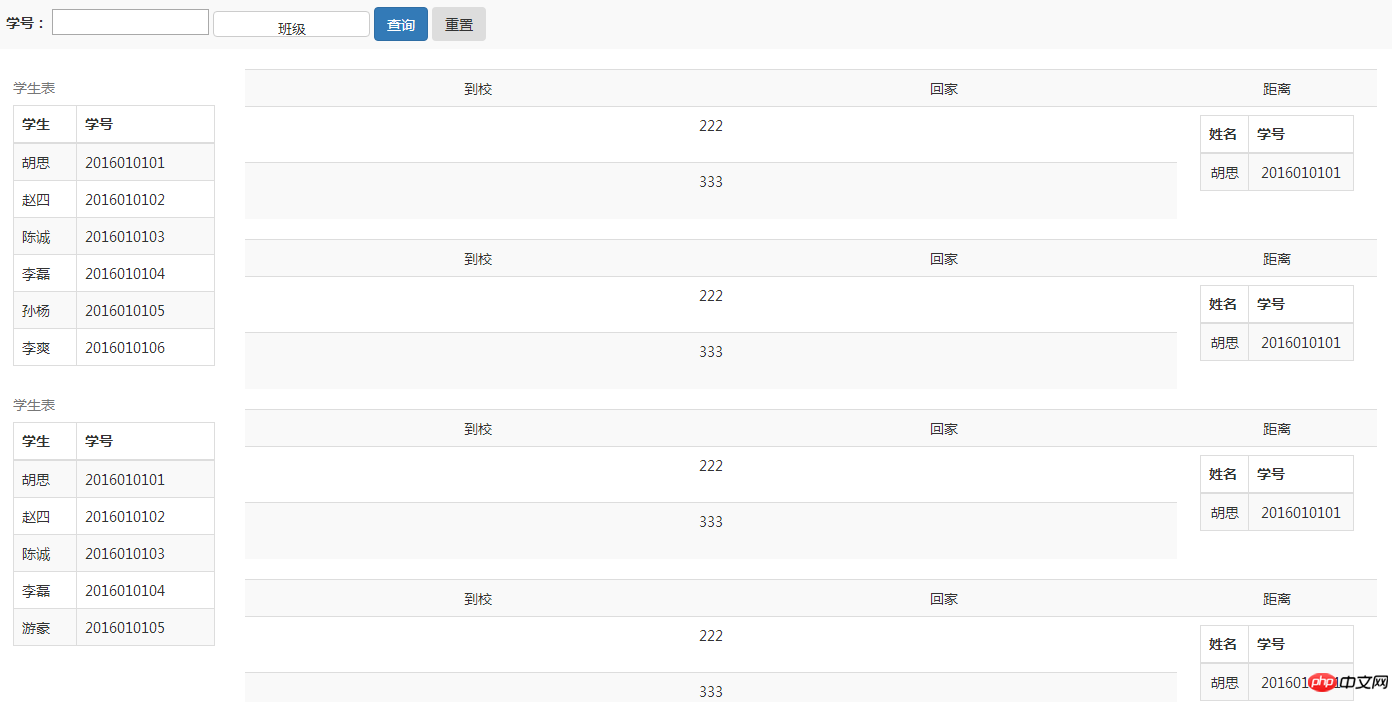
1、问题背景
利用Bootstrap设计表格,并且表格需要合并单元格
2、实现源码
<!DOCTYPE html>
<html>
  <head>
    <meta charset="utf-8">
    <meta http-equiv="X-UA-Compatible" content="IE=edge">
    <meta name="viewport" content="width=device-width, initial-scale=1">
    <meta name="description" content="">
    <meta name="author" content="">
    <title>Bootstrap-表格合并单元格</title>
    <link rel="stylesheet" href="https://cdn.bootcss.com/bootstrap/3.3.5/css/bootstrap.css" rel="external nofollow" />
    <script src="http://libs.baidu.com/jquery/2.0.0/jquery.min.js"></script>
    <script type="text/javascript" src="https://cdn.bootcss.com/bootstrap/3.3.5/js/bootstrap.js" ></script>
    <style>
      body,html{
        width: 99%;
        height: 98%;
        font-family: "微软雅黑";
        font-size: 14px;
      }
      table{
        width: 100%;
      }
    </style>
    <script>
    </script>
  </head>
  <body>
    <p class="row">
      <p class="col-xs-12">
        <table class="table table-striped">
          <tr>
            <td>
              <label for="stuNo">学号:</label>
              <input type="text" id="stuNo" />
              <p class="btn-group" style="width: 157px; height: 26px;">
                <button type="button" class="btn btn-default dropdown-toggle" data-toggle="dropdown" style="width: 157px; height: 26px;">
                  班级
                </button>
                <ul class="dropdown-menu" role="menu">
                 <li><a href="#" rel="external nofollow" rel="external nofollow" rel="external nofollow" rel="external nofollow" rel="external nofollow" >一班</a></li>
                 <li><a href="#" rel="external nofollow" rel="external nofollow" rel="external nofollow" rel="external nofollow" rel="external nofollow" >二班</a></li>
                 <li><a href="#" rel="external nofollow" rel="external nofollow" rel="external nofollow" rel="external nofollow" rel="external nofollow" >三班</a></li>
                 <li><a href="#" rel="external nofollow" rel="external nofollow" rel="external nofollow" rel="external nofollow" rel="external nofollow" >四班</a></li>
                 <li><a href="#" rel="external nofollow" rel="external nofollow" rel="external nofollow" rel="external nofollow" rel="external nofollow" >五班</a></li>
                </ul>
              </p>
              <button type="button" class="btn btn-primary">查询</button>
              <button type="button" class="btn">重置</button>
            </td>
          </tr>
        </table>
      </p>
      <p class="col-xs-12">
        <p class="col-xs-2">
          <table class="table table-striped table-bordered">
            <caption>学生表</caption>
            <thead>
              <tr>
                <th>学生</th>
                <th>学号</th>
              </tr>
            </thead>
            <tbody>
              <tr>
                <td>胡思</td>
                <td>2016010101</td>
              </tr>
              <tr>
                <td>赵四</td>
                <td>2016010102</td>
              </tr>
              <tr>
                <td>陈诚</td>
                <td>2016010103</td>
              </tr>
              <tr>
                <td>李磊</td>
                <td>2016010104</td>
              </tr>
              <tr>
                <td>孙杨</td>
                <td>2016010105</td>
              </tr>
              <tr>
                <td>李爽</td>
                <td>2016010106</td>
              </tr>
            </tbody>
          </table>
          <table class="table table-striped table-bordered">
            <caption>学生表</caption>
            <thead>
              <tr>
                <th>学生</th>
                <th>学号</th>
              </tr>
            </thead>
            <tbody>
              <tr>
                <td>胡思</td>
                <td>2016010101</td>
              </tr>
              <tr>
                <td>赵四</td>
                <td>2016010102</td>
              </tr>
              <tr>
                <td>陈诚</td>
                <td>2016010103</td>
              </tr>
              <tr>
                <td>李磊</td>
                <td>2016010104</td>
              </tr>
              <tr>
                <td>游豪</td>
                <td>2016010105</td>
              </tr>
            </tbody>
          </table>
        </p>
        <p class="col-xs-10">
          <table class="table table-striped">
            <tr style="text-align: center;">
              <td>到校</td>
              <td>回家</td>
              <td>距离</td>
            </tr>
            <tr style="text-align: center;">
              <td colspan="2" style="text-align: center;">222</td>
              <td rowspan="2" style="width: 200px;">
                <p class="col-xs-12">
                  <table class="table table-striped table-bordered">
                    <thead>
                      <tr>
                        <th>姓名</th>
                        <th>学号</th>
                      </tr>
                    </thead>
                    <tbody>
                      <tr>
                        <td>胡思</td>
                        <td>2016010101</td>
                      </tr>
                    </tbody>
                  </table>
                </p>
              </td>
            </tr>
            <tr>
              <td colspan="2" style="text-align: center;">333</td>
            </tr>
          </table>
          <table class="table table-striped">
            <tr style="text-align: center;">
              <td>到校</td>
              <td>回家</td>
              <td>距离</td>
            </tr>
            <tr style="text-align: center;">
              <td colspan="2" style="text-align: center;">222</td>
              <td rowspan="2" style="width: 200px;">
                <p class="col-xs-12">
                  <table class="table table-striped table-bordered">
                    <thead>
                      <tr>
                        <th>姓名</th>
                        <th>学号</th>
                      </tr>
                    </thead>
                    <tbody>
                      <tr>
                        <td>胡思</td>
                        <td>2016010101</td>
                      </tr>
                    </tbody>
                  </table>
                </p>
              </td>
            </tr>
            <tr>
              <td colspan="2" style="text-align: center;">333</td>
            </tr>
          </table>
          <table class="table table-striped">
            <tr style="text-align: center;">
              <td>到校</td>
              <td>回家</td>
              <td>距离</td>
            </tr>
            <tr style="text-align: center;">
              <td colspan="2" style="text-align: center;">222</td>
              <td rowspan="2" style="width: 200px;">
                <p class="col-xs-12">
                  <table class="table table-striped table-bordered">
                    <thead>
                      <tr>
                        <th>姓名</th>
                        <th>学号</th>
                      </tr>
                    </thead>
                    <tbody>
                      <tr>
                        <td>胡思</td>
                        <td>2016010101</td>
                      </tr>
                    </tbody>
                  </table>
                </p>
              </td>
            </tr>
            <tr>
              <td colspan="2" style="text-align: center;">333</td>
            </tr>
          </table>
          <table class="table table-striped">
            <tr style="text-align: center;">
              <td>到校</td>
              <td>回家</td>
              <td>距离</td>
            </tr>
            <tr style="text-align: center;">
              <td colspan="2" style="text-align: center;">222</td>
              <td rowspan="2" style="width: 200px;">
                <p class="col-xs-12">
                  <table class="table table-striped table-bordered">
                    <thead>
                      <tr>
                        <th>姓名</th>
                        <th>学号</th>
                      </tr>
                    </thead>
                    <tbody>
                      <tr>
                        <td>胡思</td>
                        <td>2016010101</td>
                      </tr>
                    </tbody>
                  </table>
                </p>
              </td>
            </tr>
            <tr>
              <td colspan="2" style="text-align: center;">333</td>
            </tr>
          </table>
        </p>
      </p>
    </p>
  </body>
</html>
3、实现结果

矢量模板现代商务信息图表传单矢量模板
下载
现代商务信息图表传单矢量模板适用于企业产品宣传(公司介绍手册、产品目录)、商业报告、年度报告、企业宣传册、产品推广、商业活动邀请、会议或研讨会通知、服务介绍、品牌广告、投资提案、市场研究报告、客户案例展示、合作伙伴招募等与商务等活动相关设计的AI格式素材。
相关推荐:




