



这篇文章主要介绍了html5使用canvas实现弹幕功能示例的相关资料,需要的朋友可以参考下
最近在着手开发弹幕视频网站,通过html5中的canvas实现了弹幕的功能。
那么闲言碎语不要讲,先说思路后上代码。
思路:从页面布局上来说就是将一块画布覆盖在了video标签产生的视频窗口之上,使用绝对定位就能实现了。最重要的就是js控制画布上弹幕的显示了,每一个弹幕都包装成一个对象,对象包含的属性有弹幕应该出现的时间,弹幕的颜色,弹幕是否是移动的以及弹幕的文本。弹幕对象拥有方法包含:设置弹幕的横纵坐标,弹幕的移动函数。实现的原理,在监听视频开始播放的事件,在视频开始播放时生成一个定时器,定时器每隔一个时间去遍历循环弹幕对象数组并根据对象的属性在画布的适当位置上绘制出弹幕,计时器中除了绘制弹幕的代码还有执行更新弹幕数组的代码。
下图是弹幕效果截屏

Delphi 7应用编程150例 全书内容 CHM版
下载
Delphi 7应用编程150例 CHM全书内容下载,全书主要通过150个实例,全面、深入地介绍了用Delphi 7开发应用程序的常用方法和技巧,主要讲解了用Delphi 7进行界面效果处理、图像处理、图形与多媒体开发、系统功能控制、文件处理、网络与数据库开发,以及组件应用等内容。这些实例简单实用、典型性强、功能突出,很多实例使用的技术稍加扩展可以解决同类问题。使用本书最好的方法是通过学习掌握实例中的技术或技巧,然后使用这些技术尝试实现更复杂的功能并应用到更多方面。本书主要针对具有一定Delphi基础知识
立即学习“前端免费学习笔记(深入)”;
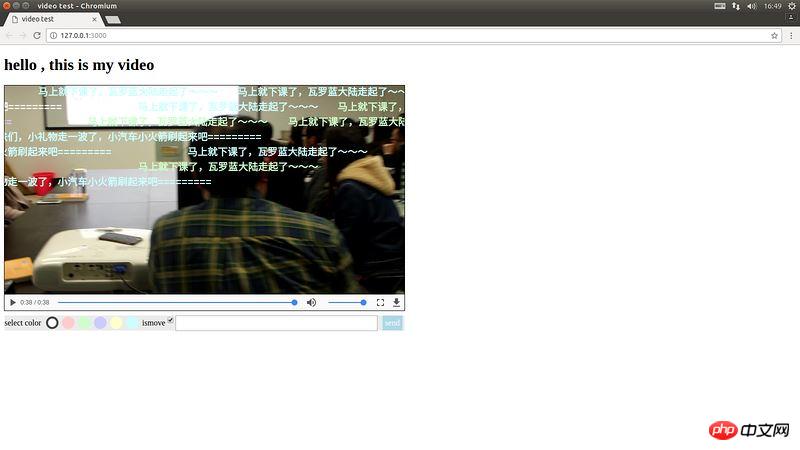
那么下面开始直接上代码:
(function () {
    window.onload=function () {
        var video = document.getElementsByTagName("video")[0]
        var cav = document.getElementsByTagName("canvas")[0]
        //设置常量canvas的高度以及宽度
        var cavWidth = 800
        var cavHeight = 420
        cav.width=cavWidth
        cav.height=cavHeight
        var ctx = cav.getContext("2d")
        //存储弹幕对象的数组
        var capObjs = []
        var lastItemTime
        var capHeight = 20
        var inputEle = document.getElementsByClassName("caption-input-text")[0]
        var sendEle = document.getElementsByClassName("caption-sendButton")[0]
        var colorUl = document.getElementsByClassName("colorItems")[0]
        var ismoveInputEle = document.getElementsByClassName("caption-input-ismove")[0]
        //弹幕颜色
        var colors=["#fff","#FFCCCC","#CCFFCC","#CCCCFF","#FFFFCC","#CCFFFF"]
        var selectedColorIndex = 0
        var prevPlayTime = 0
        //测试数据的数组
        var testArrayCopy = []
        var capobjId = 0
        //弹幕在画布中高度可能值组成的数组
        var topObjs = [{blank:true , value : 20 ,index:0},
                        {blank:true , value : 50 ,index:1},
                        {blank:true , value : 80 ,index:2},
                        {blank:true , value : 110 ,index:3},
                        {blank:true , value : 140 ,index:4},
                        {blank:true , value : 170 ,index:5},
                        {blank:true , value : 200 ,index:6},
                        {blank:true , value : 230 ,index:7},
                        {blank:true , value : 260 ,index:8},
                        {blank:true , value : 290 ,index:9},
                        {blank:true , value : 320 ,index:10},
                        {blank:true , value : 350 ,index:11},
                        {blank:true , value : 380 ,index:12},
                        {blank:true , value : 410 ,index:13}]
//test data 测试数据
var testArray = [{content:"ABCDEFGHIJKLMNOPQRSTUVWXYZ",time:"1",ismove:false,colorIndex:0},
{content:"233333333333333",time:"2",ismove:true,colorIndex:0},
{content:"干杯,哈哈哈~~~~~~",time:"2",ismove:true,colorIndex:5},
{content:"干杯,哈哈哈~~~~~~",time:"2",ismove:true,colorIndex:4},
{content:"干杯,哈哈哈~~~~~~",time:"2",ismove:true,colorIndex:4},
{content:"干杯,哈哈哈~~~~~~",time:"2",ismove:true,colorIndex:0},
{content:"干杯,哈哈哈~~~~~~",time:"2",ismove:true,colorIndex:0},
{content:"233333333333333",time:"3",ismove:true,colorIndex:0},
{content:"233333333333333",time:"3",ismove:true,colorIndex:0},
{content:"233333333333333",time:"3",ismove:true,colorIndex:0},
{content:"233333333333333",time:"3",ismove:true,colorIndex:0},
{content:"233333333333333",time:"3",ismove:true,colorIndex:0},
{content:"233333333333333",time:"3",ismove:true,colorIndex:0},
{content:"233333333333333",time:"4",ismove:false,colorIndex:0},
{content:"233333333333333",time:"5",ismove:true,colorIndex:4},
{content:"233333333333333",time:"6",ismove:true,colorIndex:2},
{content:"233333333333333",time:"7",ismove:true,colorIndex:2},
{content:"233333333333333",time:"7",ismove:true,colorIndex:2},
{content:"233333333333333",time:"7",ismove:true,colorIndex:2},
{content:"233333333333333",time:"7",ismove:true,colorIndex:2},
{content:"233333333333333",time:"7",ismove:true,colorIndex:2},
{content:"233333333333333",time:"7",ismove:true,colorIndex:2},
{content:"233333333333333",time:"8",ismove:true,colorIndex:0},
{content:"233333333333333",time:"9",ismove:true,colorIndex:0},
{content:"233333333333333",time:"10",ismove:true,colorIndex:0},
{content:"老师说的非常好,我要好好学习了》》》》",time:"12",ismove:true,colorIndex:0},
{content:"老师说的非常好,我要好好学习了》》》》",time:"13",ismove:true,colorIndex:0},
{content:"老师说的非常好,我要好好学习了》》》》",time:"14",ismove:true,colorIndex:2},
{content:"老师说的非常好,我要好好学习了》》》》",time:"15",ismove:false,colorIndex:0},
{content:"老师说的非常好,我要好好学习了》》》》",time:"16",ismove:true,colorIndex:2},
{content:"老师说的非常好,我要好好学习了》》》》",time:"17",ismove:true,colorIndex:3},
{content:"老师说的非常好,我要好好学习了》》》》",time:"18",ismove:true,colorIndex:2},
{content:"老师说的非常好,我要好好学习了》》》》",time:"19",ismove:true,colorIndex:0},
{content:"老师说的非常好,我要好好学习了》》》》",time:"20",ismove:true,colorIndex:3},
{content:"老师说的非常好,我要好好学习了》》》》",time:"21",ismove:true,colorIndex:0},
{content:"老师说的非常好,我要好好学习了》》》》",time:"22",ismove:true,colorIndex:0},
{content:"老铁们,小礼物走一波了,小汽车小火箭刷起来吧=========",time:"23",ismove:true,colorIndex:0},
{content:"老铁们,小礼物走一波了,小汽车小火箭刷起来吧=========",time:"24",ismove:true,colorIndex:0},
{content:"老铁们,小礼物走一波了,小汽车小火箭刷起来吧=========",time:"25",ismove:true,colorIndex:3},
{content:"老铁们,小礼物走一波了,小汽车小火箭刷起来吧=========",time:"26",ismove:true,colorIndex:0},
{content:"老铁们,小礼物走一波了,小汽车小火箭刷起来吧=========",time:"27",ismove:true,colorIndex:5},
{content:"老铁们,小礼物走一波了,小汽车小火箭刷起来吧=========",time:"28",ismove:false,colorIndex:5},
{content:"老铁们,小礼物走一波了,小汽车小火箭刷起来吧=========",time:"29",ismove:true,colorIndex:5},
{content:"老铁们,小礼物走一波了,小汽车小火箭刷起来吧=========",time:"30",ismove:true,colorIndex:5},
{content:"马上就下课了,瓦罗蓝大陆走起了~~~",time:"31",ismove:true,colorIndex:5},
{content:"马上就下课了,瓦罗蓝大陆走起了~~~",time:"32",ismove:true,colorIndex:2},
{content:"马上就下课了,瓦罗蓝大陆走起了~~~",time:"33",ismove:true,colorIndex:2},
{content:"马上就下课了,瓦罗蓝大陆走起了~~~",time:"33",ismove:true,colorIndex:5},
{content:"马上就下课了,瓦罗蓝大陆走起了~~~",time:"34",ismove:true,colorIndex:5},
{content:"马上就下课了,瓦罗蓝大陆走起了~~~",time:"35",ismove:true,colorIndex:5},
{content:"马上就下课了,瓦罗蓝大陆走起了~~~",time:"36",ismove:true,colorIndex:2},
{content:"马上就下课了,瓦罗蓝大陆走起了~~~",time:"37",ismove:true,colorIndex:2}]
        //将测试数据备份
        copyArray(testArray , testArrayCopy)
        /*弹幕对象的构造函数,参数分别是:1.ismove:弹幕是否是移动的弹幕,2.spe:弹幕的移动速度,3.col:弹幕的颜色,4.text:弹幕的文本*/
        /*原型链方法 setTopValue设置纵坐标,setLeftValue设置横坐标,moving完成坐标的改变,setId完成id值的设置*/
        function Caption( ismove , spe , col , text ) {
            this.isMove = ismove
            this.speed = spe
            this.color = col || "#ff0"
            this.content = text
            this.latestTime = 0
            this.width = text.length * 20
            this.id = 0
            this.topIndex = 0
            this.occupyPos = true
            this.top = 300
            this.left = 0
            this.setLeftValue()
            this.setTopValue()
        }
        Caption.prototype.setTopValue = function  () {
            for(var i = 0 ,len = topObjs.length ; i < len ; i++){
                if (topObjs[i].blank) {
                    this.top = topObjs[i].value
                    this.topIndex = i
                    topObjs[i].blank = false
                    break
                }
            }
        }
        Caption.prototype.setLeftValue = function  () {
            if (this.isMove) {
                this.left = cavWidth
            }
            else {
                var contentLength = this.content.length
                var nowItemLeft = 420 - contentLength * 9
                this.left = nowItemLeft
            }
        }
        Caption.prototype.moving = function () {
            if (this.isMove) {
                this.left-=this.speed
                if ( this.left + this.width < cavWidth && this.occupyPos) {
                    this.occupyPos = false
                    topObjs[this.topIndex].blank = true
                }
            }
            else{
                this.latestTime += 1
                if (this.latestTime > 450) {
                    topObjs[this.topIndex].blank = true
                }
            }
        }
        Caption.prototype.setId = function  () {
            this.id = capobjId
            capobjId++
        }

        var cap1 = new Caption(  false , 1 , 0 , "小礼物走一波,双击6666。。。。")
        capObjs.push(cap1)
        cap1.setId()

        //循环遍历数组,根据对象的属性绘制在画布上
        function drawAllText () {
            ctx.clearRect( 0 , 0 , cavWidth , cavHeight)
            ctx.beginPath()
            for(var i=0 , len = capObjs . length ; i < len ; i++ ){
                ctx.fillStyle = capObjs[i].color
                ctx.font = "bold 20px Courier New"
                ctx.fillText( capObjs[i].content , capObjs[i].left , capObjs[i].top )
                ctx.closePath()
                capObjs[i].moving()
                // if (capObjs[i].left < - cavWidth ) {
                    // capObjs.splice (i ,1)
                    // if excute this statement , will has fault because some item in array is null
                    // solution is : write a new function to refresh the array
                // }
            }
        }

        //更新数组,当对象已经超出范围的时候从数组删除这个对象
        function refreshObjs(objs) {
            for (var i = objs.length - 1; i >= 0; i--) {
                if (objs[i].left < - cavWidth || objs[i].latestTime > 450 ) {
                    objs.splice(i , 1)
                }

            }
        }

        //更新保存弹幕对象的数组
        function updateArray () {
            var now = parseInt( video.currentTime )
            for (var i = testArray.length - 1; i >= 0; i--) {
                var nowItemTime = parseInt(testArray[i].time)
                if ( nowItemTime == now ) {
                    //首次写的控制高度的方式,空间利用不充分,后来改为setTopValue中的方式
                    // var nowItemLeft = getLeftValue(testArray[i])
                    // var diffTime = Math.abs(nowItemTime - lastItemTime)
                    // if (diffTime < 6) {
                    //     capHeight += 30
                    //     capHeight = capHeight > 400 ? 20 : capHeight
                    // }
                    var temcolor = colors[testArray[i].colorIndex]
                    var temcap = new Caption (  testArray[i].ismove , 1 , temcolor , testArray[i].content  )
                    capObjs.push(temcap)
                    capObjs[capObjs.length - 1].setId()
                    temcap = null
                    testArray.splice(i,1)
                }
            }
        }

        //当用户点击send发送弹幕的回调函数
        function sendCaption (argument) {
            var inputEleTxt = inputEle.value
            var now = parseInt( video.currentTime )
            var inputIsmoveValue = ismoveInputEle.checked
            var temObj = {content:inputEleTxt,time:now,ismove:inputIsmoveValue,colorIndex:selectedColorIndex}
            testArray.push(temObj)
            inputEle.value = ""
        }

        // function getLeftValue (obj) {
        //     if (obj.ismove) {
        //         return 0
        //     }
        //     else {
        //         var contentLength = obj.content.length
        //         var nowItemLeft = 420 - contentLength * 9
        //         return nowItemLeft
        //     }
        // }

        //重新启动canvas,用在人为导致进度条时间的改变
        function reinitCav (argument) {
            // testArray = testArrayCopy
            copyArray(testArrayCopy , testArray)
            capObjs = []
            capHeight = 0
            clearInterval(canvasTimer)
            canvasTimer = null
            initCanvas()
        }

        var canvasTimer = null

        //初始化canvas,用在开始播放时
         function initCanvas () {
             if (canvasTimer == null ) {
                canvasTimer = setInterval(function (argument) {
                    drawAllText()
                    updateArray()
                    refreshObjs(capObjs)
                },10)
             }

        }//end function initCanvas

        //复制数组
        function copyArray (arr1 , arr2) {
            for (var i =0 , len=arr1.length ; i < len ; i++) {
                    arr2[i] = arr1[i]
                }
        }

        //color select event 用户发送弹幕的颜色控制代码
        colorUl.addEventListener("click", function( e ){
            var prevSelectItemId = ""
            switch (selectedColorIndex) {
                case 0:
                    prevSelectItemId = "colorItemFrist"
                    break;
                case 1:
                    prevSelectItemId = "colorItemSecond"
                    break;
                case 2:
                    prevSelectItemId = "colorItemThrid"
                    break;
                case 3:
                    prevSelectItemId = "colorItemFourth"
                    break;
                case 4:
                    prevSelectItemId = "colorItemFifth"
                    break;
                case 5:
                    prevSelectItemId = "colorItemSixth"
                    break;
                default:
                    // statements_def
                    break;
            }
            var prevSelectItem = document.getElementById(prevSelectItemId)
            prevSelectItem.className = ""
            var eventTarget = e.target
            eventTarget.className = "selectedColor"
            var eveTarId = eventTarget.id.substring(9)
            switch (eveTarId) {
                case "Frist":
                    selectedColorIndex = 0
                    break;
                case "Second":
                    selectedColorIndex = 1
                    break;
                case "Thrid":
                    selectedColorIndex = 2
                    break;
                case "Fourth":
                    selectedColorIndex = 3
                    break;
                case "Fifth":
                    selectedColorIndex = 4
                    break;
                case "Sixth":
                    selectedColorIndex = 5
                    break;
                default:
                    // statements_def
                    break;
            }
        }, false)

        video.addEventListener("playing" , function () {
            initCanvas()
        })

        //进度条改变执行代码
        video.addEventListener("timeupdate", function  () {
            var nowPlayTime = video.currentTime
            var diffTime = Math.abs(nowPlayTime - prevPlayTime)
            prevPlayTime = nowPlayTime
            if (diffTime > 1) {
                reinitCav()
            }
        }, false)

        //视频暂停执行代码
        video.addEventListener("pause" , function () {
            clearInterval(canvasTimer)
            canvasTimer = null
        })

        //点击send的监听事件
        sendEle.addEventListener("click" , sendCaption)

        //input的回车监听事件
        inputEle.addEventListener("keydown", function(e) {
            var keynum = 0
            keynum = window.event ? e.keyCode : e.which
            if (keynum == 13) {
                sendCaption()
            }
        })


        var aaaa = function() {
            alert(1)
        }
        aaaa()
        // function b(aaaa){
        //     return aaaa()
        // }
        // b()
    }//end
})()
希望能够对想要制作弹幕的同学有所帮助,还可以去github下载完整的项目代码:gitbub项目地址




