



这篇文章主要介绍了java 小游戏开发之俄罗斯方块的相关资料,这里实现俄罗斯方块的实例和实现效果给大家看下,学习java基础的朋友的好资料,需要的朋友可以参考下
Java项目 俄罗斯方块
一、心得
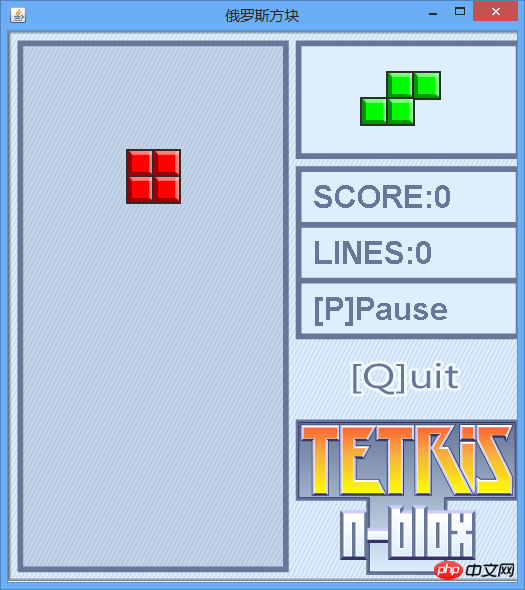
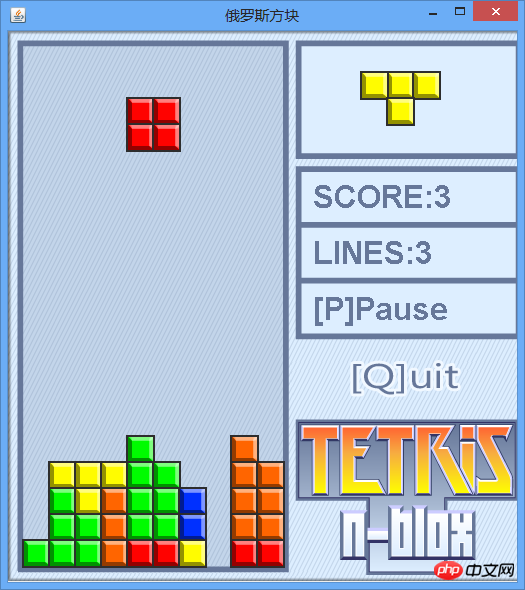
二、游戏实例
游戏截图
立即学习“Java免费学习笔记(深入)”;


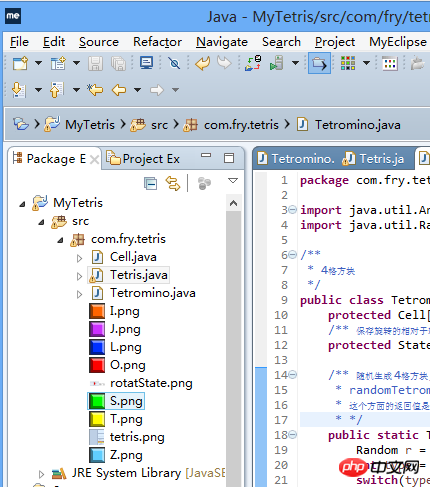
目录结构
三、代码
1、主界面 Tetris.java
package com.fry.tetris;

import java.util.Arrays;
import java.util.Random;

/**
 * 4格方块
 */
public class Tetromino {
  protected Cell[] cells = new Cell[4];
  /** 保存旋转的相对于轴位置状态 */
  protected State[] states;

  /** 随机生成 4格方块, 使用简单工厂方法模式!
   * randomTetromino 随机生成一个四格方块
   * 这个方面的返回值是多态的!
   * */
  public static Tetromino randomTetromino(){
    Random r = new Random();
    int type = r.nextInt(7);
    switch(type){
    case 0: return new T();
    case 1: return new I();
    case 2: return new J();
    case 3: return new L();
    case 4: return new O();
    case 5: return new S();
    case 6: return new Z();
    }
    return null;
  }

  public Cell[] getCells() {
    return cells;
  }

  /** 下落 */
  public void softDrop(){
    for(int i=0; i<cells.length; i++){
      cells[i].moveDown();
    }
  }
  public void moveRight(){
    //System.out.println("moveRight()");
    for(int i=0; i<cells.length; i++){
      this.cells[i].moveRight();
    }
  }
  public void moveLeft(){
    for(int i=0; i<cells.length; i++){
      cells[i].moveLeft();
    }
  }
  private int index = 100000;
  /** 在 Tetromino 上添加方法 */
  public void rotateRight() {
    index++;//index = 10001
    // index % states.length = 10001 % 4 = 1
    State s = states[index%states.length];//s1
    // [0] + s1 = [1]
    Cell o = cells[0];//获取当前的轴
    //轴与相对位置的和作为旋转以后的格子位置
    cells[1].setRow(o.getRow()+s.row1);
    cells[1].setCol(o.getCol()+s.col1);
    cells[2].setRow(o.getRow()+s.row2);
    cells[2].setCol(o.getCol()+s.col2);
    cells[3].setRow(o.getRow()+s.row3);
    cells[3].setCol(o.getCol()+s.col3);
  }
  /** 在 Tetromino 上添加方法 */
  public void rotateLeft() {
    index--;//index = 10001
    // index % states.length = 10001 % 4 = 1
    State s = states[index%states.length];//s1
    // [0] + s1 = [1]
    Cell o = cells[0];//获取当前的轴
    cells[1].setRow(o.getRow()+s.row1);
    cells[1].setCol(o.getCol()+s.col1);
    cells[2].setRow(o.getRow()+s.row2);
    cells[2].setCol(o.getCol()+s.col2);
    cells[3].setRow(o.getRow()+s.row3);
    cells[3].setCol(o.getCol()+s.col3);
  }

  @Override
  public String toString() {
    return Arrays.toString(cells);
  }

  /** Tetromino 类中添加的 内部类 用于记录旋转状态 */
  protected class State{
    int row0,col0,row1,col1,row2,col2,row3,col3;

    public State(int row0, int col0, int row1, int col1,
        int row2, int col2,
        int row3, int col3) {
      this.row0 = row0;
      this.col0 = col0;
      this.row1 = row1;
      this.col1 = col1;
      this.row2 = row2;
      this.col2 = col2;
      this.row3 = row3;
      this.col3 = col3;
    }
  }

}//Tetromino 类的结束
class T extends Tetromino{
  public T() {
    cells[0] = new Cell(0, 4, Tetris.T);
    cells[1] = new Cell(0, 3, Tetris.T);
    cells[2] = new Cell(0, 5, Tetris.T);
    cells[3] = new Cell(1, 4, Tetris.T);
    states = new State[]{
        new State(0,0, 0,-1, 0,1, 1, 0),
        new State(0,0, -1,0, 1,0, 0,-1),
        new State(0,0, 0,1, 0,-1, -1,0),
        new State(0,0, 1,0, -1,0, 0,1)};
  }
}
class I extends Tetromino{
  public I() {
    cells[0] = new Cell(0, 4, Tetris.I);
    cells[1] = new Cell(0, 3, Tetris.I);
    cells[2] = new Cell(0, 5, Tetris.I);
    cells[3] = new Cell(0, 6, Tetris.I);
    states = new State[]{
        new State(0,0, 0,1, 0,-1, 0,-2),
        new State(0,0, -1,0, 1,0,2,0)};
  }
}
class L extends Tetromino {
  public L() {
    cells[0] = new Cell(0, 4, Tetris.L);
    cells[1] = new Cell(0, 3, Tetris.L);
    cells[2] = new Cell(0, 5, Tetris.L);
    cells[3] = new Cell(1, 3, Tetris.L);
    states = new State[]{
        new State(0,0, 0,-1, 0,1, 1,-1 ),
        new State(0,0, -1,0, 1,0, -1,-1),
        new State(0,0, 0,1, 0,-1, -1,1),
        new State(0,0, 1,0, -1,0, 1,1)};
  }
}

class J extends Tetromino {
  public J() {
    cells[0] = new Cell(0, 4, Tetris.J);
    cells[1] = new Cell(0, 3, Tetris.J);
    cells[2] = new Cell(0, 5, Tetris.J);
    cells[3] = new Cell(1, 5, Tetris.J);
    states = new State[]{
        new State(0,0, 0,-1, 0,1, 1,1),
        new State(0,0, -1,0, 1,0, 1,-1),
        new State(0,0, 0,1, 0,-1, -1,-1),
        new State(0,0, 1,0, -1,0, -1,1 )};
  }
}

class S extends Tetromino {
  public S() {
    cells[0] = new Cell(0, 4, Tetris.S);
    cells[1] = new Cell(0, 5, Tetris.S);
    cells[2] = new Cell(1, 3, Tetris.S);
    cells[3] = new Cell(1, 4, Tetris.S);
    states = new State[]{
      new State(0,0, 0,1, 1,-1, 1,0 ),
      new State(0,0, -1,0, 1,1, 0,1 )};
  }
}

class Z extends Tetromino {
  public Z() {
    cells[0] = new Cell(1, 4, Tetris.Z);
    cells[1] = new Cell(0, 3, Tetris.Z);
    cells[2] = new Cell(0, 4, Tetris.Z);
    cells[3] = new Cell(1, 5, Tetris.Z);
    states = new State[]{
        new State(0,0, -1,-1, -1,0, 0,1 ),
        new State(0,0, -1,1, 0,1, 1,0 )};
  }
}

class O extends Tetromino {
  public O() {
    cells[0] = new Cell(0, 4, Tetris.O);
    cells[1] = new Cell(0, 5, Tetris.O);
    cells[2] = new Cell(1, 4, Tetris.O);
    cells[3] = new Cell(1, 5, Tetris.O);
    states = new State[]{
        new State(0,0, 0,1, 1,0, 1,1 ),
        new State(0,0, 0,1, 1,0, 1,1 )};
  }
}
二、Cell.java
package com.fry.tetris;

import java.awt.Image;

/**
 * 格子
 * 每一个小格子,就有所在的行 列 和图片
 */
public class Cell {
  private int row;
  private int col;
  //private int color;
  private Image image;//格子的贴图

  public Cell() {
  }

  public Cell(int row, int col, Image image) {
    super();
    this.row = row;
    this.col = col;
    this.image = image;
  }

  public int getRow() {
    return row;
  }

  public void setRow(int row) {
    this.row = row;
  }

  public int getCol() {
    return col;
  }

  public void setCol(int col) {
    this.col = col;
  }


  public Image getImage() {
    return image;
  }

  public void setImage(Image image) {
    this.image = image;
  }

  public void moveRight(){
    col++;
    //System.out.println("Cell moveRight()" + col);
  }

  public void moveLeft(){
    col--;
  }

  public void moveDown(){
    row++;
  }

  @Override
  public String toString() {
    return "["+row+","+col+"]";
  }
}
三、功能实现 Tetromino.java
package com.fry.tetris;

import java.util.Arrays;
import java.util.Random;

/**
 * 4格方块
 */
public class Tetromino {
  protected Cell[] cells = new Cell[4];
  /** 保存旋转的相对于轴位置状态 */
  protected State[] states;

  /** 随机生成 4格方块, 使用简单工厂方法模式!
   * randomTetromino 随机生成一个四格方块
   * 这个方面的返回值是多态的!
   * */
  public static Tetromino randomTetromino(){
    Random r = new Random();
    int type = r.nextInt(7);
    switch(type){
    case 0: return new T();
    case 1: return new I();
    case 2: return new J();
    case 3: return new L();
    case 4: return new O();
    case 5: return new S();
    case 6: return new Z();
    }
    return null;
  }

  public Cell[] getCells() {
    return cells;
  }

  /** 下落 */
  public void softDrop(){
    for(int i=0; i<cells.length; i++){
      cells[i].moveDown();
    }
  }
  public void moveRight(){
    //System.out.println("moveRight()");
    for(int i=0; i<cells.length; i++){
      this.cells[i].moveRight();
    }
  }
  public void moveLeft(){
    for(int i=0; i<cells.length; i++){
      cells[i].moveLeft();
    }
  }
  private int index = 100000;
  /** 在 Tetromino 上添加方法 */
  public void rotateRight() {
    index++;//index = 10001
    // index % states.length = 10001 % 4 = 1
    State s = states[index%states.length];//s1
    // [0] + s1 = [1]
    Cell o = cells[0];//获取当前的轴
    //轴与相对位置的和作为旋转以后的格子位置
    cells[1].setRow(o.getRow()+s.row1);
    cells[1].setCol(o.getCol()+s.col1);
    cells[2].setRow(o.getRow()+s.row2);
    cells[2].setCol(o.getCol()+s.col2);
    cells[3].setRow(o.getRow()+s.row3);
    cells[3].setCol(o.getCol()+s.col3);
  }
  /** 在 Tetromino 上添加方法 */
  public void rotateLeft() {
    index--;//index = 10001
    // index % states.length = 10001 % 4 = 1
    State s = states[index%states.length];//s1
    // [0] + s1 = [1]
    Cell o = cells[0];//获取当前的轴
    cells[1].setRow(o.getRow()+s.row1);
    cells[1].setCol(o.getCol()+s.col1);
    cells[2].setRow(o.getRow()+s.row2);
    cells[2].setCol(o.getCol()+s.col2);
    cells[3].setRow(o.getRow()+s.row3);
    cells[3].setCol(o.getCol()+s.col3);
  }

  @Override
  public String toString() {
    return Arrays.toString(cells);
  }

  /** Tetromino 类中添加的 内部类 用于记录旋转状态 */
  protected class State{
    int row0,col0,row1,col1,row2,col2,row3,col3;

    public State(int row0, int col0, int row1, int col1,
        int row2, int col2,
        int row3, int col3) {
      this.row0 = row0;
      this.col0 = col0;
      this.row1 = row1;
      this.col1 = col1;
      this.row2 = row2;
      this.col2 = col2;
      this.row3 = row3;
      this.col3 = col3;
    }
  }

}//Tetromino 类的结束
class T extends Tetromino{
  public T() {
    cells[0] = new Cell(0, 4, Tetris.T);
    cells[1] = new Cell(0, 3, Tetris.T);
    cells[2] = new Cell(0, 5, Tetris.T);
    cells[3] = new Cell(1, 4, Tetris.T);
    states = new State[]{
        new State(0,0, 0,-1, 0,1, 1, 0),
        new State(0,0, -1,0, 1,0, 0,-1),
        new State(0,0, 0,1, 0,-1, -1,0),
        new State(0,0, 1,0, -1,0, 0,1)};
  }
}
class I extends Tetromino{
  public I() {
    cells[0] = new Cell(0, 4, Tetris.I);
    cells[1] = new Cell(0, 3, Tetris.I);
    cells[2] = new Cell(0, 5, Tetris.I);
    cells[3] = new Cell(0, 6, Tetris.I);
    states = new State[]{
        new State(0,0, 0,1, 0,-1, 0,-2),
        new State(0,0, -1,0, 1,0,2,0)};
  }
}
class L extends Tetromino {
  public L() {
    cells[0] = new Cell(0, 4, Tetris.L);
    cells[1] = new Cell(0, 3, Tetris.L);
    cells[2] = new Cell(0, 5, Tetris.L);
    cells[3] = new Cell(1, 3, Tetris.L);
    states = new State[]{
        new State(0,0, 0,-1, 0,1, 1,-1 ),
        new State(0,0, -1,0, 1,0, -1,-1),
        new State(0,0, 0,1, 0,-1, -1,1),
        new State(0,0, 1,0, -1,0, 1,1)};
  }
}

class J extends Tetromino {
  public J() {
    cells[0] = new Cell(0, 4, Tetris.J);
    cells[1] = new Cell(0, 3, Tetris.J);
    cells[2] = new Cell(0, 5, Tetris.J);
    cells[3] = new Cell(1, 5, Tetris.J);
    states = new State[]{
        new State(0,0, 0,-1, 0,1, 1,1),
        new State(0,0, -1,0, 1,0, 1,-1),
        new State(0,0, 0,1, 0,-1, -1,-1),
        new State(0,0, 1,0, -1,0, -1,1 )};
  }
}

class S extends Tetromino {
  public S() {
    cells[0] = new Cell(0, 4, Tetris.S);
    cells[1] = new Cell(0, 5, Tetris.S);
    cells[2] = new Cell(1, 3, Tetris.S);
    cells[3] = new Cell(1, 4, Tetris.S);
    states = new State[]{
      new State(0,0, 0,1, 1,-1, 1,0 ),
      new State(0,0, -1,0, 1,1, 0,1 )};
  }
}

class Z extends Tetromino {
  public Z() {
    cells[0] = new Cell(1, 4, Tetris.Z);
    cells[1] = new Cell(0, 3, Tetris.Z);
    cells[2] = new Cell(0, 4, Tetris.Z);
    cells[3] = new Cell(1, 5, Tetris.Z);
    states = new State[]{
        new State(0,0, -1,-1, -1,0, 0,1 ),
        new State(0,0, -1,1, 0,1, 1,0 )};
  }
}

class O extends Tetromino {
  public O() {
    cells[0] = new Cell(0, 4, Tetris.O);
    cells[1] = new Cell(0, 5, Tetris.O);
    cells[2] = new Cell(1, 4, Tetris.O);
    cells[3] = new Cell(1, 5, Tetris.O);
    states = new State[]{
        new State(0,0, 0,1, 1,0, 1,1 ),
        new State(0,0, 0,1, 1,0, 1,1 )};
  }
} 




