



1:上边偏移属性
用来定义元素顶部偏移位置的大小。top: auto | length | percent
<!DOCTYPE HTML PUBLIC "-//W3C//DTD HTML 4.01 Transitional//EN" "http://www.w3.org/TR/html4/loose.dtd">
<html>
 <head>
  <title> CSS属性实例 </title>
  <meta name="Generator" content="EditPlus">
  <meta name="Author" content="">
  <meta name="Keywords" content="">
  <meta name="Description" content="">
  <style>
    p{
	  top: 100px;
	  position: absolute;
	  border: 2px solid #333333;
	  background: #666666;
	  width: 300px;
	  height: 50px;
	}
  </style>
 </head>

 <body>
   <p>这是使用边偏移属性的实例</p><div class="aritcle_card flexRow">
                                                        <div class="artcardd flexRow">
                                                                <a class="aritcle_card_img" href="/ai/2484" title="熊猫论文"><img
                                                                                src="https://img.php.cn/upload/ai_manual/001/246/273/176801534656076.png" alt="熊猫论文"  onerror="this.onerror='';this.src='/static/lhimages/moren/morentu.png'" ></a>
                                                                <div class="aritcle_card_info flexColumn">
                                                                        <a href="/ai/2484" title="熊猫论文">熊猫论文</a>
                                                                        <p>AI学术写作优化工具,提供AI降重、查重检测、论文润色等服务。</p>
                                                                </div>
                                                                <a href="/ai/2484" title="熊猫论文" class="aritcle_card_btn flexRow flexcenter"><b></b><span>下载</span> </a>
                                                        </div>
                                                </div>
 </body>
</html>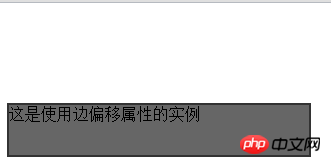
立即学习“前端免费学习笔记(深入)”;
2:右边偏移属性right
用来定义元素右侧偏移位置的大小。right: auto | length | percent;
<!DOCTYPE HTML PUBLIC "-//W3C//DTD HTML 4.01 Transitional//EN" "http://www.w3.org/TR/html4/loose.dtd">
<html>
 <head>
  <title> css属性实例 </title>
  <meta name="Generator" content="EditPlus">
  <meta name="Author" content="">
  <meta name="Keywords" content="">
  <meta name="Description" content="">
  <style>
    p{
	  right: 100px;
	  position: absolute;
	  border: 2px solid #333333;
	  background: #666666;
	  width: 300px;
	  height: 50px;
	}
  </style>
 </head>

 <body>
  <p>这是使用边偏移属性的实例</p>
 </body>
</html>
3:下边偏移属性bottom
用来定义底部偏移位置的大小。bottom:auto | length | percent;
<!DOCTYPE HTML PUBLIC "-//W3C//DTD HTML 4.01 Transitional//EN" "http://www.w3.org/TR/html4/loose.dtd">
<html>
 <head>
  <title> css属性实例 </title>
  <meta name="Generator" content="EditPlus">
  <meta name="Author" content="">
  <meta name="Keywords" content="">
  <meta name="Description" content="">
  <style>
    p {
	  bottom: 100px;
	  position: absolute;
	  border: 2px solid #333333;
	  width: 300px;
	  height: 50px;
    }
  </style>
 </head>

 <body>
  <p>这是使用下边偏移属性bottom</p>
 </body>
</html>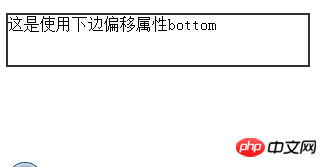
4:左边偏移属性left
用来定义元素左边偏移位置的大小,left: auto | length | percent;
<!DOCTYPE HTML PUBLIC "-//W3C//DTD HTML 4.01 Transitional//EN" "http://www.w3.org/TR/html4/loose.dtd">
<html>
 <head>
  <title> New Document </title>
  <meta name="Generator" content="EditPlus">
  <meta name="Author" content="">
  <meta name="Keywords" content="">
  <meta name="Description" content="">
  <style>
     p {
		 left: 100px;
		 position: absolute;
		 border: 2px solid #333333;
		 background: #666666;
		 width: 300px;
		 height: 50px;
	 }
  </style>
 </head>

 <body>
   <p>这是使用左边偏移属性的实例</p>
 </body>
</html>




