spring mvc配置文件中的配置
<!-- 设置使用注解的类所在的jar包,只加载controller类 -->
<context:component-scan base-package="com.jay.plat.config.controller" />
<!-- 使用 Swagger Restful API文档时,添加此注解 -->
    <mvc:default-servlet-handler />
<mvc:resources mapping="swagger-ui.html" location="classpath:/META-INF/resources/"/> <mvc:resources mapping="/webjars/**" location="classpath:/META-INF/resources/webjars/"/>
maven依赖
<!-- 构建Restful API -->

        <dependency>
            <groupId>io.springfox</groupId>
            <artifactId>springfox-swagger2</artifactId>
            <version>2.4.0</version>
        </dependency>
        <dependency>
            <groupId>io.springfox</groupId>
            <artifactId>springfox-swagger-ui</artifactId>
            <version>2.4.0</version>
        </dependency>
Swagger配置文件
package com.jay.plat.config.util;

import org.springframework.context.annotation.Bean;
import org.springframework.context.annotation.ComponentScan;
import org.springframework.context.annotation.Configuration;
import org.springframework.web.servlet.config.annotation.EnableWebMvc;
import org.springframework.web.servlet.config.annotation.WebMvcConfigurationSupport;


import springfox.documentation.builders.ApiInfoBuilder;
import springfox.documentation.builders.PathSelectors;
import springfox.documentation.builders.RequestHandlerSelectors;
import springfox.documentation.service.ApiInfo;
import springfox.documentation.spi.DocumentationType;
import springfox.documentation.spring.web.plugins.Docket;
import springfox.documentation.swagger2.annotations.EnableSwagger2;
/*
 * Restful API 访问路径:
 * http://IP:port/{context-path}/swagger-ui.html
 * eg:http://localhost:8080/jd-config-web/swagger-ui.html
 */
@EnableWebMvc
@EnableSwagger2
@ComponentScan(basePackages = {"com.plat.config.controller"})
@Configuration
public class RestApiConfig extends WebMvcConfigurationSupport{

    @Bean
    public Docket createRestApi() {
        return new Docket(DocumentationType.SWAGGER_2)
                .apiInfo(apiInfo())
                .select()
                .apis(RequestHandlerSelectors.basePackage("com.jay.plat.config.controller"))
                .paths(PathSelectors.any())
                .build();
    }

    private ApiInfo apiInfo() {
        return new ApiInfoBuilder()
                .title("Spring 中使用Swagger2构建RESTful APIs")
                .termsOfServiceUrl("http://blog.csdn.net/he90227")
                .contact("逍遥飞鹤")
                .version("1.1")
                .build();
    }
}
配置说明:
@Configuration 配置注解,自动在本类上下文加载一些环境变量信息
@EnableWebMvc
@EnableSwagger2 使swagger2生效
@ComponentScan("com.myapp.packages") 需要扫描的包路径
Controller中使用注解添加API文档
package com.jay.spring.boot.demo10.swagger2.controller;

import java.util.ArrayList;
import java.util.Collections;
import java.util.HashMap;
import java.util.List;
import java.util.Map;

import org.springframework.web.bind.annotation.PathVariable;
import org.springframework.web.bind.annotation.RequestBody;
import org.springframework.web.bind.annotation.RequestMapping;
import org.springframework.web.bind.annotation.RequestMethod;
import org.springframework.web.bind.annotation.RestController;

import com.jay.spring.boot.demo10.swagger2.bean.User;

import io.swagger.annotations.ApiImplicitParam;
import io.swagger.annotations.ApiImplicitParams;
import io.swagger.annotations.ApiOperation;

@RestController
@RequestMapping(value = "/users") // 通过这里配置使下面的映射都在/users下,可去除
public class UserController {

    static Map<Long, User> users = Collections.synchronizedMap(new HashMap<Long, User>());

    @ApiOperation(value = "获取用户列表", notes = "")
    @RequestMapping(value = { "" }, method = RequestMethod.GET)
    public List<User> getUserList() {
        List<User> r = new ArrayList<User>(users.values());
        return r;
    }

    @ApiOperation(value = "创建用户", notes = "根据User对象创建用户")
    @ApiImplicitParam(name = "user", value = "用户详细实体user", required = true, dataType = "User")
    @RequestMapping(value = "", method = RequestMethod.POST)
    public String postUser(@RequestBody User user) {
        users.put(user.getId(), user);
        return "success";
    }

    @ApiOperation(value = "获取用户详细信息", notes = "根据url的id来获取用户详细信息")
    @ApiImplicitParam(name = "id", value = "用户ID", required = true, dataType = "Long")
    @RequestMapping(value = "/{id}", method = RequestMethod.GET)
    public User getUser(@PathVariable Long id) {
        return users.get(id);
    }

    @ApiOperation(value = "更新用户详细信息", notes = "根据url的id来指定更新对象,并根据传过来的user信息来更新用户详细信息")
    @ApiImplicitParams({ @ApiImplicitParam(name = "id", value = "用户ID", required = true, dataType = "Long"),
            @ApiImplicitParam(name = "user", value = "用户详细实体user", required = true, dataType = "User") })
    @RequestMapping(value = "/{id}", method = RequestMethod.PUT)
    public String putUser(@PathVariable Long id, @RequestBody User user) {
        User u = users.get(id);
        u.setName(user.getName());
        u.setAge(user.getAge());
        users.put(id, u);
        return "success";
    }

    @ApiOperation(value = "删除用户", notes = "根据url的id来指定删除对象")
    @ApiImplicitParam(name = "id", value = "用户ID", required = true, dataType = "Long")
    @RequestMapping(value = "/{id}", method = RequestMethod.DELETE)
    public String deleteUser(@PathVariable Long id) {
        users.remove(id);
        return "success";
    }

}
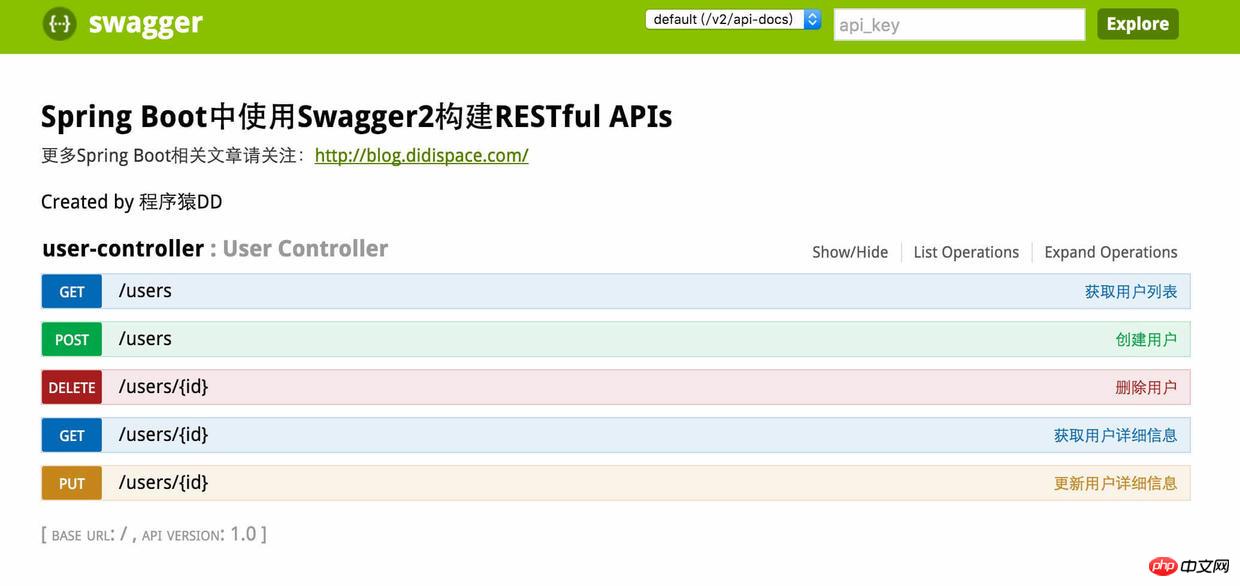
效果展示
访问路径:
Restful API 访问路径:
 * http://IP:port/{context-path}/swagger-ui.html
 * eg:http://localhost:8080/jd-config-web/swagger-ui.html