



(申明:最近在做一个练习,写点东西,谨供参考。)
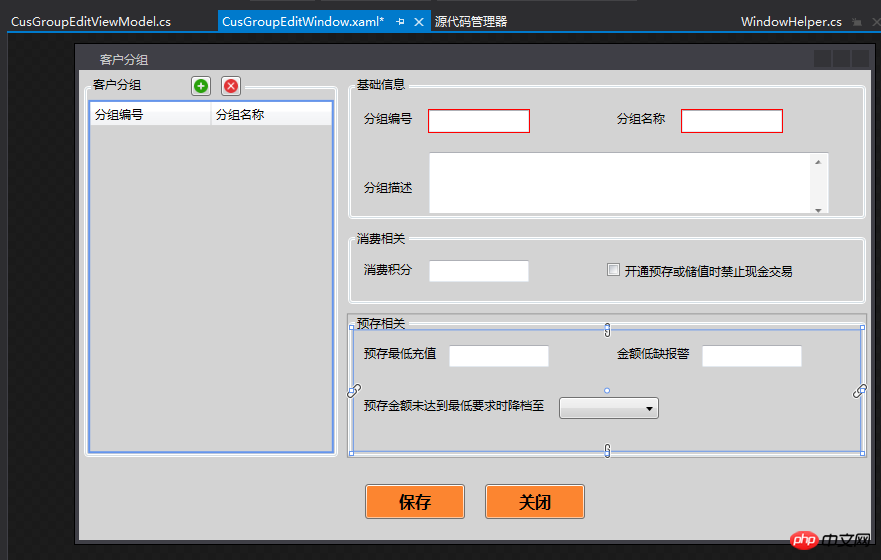
1、界面展示:其中的布局和样式就不说了,重点在MVVM架构和数据绑定(Model层使用EF(Entity Framework)实体框架,不做介绍)。
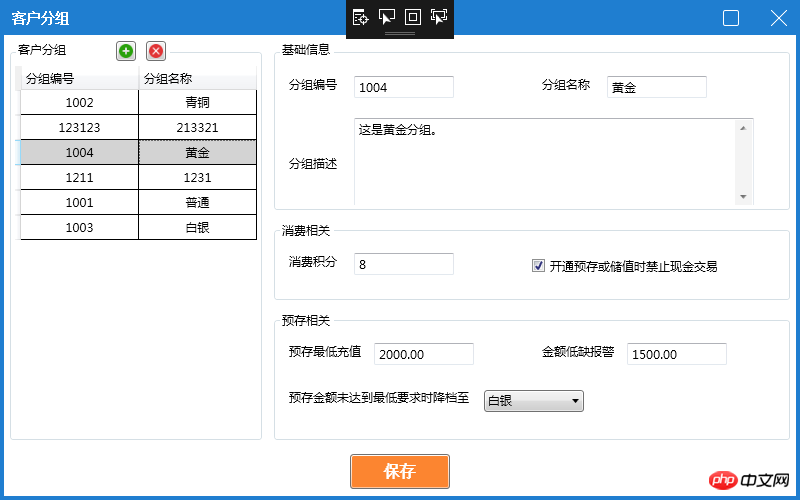
绑定后:
2、架构介绍:
在Views层中新建CusGroupEditWindow窗体,ViewModels中建立CusGroupEditViewModel类,在窗体的xaml或者cs中引用ViewModels对应类:
xaml中:
<Window.DataContext>
<local:CusGroupEditViewModel/> <!--(添加引用local:为CusGroupEditViewModel的路径)-->
</Window.DataContext>
cs:DataContext = CusGroupEditViewModel。(添加引用路径)
/***********************************************/
*CsGroup是在ViewModel中定义的一个CusGroup对象, *
*CusGroup对象是在SQL数据库中的表,在EF中的对象。 *
/***********************************************/
3、TextBox绑定:
<TextBox MaxWidth="550" Width="100" Text="{Binding CsGroup.Alarm,Mode=TwoWay}" />
4、Button绑定:
<Button Width="100" Height="35" Margin="10" Command="{Binding BtnChangedCommand}" CommandParameter="btnCusGroupSave" Background="#fc8530" >
<TextBlock Text="保存" FontWeight="Bold" FontSize="16"></TextBlock>
</Button>

<!-- Command="{Binding BtnChangedCommand}"中是在ViewModel中的委托,继承ICommoand -->
<!--CommandParameter="btnCusGroupSave" 参数-->
5、CheckBox绑定:
<CheckBox Name="cbCash" Margin="0,0,5,0" IsChecked="{Binding CsGroup.IsCash}"/>
<!-- IsCash 是在SQL表中CusGroup中字段,bit类型--> 6、ComboBox绑定:
6、ComboBox绑定:
<ComboBox MaxWidth="150" Width="100" SelectedValue="{Binding StrCMBselectValue, Mode=TwoWay, UpdateSourceTrigger=PropertyChanged}" DisplayMemberPath="Text"
                                              SelectedValuePath="Value" ItemsSource="{Binding LstCSGDownLevelID, Mode=TwoWay,UpdateSourceTrigger=PropertyChanged}" />
<!--SelectedValue:选中CommoBox的值,Mode双向模式,属性改变时触发;DisplayMemberPath:显示时绑定;SelectedValuePath:表示选择下拉框某一项对应的值;ItemsSource:绑定的数据源 -->
<!-- 其中Value和Text也可理解为数据源,在ViewModel中有赋值-->
7、DataGrid绑定:
<DataGrid ColumnWidth="*" SelectedItem="{Binding CurrentSelectItem}"  ItemsSource="{Binding CsGroupsAll}" AutoGenerateColumns="False"  IsReadOnly="True" >
                                <DataGrid.Columns>
                                    <DataGridTextColumn Header="分组编号" Binding="{Binding Code}" />
                                    <DataGridTextColumn Header="分组名称" Binding="{Binding Name}" />
                                </DataGrid.Columns>
                            </DataGrid>
/***************************************************************/


        //DataGrid当前选择对象private CusGroup currentSelectItem;public CusGroup CurrentSelectItem
        {get { return currentSelectItem; }set{
                currentSelectItem = value;

                GetCutCmbSelect(value);
            }
        }
<!--代码没有自动缩进,有点不知所措-->
/***************************************************************/
ViewModel 中的代码:
using HeYin.ERP.DataModels;using HeYin.ERP.IServices;using HeYin.ERP.Models;using HeYin.ERP.Services;using Microsoft.Practices.Prism.Commands;using System;using System.Collections.Generic;using System.Collections.ObjectModel;using System.Windows;using System.Text.RegularExpressions;using System.Windows.Controls;namespace HeYin.ERP.Client.ViewModels.Customer
{class CusGroupEditViewModel : BaseViewModel
    {private bool bIsAdd = false;

        ICusGroupService CGS;  //调用IService接口#region Properties 属性private Guid gCsGroupID = Guid.Empty;//All CusGroupprivate List<CusGroup> csGroupsAll;public List<CusGroup> CsGroupsAll
        {get { return csGroupsAll; }set{
                csGroupsAll = value; //设定值OnPropertyChanged("CsGroupsAll"); //在属性更改后,通知            }
        }private List<CusGroup> csGroupsMinPrestore;public List<CusGroup> CsGroupsAllMinPrestore
        {get { return csGroupsMinPrestore; }set{
                csGroupsMinPrestore = value; //设定值OnPropertyChanged("CsGroupsAllMinPrestore"); //在属性更改后,通知            }
        }//CusGroup对象private CusGroup csGroup;public CusGroup CsGroup
        {get { return csGroup; }set{ csGroup = value;
                OnPropertyChanged("CsGroup"); }
        }/// <summary>/// /// </summary>private string strCMBselectValue;public string StrCMBselectValue
        {get { return strCMBselectValue; }set{if (value != null)
                {
                    strCMBselectValue = value;
                    OnPropertyChanged("StrCMBselectValue");
                }
            }
        }/// <summary>/// ComboBoxDataModel:作为一个ComboBox的对象,可以理解为数据源/// </summary>private ObservableCollection<ComboBoxDataModel> lstCSGDownLevelID;public ObservableCollection<ComboBoxDataModel> LstCSGDownLevelID
        {get { return lstCSGDownLevelID; }set{
                lstCSGDownLevelID = value;
                OnPropertyChanged("LstCSGDownLevelID");
            }
        }//DataGrid当前选择对象private CusGroup currentSelectItem;public CusGroup CurrentSelectItem
        {get { return currentSelectItem; }set{
                currentSelectItem = value;

                GetCutCmbSelect(value);
            }
        }private int errorCount;public int ErrorCount { get => errorCount; set => errorCount = value; }#endregion#region Commandspublic DelegateCommand<string> BtnChangedCommand { get; set; }public DelegateCommand<CusGroup> TxtChangedCommand { get; set; }        #endregionpublic CusGroupEditViewModel()
        {
            CGS = new CusGroupService();
            CsGroupsAll = new List<CusGroup>();
            csGroup = new CusGroup();
            LstCSGDownLevelID = new ObservableCollection<ComboBoxDataModel>();
            BtnChangedCommand = new DelegateCommand<string>(MenuClick);
            TxtChangedCommand = new DelegateCommand<CusGroup>(ChangeCMBValue);

            GetAllCusGroups();
        }#region ButtonClickprivate void MenuClick(string strMessage)
        {if (string.IsNullOrEmpty(strMessage)) return;if (CsGroup == null) return;switch (strMessage)
            {case "btnCusGroupSave":
                    Save();break;case "btnCusGroupAdd":
                    Add();break;case "btnCusGroupDelete":
                    Delete();break;
            }
        }#endregion ButtonClick#region motheds/// <summary>/// 获取全部Group/// </summary>private void GetAllCusGroups()
        {//获取满足条件的客户分组信息            CsGroupsAll.Clear();
            CsGroupsAll = CGS.Get(s => s.IsDelete == 0);

            GetAllCMBItems();//给降档分组下拉框赋值if ((gCsGroupID == null || gCsGroupID == Guid.Empty) && CsGroupsAll.Count > 0)
                CsGroup = CsGroupsAll[0];    //给基础信息等赋值StrCMBselectValue = CsGroup.DownLevelID.ToString();//设置降档分组默认值        }/// <summary>/// 添加/// </summary>/// <param name="cg"></param>private void AddCusGroup(CusGroup cg)
        {
            cg.ID = Guid.NewGuid(); //新建分组GUIDcg.IsDelete = 0;        //默认为0:不删除cg.CreateBy = App.GetCurrentUserId();//创建人员关联员工 GUIDcg.CreateTime = DateTime.Now;  //初始化创建时间,应该使用服务器当前时间bool c = CGS.Add(cg);if (c)
            {
                MessageBox.Show(string.Format("创建新组别【{0}】成功!", CsGroup.Name), "提示", MessageBoxButton.OK, MessageBoxImage.Information);
                GetAllCusGroups();
                bIsAdd = false;
            }
        }/// <summary>/// 修改/// </summary>/// <param name="cg"></param>private void UpdateCusGroup(CusGroup cg)
        {
            bIsAdd = false;

            cg.UpdateTime = DateTime.Now;
            cg.UpdateBy = App.GetCurrentUserId();//更新人员关联员工 GUIDstring[] str = { "UpdateTime", "UpdateBy" };bool b = CGS.Edit(cg, str);if (b)
            {
                MessageBox.Show("更改组别【成功】!", "提示", MessageBoxButton.OK, MessageBoxImage.Information);
                GetAllCusGroups();
            }
        }/// <summary>///删除方法(实为更新)/// </summary>/// <param name="cg"></param>private void DeleteCusGroup(CusGroup cg)
        {
            cg.IsDelete = 1; //更改数据库删除标志cg.UpdateTime = DateTime.Now;  //更新删除时间cg.UpdateBy = App.GetCurrentUserId();//更新人员关联员工 GUIDstring[] str = { "UpdateTime", "IsDelete", "UpdateBy" };bool b = CGS.Edit(cg, str);if (b)
            {//MessageBox.Show(string.Format("已删除组别【{0}】!", CsGroup.Name), "提示", MessageBoxButton.OK, MessageBoxImage.Information);                GetAllCusGroups();
                CsGroup = new CusGroup(); //清空对象bIsAdd = true;
            }
        }/// <summary>/// 插入和更新方法调用/// </summary>private void Save()
        {if (ErrorCount > 0)
            {//判断必填数据是否为空:为空则提示MessageBox.Show("请核对所填数据", "提示", MessageBoxButton.YesNo, MessageBoxImage.Information);return;
            }if (bIsAdd)
                AddCusGroup(CsGroup);elseUpdateCusGroup(CsGroup);
        }/// <summary>/// 获取降档分组下拉列表的值,并指定默认值/// </summary>/// <param name="value"></param>private void GetCutCmbSelect(CusGroup value)
        {
            bIsAdd = false;//点击新增后,再选择列表的逻辑if (value != null)
            {
                CsGroup = CGS.GetById(value.ID);//查找出当前选中的对象gCsGroupID = CsGroup.ID;        //保存当前选择对象的GUIDif (CsGroup != null)
                {if (CsGroup.DownLevelID.HasValue)
                    {//如果降档ID有值,则默认显示,如果没有,则显示为空GetExceptCMBSelect();//刷新下拉列表,先刷新,再赋值给默认值StrCMBselectValue = CsGroup.DownLevelID.ToString();
                    }else{
                        LstCSGDownLevelID.Clear();
                        StrCMBselectValue = string.Empty;
                    }
                }
            }
        }private void Add()
        {
            bIsAdd = true;//点击新建分组时,重新获取所有降档ID对应的中文名            GetAllCMBItems();

            CsGroup = new CusGroup();
        }private void Delete()
        {if (this.CsGroup.ID == Guid.Empty || CsGroup.ID == null)
                MessageBox.Show("请选择要删除组别", "提示", MessageBoxButton.OK, MessageBoxImage.Information);else{
                MessageBoxResult msgResult = MessageBox.Show(string.Format("确定要删除分组【{0}】吗?", CsGroup.Name), "提示", MessageBoxButton.YesNo, MessageBoxImage.Information);if (msgResult == MessageBoxResult.Yes)
                    DeleteCusGroup(CsGroup);
            }
        }/// <summary>/// 排除当前列的降档ID和对应的Name/// </summary>private void GetExceptCMBSelect()
        {
            LstCSGDownLevelID.Clear();
            CsGroupsAllMinPrestore = CGS.Get(s => s.IsDelete == 0 && s.MinPrestore <= CsGroup.MinPrestore);foreach (var iDlID in CsGroupsAllMinPrestore)
            {if (iDlID.ID != CsGroup.ID) //去除当前选择ID对应的NameLstCSGDownLevelID.Add(new ComboBoxDataModel() { Value = iDlID.ID.ToString(), Text = iDlID.Name });
            }
        }/// <summary>/// 获取列表中所有降档ID和对应的Name/// </summary>private void GetAllCMBItems()
        {
            LstCSGDownLevelID.Clear();foreach (var iDlID in CsGroupsAll)
            {
                LstCSGDownLevelID.Add(new ComboBoxDataModel() { Value = iDlID.ID.ToString(), Text = iDlID.Name });
            }
        }private void ChangeCMBValue(CusGroup cgMinPrestore)
        {
            LstCSGDownLevelID.Clear();
            List<CusGroup> lstTextChange = new List<CusGroup>();
            lstTextChange = CGS.Get(s => s.MinPrestore < cgMinPrestore.MinPrestore);foreach (var iDlID in lstTextChange)
            {
                LstCSGDownLevelID.Add(new ComboBoxDataModel() { Value = iDlID.ID.ToString(), Text = iDlID.Name });
            }
        }public void SizeChangedCommand(object obj, SizeChangedEventArgs e)
        {

            MessageBox.Show("日了狗");

        }#endregion}
}
View中代码:
<client:BaseWindow x:Class="HeYin.ERP.Client.Views.Customer.CusGroupEditWindow"
xmlns="http://schemas.microsoft.com/winfx/2006/xaml/presentation"
xmlns:x="http://schemas.microsoft.com/winfx/2006/xaml"
xmlns:d="http://schemas.microsoft.com/expression/blend/2008"
xmlns:mc="http://schemas.openxmlformats.org/markup-compatibility/2006"
xmlns:Interaction="http://schemas.microsoft.com/expression/2010/interactions"
xmlns:Interactivity="http://schemas.microsoft.com/expression/2010/interactivity"
xmlns:CommonValidation="clr-namespace:HeYin.ERP.Common.Validation;assembly=HeYin.ERP.Common"
xmlns:client="clr-namespace:HeYin.ERP.Client"
mc:Ignorable="d"
x:Name="CusGroupWindow"
Title="客户分组" Height="500" Width="800"
WindowStartupLocation="CenterOwner"
Loaded="Window_Loaded"
MaxboxEnable="True"
MinboxEnable="False" >
<Interactivity:Interaction.Triggers>
<Interactivity:EventTrigger EventName="SizeChanged">
<Interaction:CallMethodAction TargetObject="{Binding}" MethodName="SizeChangedCommand"/>
</Interactivity:EventTrigger>
</Interactivity:Interaction.Triggers>
<Grid>
<Grid.RowDefinitions>
<RowDefinition Height="*" />
<RowDefinition Height="50" />
</Grid.RowDefinitions>
<Grid Grid.Row="0">
<Grid.ColumnDefinitions>
<ColumnDefinition Width="1*"/>
<ColumnDefinition Width="2*"/>
</Grid.ColumnDefinitions>
<!-- Left -->
<Grid Margin="5,0,5,5">
<GroupBox Name="gbGroupData">
<GroupBox.HeaderTemplate>
<DataTemplate>
<WrapPanel Margin="{StaticResource WrapPanelMarginForInfo}">
<TextBlock Text="客户分组" Height="20" />
<Button Width="20" Height="20" Margin="50,0,0,0"
Command="{Binding DataContext.BtnChangedCommand,RelativeSource={RelativeSource Mode=FindAncestor,AncestorType=GroupBox}}"
CommandParameter="btnCusGroupAdd"
Visibility="{Binding SaveVisibility,Mode=TwoWay,UpdateSourceTrigger=PropertyChanged}">
<Image Source="..\..\Resources\Images\16\Add.png" />
</Button>
<Button Width="20" Height="20" Margin="10,0,0,0"
Command="{Binding DataContext.BtnChangedCommand,RelativeSource={RelativeSource Mode=FindAncestor,AncestorType=GroupBox}}"
CommandParameter="btnCusGroupDelete"
Visibility="{Binding SaveVisibility,Mode=TwoWay,UpdateSourceTrigger=PropertyChanged}">
<Image Source="..\..\Resources\Images\16\Clear.png" />
</Button>
</WrapPanel>
</DataTemplate>
</GroupBox.HeaderTemplate>
<Grid>
<Grid Grid.Row="1">
<DataGrid ColumnWidth="*" SelectedItem="{Binding CurrentSelectItem}" ItemsSource="{Binding CsGroupsAll}" AutoGenerateColumns="False" IsReadOnly="True" >
<DataGrid.Columns>
<DataGridTextColumn Header="分组编号" Binding="{Binding Code}" />
<DataGridTextColumn Header="分组名称" Binding="{Binding Name}" />
</DataGrid.Columns>
</DataGrid>
</Grid>
</Grid>
</GroupBox>
</Grid>
<!-- Right -->
<Grid Grid.Column="1" Margin="5">
<Grid.RowDefinitions>
<RowDefinition Height="*"/>
<RowDefinition Height="100"/>
<RowDefinition Height="130"/>
</Grid.RowDefinitions>
<!-- 基础信息 -->
<Grid>
<GroupBox>
<GroupBox.Header>
<TextBlock Text="基础信息" Height="20"/>
</GroupBox.Header>
<StackPanel>
<Grid Margin="0,10">
<Grid.ColumnDefinitions>
<ColumnDefinition Width="*" />
<ColumnDefinition Width="*" />
</Grid.ColumnDefinitions>
<TextBox Visibility="Collapsed" x:Name="tbErrorCount" Text="{Binding ErrorCount, Mode=TwoWay,UpdateSourceTrigger=PropertyChanged}"></TextBox>
<WrapPanel Margin="{StaticResource WrapPanelMarginForInfo}">
<TextBlock Width="60" Margin="{StaticResource TextBlockMarginForMostLeft}"><Run Text="分组编号" /></TextBlock>
<TextBox Name="txtCusGropCrod" MaxWidth="150" Width="100"
ToolTip="{Binding RelativeSource={RelativeSource self},Path=(Validation.Errors).CurrentItem.ErrorContent}" Validation.Error="Validation_Error">
<TextBox.Text>
<Binding Path="CsGroup.Code" Mode="TwoWay" UpdateSourceTrigger="PropertyChanged" ValidatesOnDataErrors="True" NotifyOnValidationError="True">
<Binding.ValidationRules>
<ExceptionValidationRule></ExceptionValidationRule>
<CommonValidation:RequiredValidationRule MaxLenth="15" ErrorMessage="分组编号" IsRequired="True" ValidatesOnTargetUpdated="True" />
</Binding.ValidationRules>
</Binding>
</TextBox.Text>
</TextBox>
</WrapPanel>
<WrapPanel Margin="{StaticResource WrapPanelMarginForInfo}" Grid.Column="1">
<TextBlock Text="分组名称" Width="60" Margin="{StaticResource TextBlockMarginForMostLeft}"/>
<TextBox Name="txtCusGropName" MaxWidth="150" Width="100"
ToolTip="{Binding RelativeSource={RelativeSource self},Path=(Validation.Errors).CurrentItem.ErrorContent}" Validation.Error="Validation_Error">
<TextBox.Text>
<Binding Path="CsGroup.Name" Mode="TwoWay" UpdateSourceTrigger="PropertyChanged" ValidatesOnDataErrors="True" NotifyOnValidationError="True">
<Binding.ValidationRules>
<ExceptionValidationRule></ExceptionValidationRule>
<CommonValidation:RequiredValidationRule MaxLenth="15" ErrorMessage="分组名称" IsRequired="True" ValidatesOnTargetUpdated="True" />
</Binding.ValidationRules>
</Binding>
</TextBox.Text>
</TextBox>
</WrapPanel>
</Grid>
<Grid>
<WrapPanel Margin="{StaticResource WrapPanelMarginForInfo}">
<TextBlock Margin="{StaticResource TextBlockMarginForMostLeft}" Width="60" VerticalAlignment="Center"><Run Text="分组描述" /></TextBlock>
<TextBox x:Name="tbRemark" TextWrapping="Wrap" AcceptsReturn="True" VerticalScrollBarVisibility="Visible" Width="400" Height="90"
ToolTip="{Binding RelativeSource={RelativeSource self},Path=(Validation.Errors).CurrentItem.ErrorContent}" Validation.Error="Validation_Error">
<TextBox.Text>
<Binding Path="CsGroup.Description" Mode="TwoWay" UpdateSourceTrigger="PropertyChanged" ValidatesOnDataErrors="True" NotifyOnValidationError="True">
<Binding.ValidationRules>
<ExceptionValidationRule></ExceptionValidationRule>
<CommonValidation:RequiredValidationRule MaxLenth="300" ErrorMessage="分组描述" ValidatesOnTargetUpdated="True" />
</Binding.ValidationRules>
</Binding>
</TextBox.Text>
</TextBox>
</WrapPanel>
</Grid>
</StackPanel>
</GroupBox>
</Grid>
<!-- 消费相关 -->
<Grid Grid.Row="1" Margin="0,10,0,10">
<Grid>
<GroupBox>
<GroupBox.Header>
<TextBlock Text="消费相关"/>
</GroupBox.Header>
<Grid Margin="0,10">
<Grid.ColumnDefinitions>
<ColumnDefinition Width="*"/>
<ColumnDefinition Width="*"/>
</Grid.ColumnDefinitions>
<WrapPanel Margin="{StaticResource WrapPanelMarginForInfo}">
<TextBlock Text="消费积分" Width="60" Height="20" Margin="{StaticResource TextBlockMarginForMostLeft}" />
<TextBox Name="txtCusGropJF" MaxWidth="150" Width="100" Text="{Binding CsGroup.PointConversion, Mode=TwoWay,UpdateSourceTrigger=PropertyChanged}" />
</WrapPanel>
<WrapPanel Grid.Column="1" Margin="{StaticResource WrapPanelMarginForInfo}" HorizontalAlignment="Left" VerticalAlignment="Center">
<CheckBox Name="cbCash" Margin="0,0,5,0" IsChecked="{Binding CsGroup.IsCash}"/>
<TextBlock Text="开通预存或储值时禁止现金交易" />
</WrapPanel>
</Grid>
</GroupBox>
</Grid>
</Grid>
<!-- 预存相关 -->
<Grid Grid.Row="2">
<GroupBox>
<GroupBox.Header>
<TextBlock Text="预存相关"/>
</GroupBox.Header>
<StackPanel>
<Grid Margin="0,10">
<Grid.ColumnDefinitions>
<ColumnDefinition Width="*"/>
<ColumnDefinition Width="*"/>
</Grid.ColumnDefinitions>
<WrapPanel Margin="{StaticResource WrapPanelMarginForInfo}">
<TextBlock Width="80" Margin="{StaticResource TextBlockMarginForMostLeft}" ><Run Text="预存最低充值"/></TextBlock>
<TextBox MaxWidth="150" Width="100" Text="{Binding CsGroup.MinPrestore, Mode=TwoWay,UpdateSourceTrigger=PropertyChanged}" />
</WrapPanel>
<WrapPanel Grid.Column="1" Margin="{StaticResource WrapPanelMarginForInfo}">
<TextBlock Width="80" Text="金额低缺报警" Margin="{StaticResource TextBlockMarginForMostLeft}" />
<TextBox MaxWidth="550" Width="100" Text="{Binding CsGroup.Alarm,Mode=TwoWay}" />
</WrapPanel>
</Grid>
<Grid Margin="0,5">
<WrapPanel Margin="{StaticResource WrapPanelMarginForInfo}">
<TextBlock Width="190" Text="预存金额未达到最低要求时降档至" Margin="{StaticResource TextBlockMarginForMostLeft}"/>
<ComboBox MaxWidth="150" Width="100" SelectedValue="{Binding StrCMBselectValue, Mode=TwoWay, UpdateSourceTrigger=PropertyChanged}" DisplayMemberPath="Text"
SelectedValuePath="Value" ItemsSource="{Binding LstCSGDownLevelID, Mode=TwoWay,UpdateSourceTrigger=PropertyChanged}" />
</WrapPanel>
</Grid>
</StackPanel>
</GroupBox>
</Grid>
</Grid>
</Grid>
<!-- bottom -->
<Grid Grid.Row="2">
<WrapPanel HorizontalAlignment="Center" VerticalAlignment="Center" Margin="{StaticResource WrapPanelMarginForInfo}">
<Button Margin="1" Command="{Binding BtnChangedCommand}" CommandParameter="btnCusGroupSave" Background="#fc8530" Style="{StaticResource SaveButtonStyle}"
Visibility="{Binding SaveVisibility,Mode=TwoWay,UpdateSourceTrigger=PropertyChanged}" >
<TextBlock Text="保存" FontWeight="Bold" FontSize="16"></TextBlock>
</Button>
</WrapPanel>
</Grid>
</Grid>
</client:BaseWindow>




