



一、websocket简介
对于一些对数据实时性要求较高的系统,比如股票行情、在线聊天、微博,实现数据的实时推送是必须的。通常实现实时推送的方式有:
1、轮询:隔一段时间发送数据(如:webqq)
2、socket:以往普通的网页是不支持socket接收消息的。可以通过flash或者applet来作为socket的客户端
3、长连接:指在一个TCP连接上可以连续发送多个数据包,在TCP连接保持期间,如果没有数据包发送,需要双方发检测包以维持此连接,一般需要自己做
立即学习“前端免费学习笔记(深入)”;
在线维持。
----------------------------------------------------------------------------------------------
html5通过window.WebSocket(firefox下是window.MozWebSocket)提供了一种非http的双向连接,这个连接是实时的更是永久的,除非被显示colse。
这就表示只要客户端打开一个Socket并且请求建立了连接(just once),服务端就能实时接收并发送消息,不需手动检测和维持状态。
WebSocket提供的方法和属性可以在firebug中输入Window.WebSocket.prototype看到。
接下去的代码列出了基本的使用思路:
var location = "ws://localhost:port/serlet/xxx";
//服务端处理的servlet

var webSocket = new WebSocket(location);

//webSocket.readyState
var readyStates = {
    "CONNECTING":"正在连接“,
    ”OPEN“ : "已建立连接",
    "CLOSING":"正在关闭连接",
    "CLOSED":"已关闭连接"
}

webSocket.send(data);//发送数据到服务端,目前只支持文本类型。JSON.stringify(data);JSON.parse(data);

webSocket.onMessage = function(event){
     var data = event.data;//从服务端过来的数据
}

webSocket.onOpen = function(event){
     //开始通信
}

webSocket.onClose = function(event){
   //结束通信
}
webSocket.close();
二、一个基于jetty(java服务器)的例子
目前Apache还不支持WebSocket,各种语言都有各自的方式可以实现它,这里在Java中实现了。
步骤一:下载一个jetty,解压放在任意盘下。jetty7及以上才支持WebSocket,下载地址:download.eclipse.org/jetty/stable-7/dist/
步骤二:下载eclipse(不推荐用MyEclipse,比较麻烦,需要安装其他的插件),必须支持jetty7,版本是越高越好。
步骤三:在eclipse中安装插件,help---Install new software...----url为:eclipse-jetty.sourceforge.net/update/
步骤四:新建一个Dynamic Web Project
Modoer 是一款以本地分享,多功能的点评网站管理系统。采用 PHP+MYSQL 开发设计,开放全部源代码。因具有非凡的访问速度和卓越的负载能力而深受国内外朋友的喜爱,不局限于商铺类点评,真正实现了多类型的点评,可以让您的网站点评任何事与物,同时增加产品模块,也更好的网站产品在网站上展示。Modoer点评系统 2.5 Build 20110710更新列表1.同步 旗舰版系统框架2.增加 限制图片
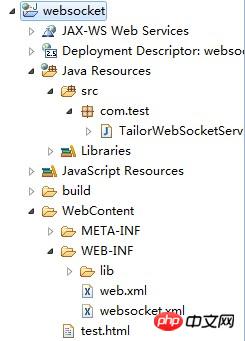
目录结构如下
步骤五:拷入如下代码:
TailorWebSocketServlet.java
package com.test;

import java.io.IOException;
import java.util.Date;
import java.util.Set;
import java.util.concurrent.CopyOnWriteArraySet;
import java.util.concurrent.Executors;
import java.util.concurrent.ScheduledExecutorService;
import java.util.concurrent.TimeUnit;

import javax.servlet.ServletException;
import javax.servlet.http.HttpServletRequest;
import javax.servlet.http.HttpServletResponse;

import org.eclipse.jetty.websocket.WebSocket;
import org.eclipse.jetty.websocket.WebSocketServlet;


public class TailorWebSocketServlet extends WebSocketServlet {
    private static final long serialVersionUID = -7289719281366784056L;
    public static String newLine = System.getProperty("line.separator");

    private final Set<TailorSocket> _members = new CopyOnWriteArraySet<TailorSocket>();
    private ScheduledExecutorService executor = Executors.newSingleThreadScheduledExecutor();


    public void init() throws ServletException {
        super.init();
        executor.scheduleAtFixedRate(new Runnable() {

            public void run() {
                System.out.println("Running Server Message Sending");
                for(TailorSocket member : _members){
                    System.out.println("Trying to send to Member!");
                    if(member.isOpen()){
                        System.out.println("Sending!");
                        try {
                            member.sendMessage("from server : happy and happiness! "+new Date()+newLine);
                        } catch (IOException e) {
                            e.printStackTrace();
                        }
                    }
                }
            }
        }, 2, 2, TimeUnit.SECONDS);

    }

    protected void doGet(HttpServletRequest request,
            HttpServletResponse response) throws ServletException, IOException {
        getServletContext().getNamedDispatcher("default").forward(request,
                response);
    }

    public WebSocket doWebSocketConnect(HttpServletRequest request,
            String protocol) {
        return new TailorSocket();
    }

    class TailorSocket implements WebSocket.OnTextMessage {
        private Connection _connection;

        public void onClose(int closeCode, String message) {
            _members.remove(this);
        }

        public void sendMessage(String data) throws IOException {
            _connection.sendMessage(data);
        }


        public void onMessage(String data) {
            System.out.println("Received: "+data);
        }

        public boolean isOpen() {
            return _connection.isOpen();
        }


        public void onOpen(Connection connection) {
            _members.add(this);
            _connection = connection;
            try {
                connection.sendMessage("onOpen:Server received Web Socket upgrade and added it to Receiver List.");
            } catch (IOException e) {
                e.printStackTrace();
            }
        }
    }
}
test.html
<!DOCTYPE HTML>
<html>
    <head>
        <meta charset = "utf-8"/>
        <title>Chat by Web Sockets</title>
        <script type='text/javascript'>
            if (!window.WebSocket)
                alert("window.WebSocket unsuport!");

            function $() {
                return document.getElementById(arguments[0]);
            }
            function $F() {
                return document.getElementById(arguments[0]).value;
            }

            function getKeyCode(ev) {
                if (window.event)
                    return window.event.keyCode;
                return ev.keyCode;
            }

            var server = {
                connect : function() {
                    var location ="ws://localhost:8888/servlet/a";
                    this._ws =new WebSocket(location);
                    this._ws.onopen =this._onopen;
                    this._ws.onmessage =this._onmessage;
                    this._ws.onclose =this._onclose;
                },

                _onopen : function() {
                    server._send('send to server : websockets are open for communications!');
                },

                _send : function(message) {
                    if (this._ws)
                        this._ws.send(message);
                },

                send : function(text) {
                    if (text !=null&& text.length >0)
                        server._send(text);
                },

                _onmessage : function(m) {
                    if (m.data) {
                        var messageBox = $('messageBox');
                        var spanText = document.createElement('span');
                        spanText.className ='text';
                        spanText.innerHTML = m.data;
                        var lineBreak = document.createElement('br');
                        messageBox.appendChild(spanText);
                        messageBox.appendChild(lineBreak);
                        messageBox.scrollTop = messageBox.scrollHeight
                                - messageBox.clientHeight;
                    }
                },

                _onclose : function(m) {
                    this._ws =null;
                }
            };
        </script>
        <style type='text/css'>
            div {
                border: 0px solid black;
            }

            div#messageBox {
                clear: both;
                width: 40em;
                height: 20ex;
                overflow: auto;
                background-color: #f0f0f0;
                padding: 4px;
                border: 1px solid black;
            }

            div#input {
                clear: both;
                width: 40em;
                padding: 4px;
                background-color: #e0e0e0;
                border: 1px solid black;
                border-top: 0px
            }

            div.hidden {
                display: none;
            }

            span.alert {
                font-style: italic;
            }
        </style>
    </head>
    <body>
        <div id='messageBox'></div>
        <div id='input'>
            <div>
                <input id='connect' type='submit' name='Connect'
                    value='Connect' />
            </div>
        </div>
        <script type='text/javascript'>
            $('connect').onclick =function(event) {
                server.connect();
                returnfalse;
            };
        </script>

        <p>
            JAVA Jetty for WebSocket
        </p>
    </body>
</html>web.html50
<?xml version="1.0" encoding="UTF-8"?>
<web-app version="2.5"
    xmlns="http://java.sun.com/xml/ns/javaee"
    xmlns:xsi="http://www.w3.org/2001/XMLSchema-instance"
    xsi:schemaLocation="http://java.sun.com/xml/ns/javaee
    http://java.sun.com/xml/ns/javaee/web-app_2_5.xsd">
    <display-name>tailor</display-name>
    <servlet>
        <servlet-name>WebSocket</servlet-name>
        <servlet-class>com.test.TailorWebSocketServlet</servlet-class>
    </servlet>
    <servlet-mapping>
        <servlet-name>WebSocket</servlet-name>
        <url-pattern>/servlet/*</url-pattern>
    </servlet-mapping>

    <welcome-file-list>
        <welcome-file>test.html</welcome-file>
    </welcome-file-list>
</web-app>
websocket.xml
<?xml version="1.0"  encoding="ISO-8859-1"?>
<!DOCTYPE Configure PUBLIC "-//Jetty//Configure//EN" "http://www.eclipse.org/jetty/configure.dtd">

<!-- ==================================================================
Configure and deploy the test web application in $(jetty.home)/webapps/test

Note. If this file did not exist or used a context path other that /test
then the default configuration of jetty.xml would discover the test
webapplication with a WebAppDeployer.  By specifying a context in this
directory, additional configuration may be specified and hot deployments
detected.
===================================================================== -->

<Configure class="org.eclipse.jetty.webapp.WebAppContext">


  <!-- - - - - - - - - - - - - - - - - - - - - - - - - - - - - - - - - -->
  <!-- Required minimal context configuration :                        -->
  <!--  + contextPath                                                  -->
  <!--  + war OR resourceBase                                          -->
  <!-- - - - - - - - - - - - - - - - - - - - - - - - - - - - - - - - - -->
  <Set name="contextPath">/</Set>

  <Set name="defaultsDescriptor"><SystemProperty name="jetty.home" default="."/>/etc/webdefault.xml</Set>
  <Set name="overrideDescriptor"><SystemProperty name="jetty.home" default="."/>/contexts/test.d/override-web.xml</Set>

  <!-- virtual hosts
  <Set name="virtualHosts">
    <Array type="String">
      <Item>www.myVirtualDomain.com</Item>
      <Item>localhost</Item>
      <Item>127.0.0.1</Item>
    </Array>
  </Set>
  -->

  <!-- disable cookies
  <Get name="sessionHandler">
     <Get name="sessionManager">
        <Set name="usingCookies" type="boolean">false</Set>
     </Get>
  </Get>
  -->

  <Get name="securityHandler">
    <Set name="loginService">
      <New class="org.eclipse.jetty.security.HashLoginService">
        <Set name="name">Test Realm</Set>
        <Set name="config"><SystemProperty name="jetty.home" default="."/>/etc/realm.properties</Set>
            <!-- To enable reload of realm when properties change, uncomment the following lines -->
            <!-- changing refreshInterval (in seconds) as desired                                -->
            <!--
            <Set name="refreshInterval">5</Set>
            <Call name="start"></Call>
            -->
      </New>
    </Set>
    <Set name="checkWelcomeFiles">true</Set>
  </Get>

  <!-- Non standard error page mapping -->
  <!--
  <Get name="errorHandler">
    <Call name="addErrorPage">
      <Arg type="int">500</Arg>
      <Arg type="int">599</Arg>
      <Arg type="String">/dump/errorCodeRangeMapping</Arg>
    </Call>
  </Get>
  -->

  <!-- Add context specific logger
  <Set name="handler">
    <New id="RequestLog" class="org.eclipse.jetty.server.handler.RequestLogHandler">
      <Set name="requestLog">
    <New id="RequestLogImpl" class="org.eclipse.jetty.server.NCSARequestLog">
      <Set name="filename"><Property name="jetty.logs" default="./logs"/>/test-yyyy_mm_dd.request.log</Set>
      <Set name="filenameDateFormat">yyyy_MM_dd</Set>
      <Set name="append">true</Set>
      <Set name="LogTimeZone">GMT</Set>
    </New>
      </Set>
    </New>
  </Set>
  -->

</Configure>
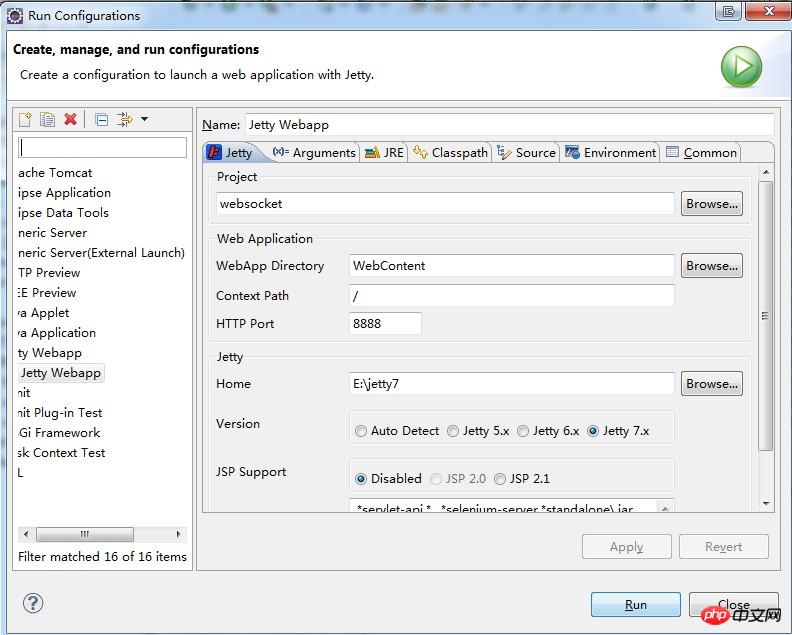
步骤六:
跑后的效果:
浏览器访问:localhost:8080
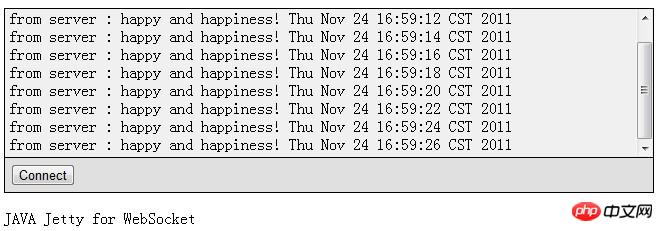
eclipse控制台上:
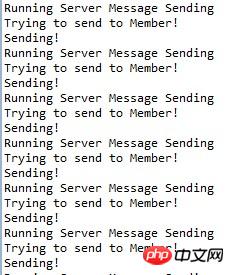
恭喜你,到这儿就算success了!
三、性能
对于这种类型的连接,各种服务器需要消耗的性能也不同,java下可以通过JDK的bin目录下的Jconsole来查看,单个连接内存消耗在2.5M左右,但是对于并发量还没有做测试。这里不贴图了




