



这篇文章主要介绍了微信小程序 用户数据解密详细介绍的相关资料,需要的朋友可以参考下
微信小程序 用户数据解密
官方指引图:
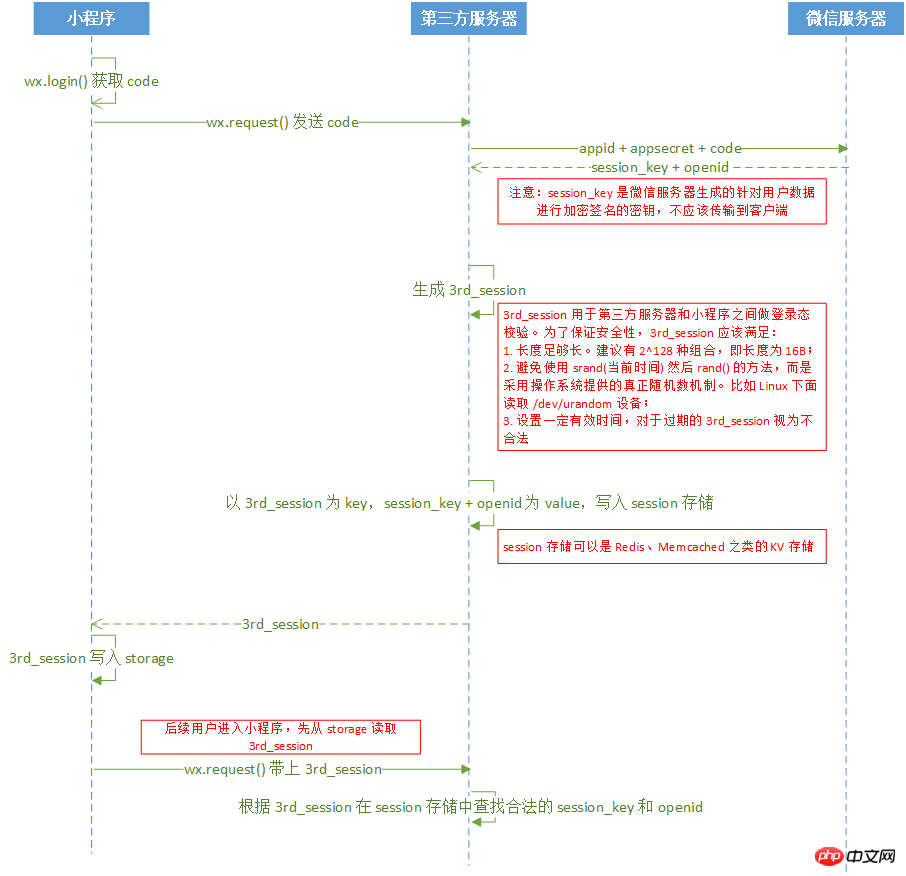
引导图一步一步操作
1、获取code
onLoad: function (options) {
  // 页面初始化 options为页面跳转所带来的参数
  let that = this
  wx.login({
   success: function (res) {
    // success
    let code = res.code
    that.setData({ code: code })
    wx.getUserInfo({
     success: function (res) {
      // success
      that.setData({ userInfo: res.userInfo })
      that.setData({ iv: res.iv })
      that.setData({ encryptedData: res.encryptedData })
      that.get3rdSession()
     }
    })
   }
 })
}
2、发送code到第三方服务器,获取3rd_session
get3rdSession:function(){
  let that = this
  wx.request({
   url: 'https://localhost:8443/get3rdSession',
   data: {
    code: this.data.code
   },
   method: 'GET', // OPTIONS, GET, HEAD, POST, PUT, DELETE, TRACE, CONNECT
   // header: {}, // 设置请求的 header
   success: function (res) {
    // success
    var sessionId = res.data.session;
    that.setData({ sessionId: sessionId })
    wx.setStorageSync('sessionId', sessionId)
    that.decodeUserInfo()
   }
  })
 }
3、在第三方服务器上发送appid、appsecret、code到微信服务器换取session_key和openid
这里使用JFinal搭建的服务器
Redis配置

简灰服装商城整站 For SHOPEX
下载
SHOPEX简灰服装商城整站源码下载。 安装方法:1.解压上传程序至网站根目录.. 访问:域名/bak.(用户名:admin 密码:123456)2.进入帝国备份王后,配置数据库数据库信息.选择-www.taomoban.net目录.还原数据库.3.修改FTP目录下的config/config.phpphp 数据库连接信息.4.登陆网站后台--清空缓存..5.删除bak文件夹 后台:shopadm
public void configPlugin(Plugins me) {
  //用于缓存userinfo模块的redis服务
  RedisPlugin userInfoRedis = new RedisPlugin("userInfo","localhost");
  me.add(userInfoRedis);
}
获取第三方session
public void get3rdSession() {
  //获取名为userInfo的Redis Cache对象
  Cache userInfoCache = Redis.use("userInfo");
  String sessionId = "";
  JSONObject json = new JSONObject();
  String code = getPara("code");
  String url = "https://api.weixin.qq.com/sns/jscode2session?appid=wx7560b8008e2c445d&secret=f1af3312b7038513fd17dd9cbc3b357c&js_code=" + code + "&grant_type=authorization_code";
  //执行命令生成3rd_session
  String session = ExecLinuxCMDUtil.instance.exec("cat /dev/urandom |od -x | tr -d ' '| head -n 1").toString();
  json.put("session", session);
  //创建默认的httpClient实例
  CloseableHttpClient httpClient = getHttpClient();
  try {
    //用get方法发送http请求
    HttpGet get = new HttpGet(url);
    System.out.println("执行get请求:...." + get.getURI());
    CloseableHttpResponse httpResponse = null;
    //发送get请求
    httpResponse = httpClient.execute(get);
    try {
      //response实体
      HttpEntity entity = httpResponse.getEntity();
      if (null != entity) {
        String result = EntityUtils.toString(entity);
        System.out.println(result);
        JSONObject resultJson = JSONObject.fromObject(result);
        String session_key = resultJson.getString("session_key");
        String openid = resultJson.getString("openid");
        //session存储
        userInfoCache.set(session,session_key+","+openid);
        }
      } finally {
        httpResponse.close();
      }
    } catch (Exception e) {
      e.printStackTrace();
    } finally {
      try {
        closeHttpClient(httpClient);
      } catch (IOException e) {
        e.printStackTrace();
      }
    }
    renderJson(json);
}
private CloseableHttpClient getHttpClient() {
  return HttpClients.createDefault();
}

private void closeHttpClient(CloseableHttpClient client) throws IOException {
  if (client != null) {
    client.close();
  }
}
ExecLinuxCMDUtil.Java
import java.io.InputStreamReader;
import java.io.LineNumberReader;

/**
 * java在linux环境下执行linux命令,然后返回命令返回值。
 * Created by LJaer on 16/12/22.
 */
public class ExecLinuxCMDUtil {
  public static final ExecLinuxCMDUtil instance = new ExecLinuxCMDUtil();

  public static Object exec(String cmd) {
    try {
      String[] cmdA = { "/bin/sh", "-c", cmd };
      Process process = Runtime.getRuntime().exec(cmdA);
      LineNumberReader br = new LineNumberReader(new InputStreamReader(
          process.getInputStream()));
      StringBuffer sb = new StringBuffer();
      String line;
      while ((line = br.readLine()) != null) {
        System.out.println(line);
        sb.append(line).append("\n");
      }
      return sb.toString();
    } catch (Exception e) {
      e.printStackTrace();
    }
    return null;
  }
}
4、解密用户数据
decodeUserInfo:function(){
  let that = this
  wx.request({
   url: 'https://localhost:8443/decodeUserInfo',
   data: {
    encryptedData: that.data.encryptedData,
    iv: that.data.iv,
    session: wx.getStorageSync('sessionId')
   },
   method: 'GET', // OPTIONS, GET, HEAD, POST, PUT, DELETE, TRACE, CONNECT
   // header: {}, // 设置请求的 header
   success: function (res) {
    // success
    console.log(res)
   }
  })
}
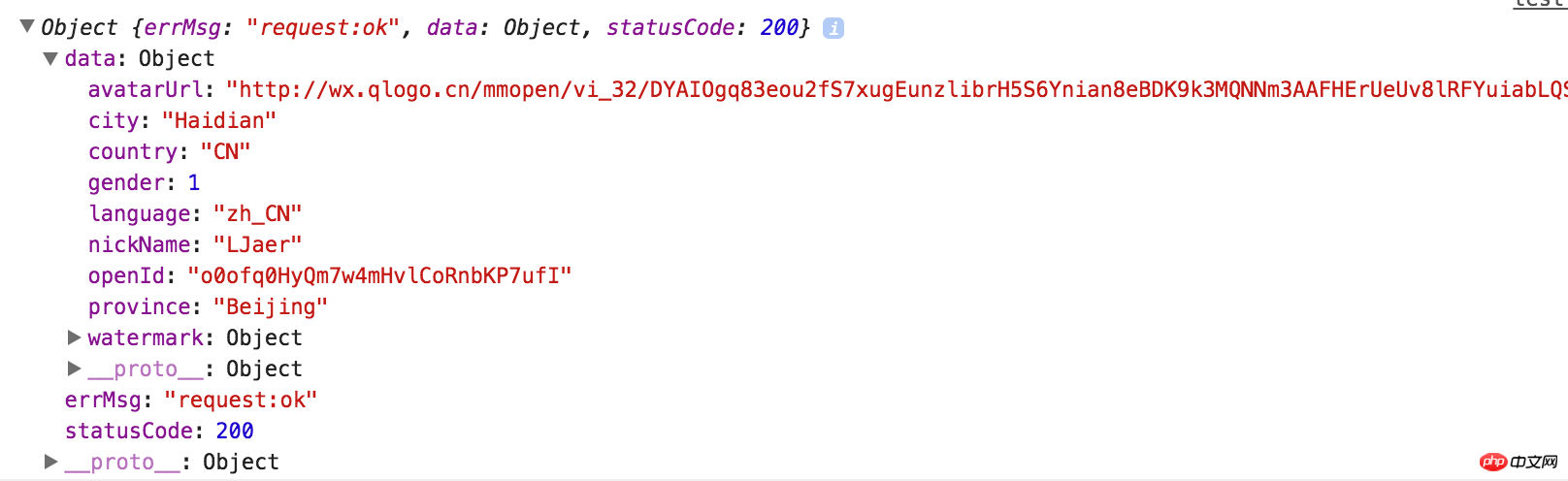
console输出结果:
后端解密代码
/**
 * 解密用户敏感数据
 */
public void decodeUserInfo(){
  String encryptedData = getPara("encryptedData");
  String iv = getPara("iv");
  String session = getPara("session");
  //从缓存中获取session_key
  //获取名称为userInfo的Redis Cache对象
  Cache userInfoRedis = Redis.use("userInfo");
  Object wxSessionObj = userInfoRedis.get(session);
  if(null==wxSessionObj){
    renderNull();
  }
  String wxSessionStr = (String)wxSessionObj;
  String session_key = wxSessionStr.split(",")[0];


  try {
    byte[] resultByte = AESUtil.instance.decrypt(Base64.decodeBase64(encryptedData), Base64.decodeBase64(session_key), Base64.decodeBase64(iv));
    if(null != resultByte && resultByte.length > 0){
      String userInfo = new String(resultByte, "UTF-8");
      System.out.println(userInfo);
      JSONObject json = JSONObject.fromObject(userInfo); //将字符串{“id”:1}
      renderJson(json);
    }
  } catch (InvalidAlgorithmParameterException e) {
    e.printStackTrace();
  } catch (UnsupportedEncodingException e) {
    e.printStackTrace();
  }
}
AESUtil.java
import org.bouncycastle.jce.provider.BouncyCastleProvider;

import javax.crypto.BadPaddingException;
import javax.crypto.Cipher;
import javax.crypto.IllegalBlockSizeException;
import javax.crypto.NoSuchPaddingException;
import javax.crypto.spec.IvParameterSpec;
import javax.crypto.spec.SecretKeySpec;
import java.security.*;

public class AESUtil {
  public static final AESUtil instance = new AESUtil();

  public static boolean initialized = false;

  /**
   * AES解密
   * @param content 密文
   * @return
   * @throws InvalidAlgorithmParameterException
   * @throws NoSuchProviderException
   */
  public byte[] decrypt(byte[] content, byte[] keyByte, byte[] ivByte) throws InvalidAlgorithmParameterException {
    initialize();
    try {
      Cipher cipher = Cipher.getInstance("AES/CBC/PKCS7Padding");
      Key sKeySpec = new SecretKeySpec(keyByte, "AES");

      cipher.init(Cipher.DECRYPT_MODE, sKeySpec, generateIV(ivByte));// 初始化
      byte[] result = cipher.doFinal(content);
      return result;
    } catch (NoSuchAlgorithmException e) {
      e.printStackTrace();
    } catch (NoSuchPaddingException e) {
      e.printStackTrace();
    } catch (InvalidKeyException e) {
      e.printStackTrace();
    } catch (IllegalBlockSizeException e) {
      e.printStackTrace();
    } catch (BadPaddingException e) {
      e.printStackTrace();
    } catch (NoSuchProviderException e) {
      // TODO Auto-generated catch block
      e.printStackTrace();
    } catch (Exception e) {
      // TODO Auto-generated catch block
      e.printStackTrace();
    }
    return null;
  }

  public static void initialize(){
    if (initialized) return;
    Security.addProvider(new BouncyCastleProvider());
    initialized = true;
  }
  //生成iv
  public static AlgorithmParameters generateIV(byte[] iv) throws Exception{
    AlgorithmParameters params = AlgorithmParameters.getInstance("AES");
    params.init(new IvParameterSpec(iv));
    return params;
  }
}
感谢阅读,希望能帮助到大家,谢谢大家对本站的支持!





