



这篇文章主要介绍了asp.net微信开发中有关已关注用户管理的相关内容,需要的朋友可以参考下
公众号可通过本接口来获取帐号的关注者列表,关注者列表由一串OpenID(加密后的微信号,每个用户对每个公众号的OpenID是唯一的)组成。一次拉取调用最多拉取10000个关注者的OpenID,可以通过多次拉取的方式来满足需求。
接口调用请求说明
http请求方式: GET(请使用https协议)

返回说明
正确时返回JSON数据包:
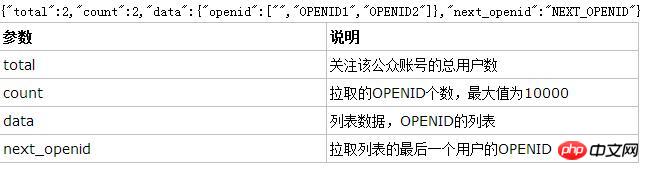
错误时返回JSON数据包(示例为无效AppID错误):
{"errcode":40013,"errmsg":"invalid appid"}
附:关注者数量超过10000时
当公众号关注者数量超过10000时,可通过填写next_openid的值,从而多次拉取列表的方式来满足需求。
具体而言,就是在调用接口时,将上一次调用得到的返回中的next_openid值,作为下一次调用中的next_openid值。
示例如下:
公众账号A拥有23000个关注的人,想通过拉取关注接口获取所有关注的人,那么分别请求url如下:
https://api.weixin.qq.com/cgi-bin/user/get?access_token=ACCESS_TOKEN
返回结果:
{
 "total":23000,
 "count":10000,
 "data":{"
 openid":[
 "OPENID1",
 "OPENID2",
 ...,
 "OPENID10000"
 ]
 },
 "next_openid":"OPENID10000"
}
https://api.weixin.qq.com/cgi-bin/user/get?access_token=ACCESS_TOKEN&next_openid=NEXT_OPENID1
返回结果:
{
 "total":23000,
 "count":10000,
 "data":{
 "openid":[
 "OPENID10001",
 "OPENID10002",
 ...,
 "OPENID20000"
 ]
 },
 "next_openid":"OPENID20000"
}
https://api.weixin.qq.com/cgi-bin/user/get?access_token=ACCESS_TOKEN&next_openid=NEXT_OPENID2
返回结果(关注者列表已返回完时,返回next_openid为空):
{
 "total":23000,
 "count":3000,
 "data":{"
 "openid":[
  "OPENID20001",
  "OPENID20002",
  ...,
  "OPENID23000"
 ]
 },
 "next_openid":"OPENID23000"
}微信官方网站后台的接口权限表里(以服务号为例)每天调用的获取用户列表能获取500次,获取用户基本信息可以获取500000次,所以说接下来,我在获取用户列表的时候,会用到缓存,别看500次不少了,
可是真正的用起来快得不得了,先上效果图如下:
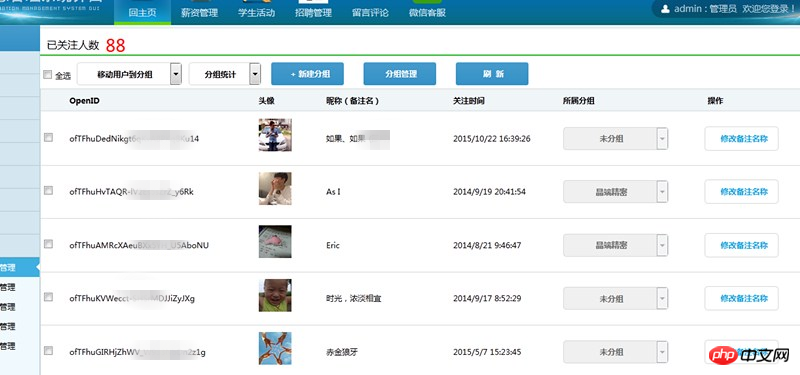
先来看看用户列表,官网说获取用户的列表返回的是一组组openID,针对这个特性,我是这么做的,
创建一个用于存储openId的类
public class WxOpenIdInfo
 {
 public string WxopenId { get; set; }//用户存放微信用户的openId
 }
然后再创建用户信息的基本类
////// 微信用户基本信息类 /// public class WxUserInfo { public int subscribe { get; set; }//关注状态 public string openid { get; set; }//OpenID public string nickname { get; set; }//昵称 public string sex { get; set; }//性别 public string city { get; set; }//城市 public string province { get; set; }//省份 public string headimgurl { get; set; }//头像图片地址 public string subscribe_time { get; set; }//关注时间 public string remark { get; set; }//备注 public string groupid { get; set; }//分组ID }
用户列表前台代码
<%@ Page Language="C#" AutoEventWireup="true" CodeBehind="WeiXinUserList.aspx.cs" Inherits="DQWebSite.Administrator.WeiXinUserList" %>
获取用户列表绑定用户信息的后台代码,已包括,修改备注名,将用户移动到分组,新建分组代码
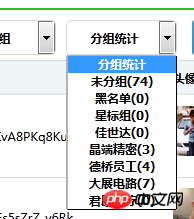
分组统计,用于显示每个分组的已存在人数,无其他作用
上代码:
PagedDataSource pds = new PagedDataSource();
protected void Page_Load(object sender, EventArgs e)
{
if(!Page.IsPostBack)
{
BindGroupList();
BindGetAllUserOpenIdList();
this.DataBind();
this.CheckAll.AutoPostBack = true;
this.DDlAddgroups.AutoPostBack = true;
}
//this.DDlAddgroups.Enabled = false;
}
///
/// 获取所有用户的openId列表
///
private void BindGetAllUserOpenIdList()
{
WeiXinServer wxs = new WeiXinServer();
///从缓存读取accesstoken
string Access_token = Cache["Access_token"] as string;
if (Access_token == null)
{
//如果为空,重新获取
Access_token = wxs.GetAccessToken();
//设置缓存的数据7000秒后过期
Cache.Insert("Access_token", Access_token, null, DateTime.Now.AddSeconds(7000), System.Web.Caching.Cache.NoSlidingExpiration);
}
string Access_tokento = Access_token.Substring(17, Access_token.Length - 37);
string jsonres = "";
string content = Cache["AllUserOpenList_content"] as string;
if (content == null)
{
jsonres = "https://api.weixin.qq.com/cgi-bin/user/get?access_token=" + Access_tokento;
HttpWebRequest myRequest = (HttpWebRequest)WebRequest.Create(jsonres);
myRequest.Method = "GET";
HttpWebResponse myResponse = (HttpWebResponse)myRequest.GetResponse();
StreamReader reader = new StreamReader(myResponse.GetResponseStream(), Encoding.UTF8);
content = reader.ReadToEnd();
reader.Close();
//设置缓存的数据7000秒后过期
Cache.Insert("AllUserOpenList_content", content, null, DateTime.Now.AddSeconds(7000), System.Web.Caching.Cache.NoSlidingExpiration);
}
//使用前需要引用Newtonsoft.json.dll文件
JObject jsonObj = JObject.Parse(content);
int totalnum = int.Parse(jsonObj["count"].ToString());
List openidlist = new List();
for (int i = 0; i < totalnum;i++ )
{
WxOpenIdInfo wxopeninfo = new WxOpenIdInfo();
wxopeninfo.WxopenId = jsonObj["data"]["openid"][i].ToString();
openidlist.Add(wxopeninfo);
}
pds.DataSource = openidlist;
pds.AllowPaging = true;
pds.PageSize = 20;//每页显示为20条
int CurrentPage;
if (!String.IsNullOrWhiteSpace(this.txtPageIndex.Text.ToString().Trim()))
{
CurrentPage = Convert.ToInt32(this.txtPageIndex.Text.ToString().Trim());
}
else if (Request.QueryString["Page"] != null)
{
CurrentPage = Convert.ToInt32(Request.QueryString["Page"]);
}
else
{
CurrentPage = 1;
}
pds.CurrentPageIndex = CurrentPage - 1;//当前页的索引就等于当前页码-1;
if (!pds.IsFirstPage)
{
//Request.CurrentExecutionFilePath 为当前请求的虚拟路径
this.lnkTop.NavigateUrl = Request.CurrentExecutionFilePath + "?Page=" + Convert.ToString(CurrentPage - 1);
this.lnkFist.Enabled = this.lnkTop.Enabled = true;
this.lnkNext.Enabled = this.lnkLast.Enabled = true;
}
else
{
this.lnkFist.Enabled = this.lnkTop.Enabled = false;
this.lnkNext.Enabled = this.lnkLast.Enabled = true;
this.lnkFist.Attributes.Add("style", "color:#ced9df;");
this.lnkTop.Attributes.Add("style", "color:#ced9df;");
this.lnkNext.Attributes.Remove("style");
this.lnkLast.Attributes.Remove("style");
}
if (!pds.IsLastPage)
{
//Request.CurrentExecutionFilePath 为当前请求的虚拟路径
this.lnkNext.NavigateUrl = Request.CurrentExecutionFilePath + "?Page=" + Convert.ToString(CurrentPage + 1);
this.lnkFist.Enabled = this.lnkTop.Enabled = true;
this.lnkNext.Enabled = this.lnkLast.Enabled = true;
}
else
{
this.lnkNext.Enabled = this.lnkLast.Enabled = false;
this.lnkFist.Enabled = this.lnkTop.Enabled = true;
this.lnkNext.Attributes.Add("style", "color:#ced9df;");
this.lnkLast.Attributes.Add("style", "color:#ced9df;");
this.lnkFist.Attributes.Remove("style");
this.lnkTop.Attributes.Remove("style");
}
this.lnkFist.NavigateUrl = Request.CurrentExecutionFilePath + "?Page=" + Convert.ToString(1);//跳转至首页
this.lnkLast.NavigateUrl = Request.CurrentExecutionFilePath + "?Page=" + Convert.ToString(pds.PageCount);//跳转至末页
this.RepeaterWxUserList.DataSource = pds;
this.RepeaterWxUserList.DataBind();
this.lbCountData.Text = openidlist.Count.ToString();
this.lbPageIndex.Text = (pds.CurrentPageIndex + 1).ToString();
this.lbPageSize.Text = "每页" + pds.PageSize.ToString() + "条记录";
this.lbCountPage.Text = pds.PageCount.ToString();
this.txtPageIndex.Text = (pds.CurrentPageIndex + 1).ToString();
if (int.Parse(openidlist.Count.ToString()) <= int.Parse(pds.PageSize.ToString()))
{
this.lnkFist.Visible = this.lnkTop.Visible = this.lnkNext.Visible = this.lnkLast.Visible = this.txtPageIndex.Visible = this.LinkBtnToPage.Visible = false;
}
else
{
this.lnkFist.Visible = this.lnkTop.Visible = this.lnkNext.Visible = this.lnkLast.Visible = this.txtPageIndex.Visible = this.LinkBtnToPage.Visible = true;
}
this.lbsubscribeCount.Text = openidlist.Count.ToString();
}
///
/// 绑定分组列表
///
private void BindGroupList()
{
WeiXinServer wxs = new WeiXinServer();
///从缓存读取accesstoken
string Access_token = Cache["Access_token"] as string;
if (Access_token == null)
{
//如果为空,重新获取
Access_token = wxs.GetAccessToken();
//设置缓存的数据7000秒后过期
Cache.Insert("Access_token", Access_token, null, DateTime.Now.AddSeconds(7000), System.Web.Caching.Cache.NoSlidingExpiration);
}
string Access_tokento = Access_token.Substring(17, Access_token.Length - 37);
string jsonres = "";
string content = Cache["AllGroups_content"] as string;
if (content == null)
{
jsonres = "https://api.weixin.qq.com/cgi-bin/groups/get?access_token=" + Access_tokento;
HttpWebRequest myRequest = (HttpWebRequest)WebRequest.Create(jsonres);
myRequest.Method = "GET";
HttpWebResponse myResponse = (HttpWebResponse)myRequest.GetResponse();
StreamReader reader = new StreamReader(myResponse.GetResponseStream(), Encoding.UTF8);
content = reader.ReadToEnd();
reader.Close();
//设置缓存的数据7000秒后过期
Cache.Insert("AllGroups_content", content, null, DateTime.Now.AddSeconds(7000), System.Web.Caching.Cache.NoSlidingExpiration);
}
//使用前需要引用Newtonsoft.json.dll文件
JObject jsonObj = JObject.Parse(content);
int groupsnum = jsonObj["groups"].Count();
this.DDLgroups.Items.Clear();//清除
this.DDlAddgroups.Items.Clear();
this.DDLgroups.Items.Insert(0, new ListItem("分组统计", "0"));//添加默认第一个提示
this.DDlAddgroups.Items.Insert(0, new ListItem("移动用户到分组", "0"));
for (int i = 0; i < groupsnum; i++)
{
this.DDLgroups.Items.Add(new ListItem(jsonObj["groups"][i]["name"].ToString() + "(" + jsonObj["groups"][i]["count"].ToString() + ")", jsonObj["groups"][i]["id"].ToString()));
this.DDlAddgroups.Items.Add(new ListItem(jsonObj["groups"][i]["name"].ToString(), jsonObj["groups"][i]["id"].ToString()));
}
}
///
/// 输入页码提交跳转
///
///
///
protected void LinkBtnToPage_Click(object sender, EventArgs e)
{
if (String.IsNullOrWhiteSpace(this.txtPageIndex.Text.ToString().Trim()))
{
ScriptManager.RegisterClientScriptBlock(this.Page, this.GetType(), "", "alert('页码不能为空!')", true);
this.txtPageIndex.Focus();
return;
}
if (IsNum(this.txtPageIndex.Text.ToString().Trim()))
{
ScriptManager.RegisterClientScriptBlock(this.Page, this.GetType(), "", "alert('页码数只能输入数字!')", true);
this.txtPageIndex.Focus();
this.txtPageIndex.Text = this.lbPageIndex.Text.ToString();
return;
}
if (int.Parse(this.txtPageIndex.Text.ToString().Trim()) > int.Parse(this.lbCountPage.Text.ToString().Trim()))
{
ScriptManager.RegisterClientScriptBlock(this.Page, this.GetType(), "", "alert('所输页数不能大于总页数!')", true);
this.txtPageIndex.Focus();
this.txtPageIndex.Text = this.lbPageIndex.Text.ToString();
return;
}
BindGetAllUserOpenIdList();
}
///
/// 判断是否是数字
///
///
///
/// 绑定用户基本信息事件
///
///
///
protected void RepeaterWxUserList_ItemDataBound(object sender, RepeaterItemEventArgs e)
{
//CheckBox checkIn = e.Item.FindControl("CheckIn") as CheckBox;
//checkIn.AutoPostBack = true;
if(e.Item.ItemType==ListItemType.Item||e.Item.ItemType==ListItemType.AlternatingItem)
{
WxOpenIdInfo wxopen = e.Item.DataItem as WxOpenIdInfo;
Label lbwxopenID = e.Item.FindControl("lbwxopenID") as Label;
lbwxopenID.Text = wxopen.WxopenId.ToString();
//根据OpenID获取用户基本信息。缓存处理
WeiXinServer wxs = new WeiXinServer();
///从缓存读取accesstoken
string Access_token = Cache["Access_token"] as string;
if (Access_token == null)
{
//如果为空,重新获取
Access_token = wxs.GetAccessToken();
//设置缓存的数据7000秒后过期
Cache.Insert("Access_token", Access_token, null, DateTime.Now.AddSeconds(7000), System.Web.Caching.Cache.NoSlidingExpiration);
}
string Access_tokento = Access_token.Substring(17, Access_token.Length - 37);
string jsonres ="https://api.weixin.qq.com/cgi-bin/user/info?access_token=" + Access_tokento + "&openid=" + lbwxopenID.Text.ToString();
HttpWebRequest myRequest = (HttpWebRequest)WebRequest.Create(jsonres);
myRequest.Method = "GET";
HttpWebResponse myResponse = (HttpWebResponse)myRequest.GetResponse();
StreamReader reader = new StreamReader(myResponse.GetResponseStream(), Encoding.UTF8);
string content = reader.ReadToEnd();
reader.Close();
//使用前需要引用Newtonsoft.json.dll文件
JObject jsonObj = JObject.Parse(content);
Image ImgHeadUrl = e.Item.FindControl("ImgHeadUrl") as Image;
Label lbNickName = e.Item.FindControl("lbNickName") as Label;
Label lbRemark = e.Item.FindControl("lbRemark") as Label;
Label lbSubscrine_time = e.Item.FindControl("lbSubscrine_time") as Label;
Label lbgroupId = e.Item.FindControl("lbgroupId") as Label;
DropDownList DDlAddgroupss = e.Item.FindControl("DDlAddgroupss") as DropDownList;
lbNickName.Text = jsonObj["nickname"].ToString();
if (!String.IsNullOrWhiteSpace(jsonObj["remark"].ToString()))
{
lbRemark.Text = "(" + jsonObj["remark"].ToString() + ")";
}
ImgHeadUrl.ImageUrl = jsonObj["headimgurl"].ToString();
lbgroupId.Text = jsonObj["groupid"].ToString();
//获取关注时间
int totaltiem = int.Parse(jsonObj["subscribe_time"].ToString());
//将整型格式时间转换为时间格式
DateTime t = new DateTime(1970, 1, 1).AddSeconds(totaltiem);
//转换后的时间会比原有时间小8个小时,因此需要加上8个小时
lbSubscrine_time.Text = t.AddHours(8).ToString();
string jjjjjjjjjddd = Cache["AllGroups_content"] as string;
if (jjjjjjjjjddd == null)
{
jsonres = "https://api.weixin.qq.com/cgi-bin/groups/get?access_token=" + Access_tokento;
HttpWebRequest myRequestss = (HttpWebRequest)WebRequest.Create(jsonres);
myRequest.Method = "GET";
HttpWebResponse myResponsess = (HttpWebResponse)myRequest.GetResponse();
StreamReader readerss = new StreamReader(myResponse.GetResponseStream(), Encoding.UTF8);
jjjjjjjjjddd = reader.ReadToEnd();
reader.Close();
//设置缓存的数据7000秒后过期
Cache.Insert("AllGroups_content", jjjjjjjjjddd, null, DateTime.Now.AddSeconds(7000), System.Web.Caching.Cache.NoSlidingExpiration);
}
//使用前需要引用Newtonsoft.json.dll文件
JObject jsonObjss = JObject.Parse(jjjjjjjjjddd);
int groupsnumss = jsonObjss["groups"].Count();
for (int i = 0; i < groupsnumss;i++ )
{
if (jsonObjss["groups"][i]["id"].ToString().Equals(lbgroupId.Text.ToString()))
{
DDlAddgroupss.SelectedItem.Text = jsonObjss["groups"][i]["name"].ToString();
}
}
}
}
///
/// 创建分组
///
///
///
protected void LinkBtnCreateGroup_Click(object sender, EventArgs e)
{
if (this.txtgroupsName.Value.ToString().Equals("分组名称"))
{
////
ScriptManager.RegisterClientScriptBlock(this.Page,this.GetType(),"","alert('不能为空!')",true);
this.txtgroupsName.Focus();
return;
}
WeiXinServer wxs = new WeiXinServer();
string res = "";
///从缓存读取accesstoken
string Access_token = Cache["Access_token"] as string;
if (Access_token == null)
{
//如果为空,重新获取
Access_token = wxs.GetAccessToken();
//设置缓存的数据7000秒后过期
Cache.Insert("Access_token", Access_token, null, DateTime.Now.AddSeconds(7000), System.Web.Caching.Cache.NoSlidingExpiration);
}
string Access_tokento = Access_token.Substring(17, Access_token.Length - 37);
string posturl = "https://api.weixin.qq.com/cgi-bin/groups/create?access_token=" + Access_tokento;
//string postData = "{\"group\":{\"name\":\""+this.txtgroupsName.Value.ToString().Trim()+"\"}}";
string postData = "{\"group\":{\"name\":\""+this.txtgroupsName.Value.ToString().Trim()+"\"}}";
res = wxs.GetPage(posturl, postData);
ScriptManager.RegisterClientScriptBlock(this.Page, this.GetType(), "", "alert('创建成功!如未显示,请退出重新登录即可!');location='WeiXinUserList.aspx';", true);
}
///
/// 全选、全不选
///
///
///
protected void CheckAll_CheckedChanged(object sender, EventArgs e)
{
CheckBox checkAll = (CheckBox)sender;
foreach (RepeaterItem item in this.RepeaterWxUserList.Items)
{
CheckBox checkIn = (CheckBox)item.FindControl("CheckIn");
checkIn.Checked = checkAll.Checked;
}
}
///
/// 移动用户到分组
///
///
///
protected void DDlAddgroups_SelectedIndexChanged(object sender, EventArgs e)
{
///取得分组ID
string groupId = this.DDlAddgroups.SelectedValue.ToString();
//this.Label1.Text = groupId.ToString();
Boolean bools = false;
foreach (RepeaterItem item in this.RepeaterWxUserList.Items)
{
CheckBox checkIn = (CheckBox)item.FindControl("CheckIn");
if (checkIn.Checked)
{
bools = true;
Label lbwxopenID = item.FindControl("lbwxopenID") as Label;
WeiXinServer wxs = new WeiXinServer();
string res = "";
///从缓存读取accesstoken
string Access_token = Cache["Access_token"] as string;
if (Access_token == null)
{
//如果为空,重新获取
Access_token = wxs.GetAccessToken();
//设置缓存的数据7000秒后过期
Cache.Insert("Access_token", Access_token, null, DateTime.Now.AddSeconds(7000), System.Web.Caching.Cache.NoSlidingExpiration);
}
string Access_tokento = Access_token.Substring(17, Access_token.Length - 37);
string posturl = "https://api.weixin.qq.com/cgi-bin/groups/members/update?access_token=" + Access_tokento;
//POST数据例子:{"openid":"oDF3iYx0ro3_7jD4HFRDfrjdCM58","to_groupid":108}
//string postData = "{\"openid\":\"" + openid.ToString().Trim() + "\",\"remark\":\"" + this.txtRemarkName.Value.ToString() + "\"}";
string postData = "{\"openid\":\"" + lbwxopenID.Text.ToString() + "\",\"to_groupid\":\"" + groupId.ToString() + "\"}";
res = wxs.GetPage(posturl, postData);
//使用前需要引用Newtonsoft.json.dll文件
JObject jsonObj = JObject.Parse(res);
///获取返回结果的正确|true|false,
string isright = jsonObj["errcode"].ToString();//0
string istrueorfalse = jsonObj["errmsg"].ToString();//ok
if (isright.Equals("0") && istrueorfalse.Equals("ok"))
{
ScriptManager.RegisterClientScriptBlock(this.Page, this.GetType(), "", "alert('移动用户成功!');location='WeiXinUserList.aspx';", true);
}
else
{
ScriptManager.RegisterClientScriptBlock(this.Page, this.GetType(), "", "alert('移动用户失败!');", true);
return;
}
}
}
if (!bools)
{
ScriptManager.RegisterClientScriptBlock(this.Page, this.GetType(), "", "alert('未选中项!');location='WeiXinUserList.aspx';", true);
return;
}
} WeiXinServer wxs = new WeiXinServer();是单独创建的一个类,主要用来获取通行证和加载流的方法,代码如下:
////// 微信服务类 /// public class WeiXinServer { ////// 获取通行证 /// ///public string GetAccessToken() { string url_token = "https://api.weixin.qq.com/cgi-bin/token?grant_type=client_credential&appid=此处应该填写公众的appid&secret=此处应该填写公众号的secret"; HttpWebRequest myRequest = (HttpWebRequest)WebRequest.Create(url_token); myRequest.Method = "GET"; HttpWebResponse myResponse = (HttpWebResponse)myRequest.GetResponse(); StreamReader reader = new StreamReader(myResponse.GetResponseStream(), Encoding.UTF8); string content = reader.ReadToEnd(); reader.Close(); return content; } public string GetPage(string p, string postData) { Stream outstream = null; Stream instream = null; StreamReader sr = null; HttpWebResponse response = null; HttpWebRequest request = null; Encoding encoding = Encoding.UTF8; byte[] data = encoding.GetBytes(postData); // 准备请求... try { // 设置参数 request = WebRequest.Create(p) as HttpWebRequest; CookieContainer cookieContainer = new CookieContainer(); request.CookieContainer = cookieContainer; request.AllowAutoRedirect = true; request.Method = "POST"; request.ContentType = "application/x-www-form-urlencoded"; request.ContentLength = data.Length; outstream = request.GetRequestStream(); outstream.Write(data, 0, data.Length); outstream.Close(); //发送请求并获取相应回应数据 response = request.GetResponse() as HttpWebResponse; //直到request.GetResponse()程序才开始向目标网页发送Post请求 instream = response.GetResponseStream(); sr = new StreamReader(instream, encoding); //返回结果网页(html)代码 string content = sr.ReadToEnd(); string err = string.Empty; return content; } catch (Exception ex) { string err = ex.Message; return string.Empty; } } }
修改备注页面的代码:
 protected void Page_Load(object sender, EventArgs e)
 {
  if(Request.QueryString["id"]!=null)
  {
  String openid = Request.QueryString["id"].ToString();
  this.txtOpenId.Value = openid.ToString();

  //根据OpenID获取用户基本信息。缓存处理
  WeiXinServer wxs = new WeiXinServer();

  ///从缓存读取accesstoken
  string Access_token = Cache["Access_token"] as string;

  if (Access_token == null)
  {
   //如果为空,重新获取
   Access_token = wxs.GetAccessToken();

   //设置缓存的数据7000秒后过期
   Cache.Insert("Access_token", Access_token, null, DateTime.Now.AddSeconds(7000), System.Web.Caching.Cache.NoSlidingExpiration);
  }

  string Access_tokento = Access_token.Substring(17, Access_token.Length - 37);

  string jsonres = "https://api.weixin.qq.com/cgi-bin/user/info?access_token=" + Access_tokento + "&openid=" + openid;

  HttpWebRequest myRequest = (HttpWebRequest)WebRequest.Create(jsonres);
  myRequest.Method = "GET";
  HttpWebResponse myResponse = (HttpWebResponse)myRequest.GetResponse();
  StreamReader reader = new StreamReader(myResponse.GetResponseStream(), Encoding.UTF8);
  string content = reader.ReadToEnd();
  reader.Close();

  //使用前需要引用Newtonsoft.json.dll文件
  JObject jsonObj = JObject.Parse(content);

        //假如备注名不为空,给备注名文本框赋值,显示原有的备注名
  if (!String.IsNullOrWhiteSpace(jsonObj["remark"].ToString()))
  {
   this.txtRemarkName.Value = jsonObj["remark"].ToString();
  }

  }
 }
 ///
 /// 设置备注名
 ///
 ///
 ///
 protected void LinkBtnSet_Click(object sender, EventArgs e)
 {


  String openid = Request.QueryString["id"].ToString();

  WeiXinServer wxs = new WeiXinServer();
  string res = "";

  ///从缓存读取accesstoken
  string Access_token = Cache["Access_token"] as string;

  if (Access_token == null)
  {
  //如果为空,重新获取
  Access_token = wxs.GetAccessToken();

  //设置缓存的数据7000秒后过期
  Cache.Insert("Access_token", Access_token, null, DateTime.Now.AddSeconds(7000), System.Web.Caching.Cache.NoSlidingExpiration);
  }

  string Access_tokento = Access_token.Substring(17, Access_token.Length - 37);


  string posturl = "https://api.weixin.qq.com/cgi-bin/user/info/updateremark?access_token=" + Access_tokento;

  string postData = "{\"openid\":\"" + openid.ToString().Trim() + "\",\"remark\":\"" + this.txtRemarkName.Value.ToString() + "\"}";


  res = wxs.GetPage(posturl, postData);


  //使用前需药引用Newtonsoft.json.dll文件
  JObject jsonObj = JObject.Parse(res);

  ///获取返回结果的正确|true|false,
  string isright = jsonObj["errcode"].ToString();//0
  string istrueorfalse = jsonObj["errmsg"].ToString();//ok
  if (isright.Equals("0") && istrueorfalse.Equals("ok"))
  {
  ScriptManager.RegisterClientScriptBlock(this.Page, this.GetType(), "", "alert('修改备注成功!');location='WeiXinUserList.aspx';", true);
  }
  else
  {
  ScriptManager.RegisterClientScriptBlock(this.Page, this.GetType(), "", "alert('修改备注失败!');", true);
  }

} 




