



手势解锁是app上常见的解锁方式,相比输入密码方式操作起来要方便许多。下面展示如何基于微信小程序实现手机解锁。最终实现效果如下图:
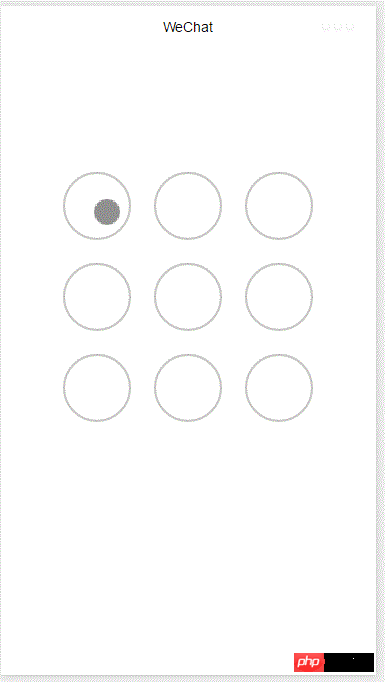
整个功能基于canvas实现,首先添加画布组件,并设定样式
.gesture-lock {
  margin: 100rpx auto;
  width: 300px;
  height: 300px;
  background-color: #ffffff;
}
手势解锁实现代码在gesture_lock.js中(完整源码地址见末尾)。
初始化
  constructor(canvasid, context, cb, opt){
    this.touchPoints = [];
    this.checkPoints = [];
    this.canvasid = canvasid;
    this.ctx = context;
    this.width = opt && opt.width || 300; //画布长度
    this.height = opt && opt.height || 300; //画布宽度
    this.cycleNum = opt && opt.cycleNum || 3;
    this.radius = 0; //触摸点半径
    this.isParamOk = false;
    this.marge = this.margeCircle = 25; //触摸点及触摸点和画布边界间隔
    this.initColor = opt && opt.initColor || '#C5C5C3';
    this.checkColor = opt && opt.checkColor || '#5AA9EC';
    this.errorColor = opt && opt.errorColor || '#e19984';
    this.touchState = "unTouch";
    this.checkParam();
    this.lastCheckPoint = null;
    if (this.isParamOk) {
      // 计算触摸点的半径长度
      this.radius = (this.width - this.marge * 2 - (this.margeCircle * (this.cycleNum - 1))) / (this.cycleNum * 2)
      this.radius = Math.floor(this.radius);
      // 计算每个触摸点的圆心位置
      this.calCircleParams();
    }
    this.onEnd = cb; //滑动手势结束时的回调函数
  }
主要设置一些参数,如canvas的长宽,canvas的context,手势锁的个数(3乘3, 4乘4),手势锁的颜色,手势滑动结束时的回调函数等。并计算出手势锁的半径。
计算每个手势锁的圆心位置
  calCircleParams() {
    let n = this.cycleNum;
    let count = 0;
    for (let i = 0; i < n; i++) {
      for (let j = 0; j < n; j++){
        count++;
        let touchPoint = {
          x: this.marge + i * (this.radius * 2 + this.margeCircle) + this.radius,
          y: this.marge + j * (this.radius * 2 + this.margeCircle) + this.radius,
          index: count,
          check: "uncheck",
        }
        this.touchPoints.push(touchPoint)
      }
    }
  }
绘制手势锁
   for (let i = 0; i < this.touchPoints.length; i++){
      this.drawCircle(this.touchPoints[i].x, this.touchPoints[i].y, this.radius, this.initColor)
   }
   this.ctx.draw(true);
接下来就是识别用户的滑动行为,判断用户划过了哪些圆圈,进而识别出用户的手势。
在touchstart和touchmove事件中检测触发并更新画布
微信小程序公众号SaaS管理系统
下载
微信小程序公众号SaaS管理系统是一款完全开源的微信第三方管理系统,为中小企业提供最佳的小程序集中管理解决方案。可实现小程序的快速免审核注册(免300元审核费),可批量发布小程序模板,同步升级版本等功能。基础版本提供商城和扫码点餐两种小程序模板。商户端可以实现小程序页面模块化设计和自动生成小程序源代码并直接发布。
  onTouchStart(e) {
    // 不识别多点触控
    if (e.touches.length > 1){
      this.touchState = "unTouch";
      return;
    }
    this.touchState = "startTouch";
    this.checkTouch(e);
    let point = {x:e.touches[0].x, y:e.touches[0].y};
    this.drawCanvas(this.checkColor, point);
  }

  onTouchMove(e) {
    if (e.touchState === "unTouch") {
      return;
    }
    if (e.touches.length > 1){
      this.touchState = "unTouch";
      return;
    }
    this.checkTouch(e);
    let point = {x:e.touches[0].x, y:e.touches[0].y};
    this.drawCanvas(this.checkColor, point);
  }
检测用户是否划过某个圆圈
  checkTouch(e) {
    for (let i = 0; i < this.touchPoints.length; i++){
      let point = this.touchPoints[i];
      if (isPointInCycle(e.touches[0].x, e.touches[0].y, point.x, point.y, this.radius)) {
        if (point.check === 'uncheck') {
          this.checkPoints.push(point);
          this.lastCheckPoint = point;
        }
        point.check = "check"
        return;
      }
    }
  }
更新画布
   drawCanvas(color, point) {
    //每次更新之前先清空画布
    this.ctx.clearRect(0, 0, this.width, this.height);
    //使用不同颜色和形式绘制已触发和未触发的锁
    for (let i = 0; i < this.touchPoints.length; i++){
      let point = this.touchPoints[i];
      if (point.check === "check") {
        this.drawCircle(point.x, point.y, this.radius, color);
        this.drawCircleCentre(point.x, point.y, color);
      }
      else {
        this.drawCircle(this.touchPoints[i].x, this.touchPoints[i].y, this.radius, this.initColor)
      }
    }
    //绘制已识别锁之间的线段
    if (this.checkPoints.length > 1) {
       let lastPoint = this.checkPoints[0];
       for (let i = 1; i < this.checkPoints.length; i++) {
         this.drawLine(lastPoint, this.checkPoints[i], color);
         lastPoint = this.checkPoints[i];
       }
    }
    //绘制最后一个识别锁和当前触摸点之间的线段
    if (this.lastCheckPoint && point) {
      this.drawLine(this.lastCheckPoint, point, color);
    }
    this.ctx.draw(true);
  }
当用户滑动结束时调用回调函数并传递识别出的手势
  onTouchEnd(e) {
    typeof this.onEnd === 'function' && this.onEnd(this.checkPoints, false);
  }

  onTouchCancel(e) {
    typeof this.onEnd === 'function' && this.onEnd(this.checkPoints, true);
  }
重置和显示手势错误
  gestureError() {
    this.drawCanvas(this.errorColor)
  }

  reset() {
    for (let i = 0; i < this.touchPoints.length; i++) {
      this.touchPoints[i].check = 'uncheck';
    }
    this.checkPoints = [];
    this.lastCheckPoint = null;
    this.drawCanvas(this.initColor);
  }
如何调用
在onload方法中创建lock对象并在用户触摸事件中调用相应方法
 onLoad: function () {
  var s = this;
  this.lock = new Lock("id-gesture-lock", wx.createCanvasContext("id-gesture-lock"), function(checkPoints, isCancel) {
   console.log('over');
   s.lock.gestureError();
   setTimeout(function() {
    s.lock.reset();
   }, 1000);
  }, {width:300, height:300})
  this.lock.drawGestureLock();
  console.log('onLoad')
  var that = this
  //调用应用实例的方法获取全局数据
  app.getUserInfo(function(userInfo){
   //更新数据
   that.setData({
    userInfo:userInfo
   })
   that.update()
  })
 },
 onTouchStart: function (e) {
  this.lock.onTouchStart(e);
 },
 onTouchMove: function (e) {
  this.lock.onTouchMove(e);
 },
 onTouchEnd: function (e) {
  this.lock.onTouchEnd(e);
} 




