0

0

html5 canvas+js实现ps钢笔抠图

高洛峰

高洛峰

发布时间:2017-02-14 10:08:05

|

2854人浏览过

|

来源于php中文网

原创

html5 canvas+js实现ps钢笔抠图

1. 项目要求需要用js实现photoshop中钢笔抠图功能,就用了近三四天的时间去解决它,最终还是基本上把他实现了。

    做的过程中走了不少弯路,最终一同事找到了canvans以比较核心的属性globalCompositeOperation = "destination-out",

    属性可以实现通过由多个点构成的闭合区间设置成透明色穿透画布背景色或是背景图片,这样省了许多事。

2.实现效果:

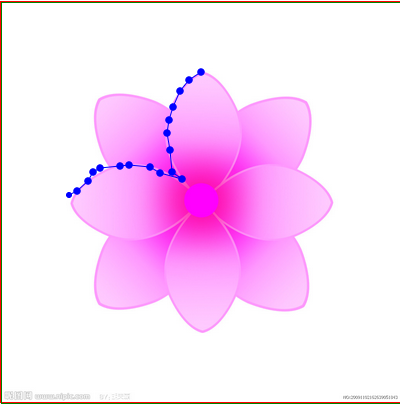
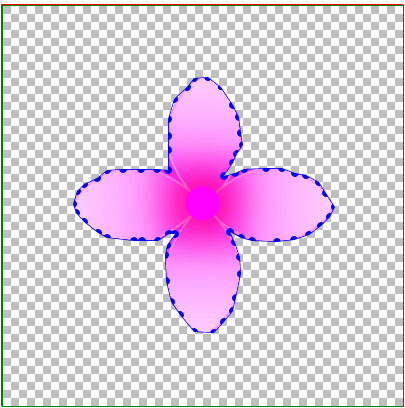
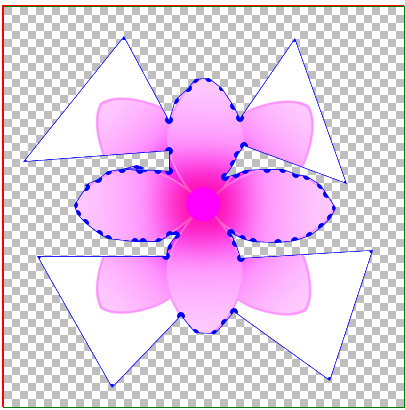
   鼠标点完之后会将所有的点连成闭合区间,并可自由拖拉任一点,当形成闭合区间后,可在任意两点之间添加新点进行拖拉。

立即学习前端免费学习笔记(深入)”;

html5 canvas+js实现ps钢笔抠图html5 canvas+js实现ps钢笔抠图html5 canvas+js实现ps钢笔抠图html5 canvas+js实现ps钢笔抠图

3.实现思路:

  设置两层p,底层设置图片,顶层设置canvas画布(如果将图片渲染到画布上,抠图时会闪烁,所以至于底层),在画布上监视

  鼠标事件反复渲染点及之间连线,形成闭合区间后将整体画布渲染小块背景图片,并将闭合区间渲染透明色。并把点的相对画布

  坐标记录或更新到数组中去。截完图后,将点的坐标集合传回后台,由后台代码实现根据坐标点及图片宽度高度实现截图,并设

影谱
影谱

汉语电影AI辅助创作平台

下载

  至背景色为透明色(canvas也可以实现截图,但需要处理像素点实现背景透明,暂时还没实现,计划用C#后台代码实现)。

4.js(写的不规范比较乱,大家就当参考吧)

<script type="text/javascript">
        $(function () {
            var a = new tailorImg();
            a.iniData();
        });
        //
        var tailorImg=function()
        {
            this.iniData = function () {
                //画布
                this.can.id = "canvas";
                this.can.w = 400;
                this.can.h = 400;
                this.can.roundr = 7;
                this.can.roundrr = 3;
                this.can.curPointIndex = 0;
                this.can.imgBack.src = "gzf.png";
                this.can.canvas = document.getElementById(this.can.id).getContext("2d");
                //图片
                this.img.w = 400;
                this.img.h = 400;
                this.img.image.src = "flower.jpg";
                //加载事件:
                //初始化事件:
                var a = this;
                var p = a.can.pointList;
                $("#" + a.can.id).mousemove(function (e) {
                    if (a.can.paint) {//是不是按下了鼠标  
                        if (p.length > 0) {
                            a.equalStartPoint(p[p.length - 1].pointx, p[p.length - 1].pointy);
                        }
                        a.roundIn(e.offsetX, e.offsetY);
                    }
                    //判断是否在直线上
                    //光标移动到线的附近如果是闭合的需要重新划线,并画上新添加的点
                    a.AddNewNode(e.offsetX, e.offsetY);
                });
                $("#" + a.can.id).mousedown(function (e) {
                    a.can.paint = true;
                    //点击判断是否需要在线上插入新的节点:
                    if (a.can.tempPointList.length > 0) {
                        a.can.pointList.splice(a.can.tempPointList[1].pointx, 0, new a.point(a.can.tempPointList[0].pointx, a.can.tempPointList[0].pointy));
                        //清空临时数组
                        a.can.tempPointList.length = 0;
                    }
                });
                $("#" + a.can.id).mouseup(function (e) {
                    //拖动结束
                    a.can.paint = false;
                    //拖动结束;
                    if (a.can.juPull) {
                        a.can.juPull = false;
                        a.can.curPointIndex = 0;
                        //验证抠图是否闭合:闭合,让结束点=开始点;添加标记
                        a.equalStartPoint(p[p.length - 1].pointx, p[p.length - 1].pointy);
                        //判断是否闭合:
                        if (a.can.IsClose) {

                        }
                    }
                    else {
                        //如果闭合:禁止添加新的点;
                        if (!a.can.IsClose) {//没有闭合
                            p.push(new a.point(e.offsetX, e.offsetY));
                            //验证抠图是否闭合:闭合,让结束点=开始点;添加标记
                            a.equalStartPoint(p[p.length - 1].pointx, p[p.length - 1].pointy);
                            //判断是否闭合:
                            //重新画;
                            if (p.length > 1) {
                                a.drawLine(p[p.length - 2].pointx, p[p.length - 2].pointy, p[p.length - 1].pointx, p[p.length - 1].pointy);
                                a.drawArc(p[p.length - 1].pointx, p[p.length - 1].pointy);
                            } else {
                                a.drawArc(p[p.length - 1].pointx, p[p.length - 1].pointy);
                            }
                        }
                        else {
                            //闭合
                        }
                    }
                    //验证是否填充背景:
                    if (a.can.IsClose) {
                        a.fillBackColor();
                        a.drawAllLine();
                    }
                });
                $("#" + a.can.id).mouseleave(function (e) {
                    a.can.paint = false;
                });
                //鼠标点击事件:
                $("#" + a.can.id).click(function (e) {
                    //空
                });
            }
            this.point = function (x, y) {
                this.pointx = x;
                this.pointy = y;
            };
            //图片
            this.img = {
                image:new Image(),
                id: "",
                w:0,
                h:0
            };
            //画布;
            this.can = {
                canvas:new Object(),
                id: "",
                w: 0,
                h: 0,
                //坐标点集合
                pointList: new Array(),
                //临时存储坐标点
                tempPointList: new Array(),
                //圆点的触发半径:
                roundr: 7,
                //圆点的显示半径:
                roundrr: 7,
                //当前拖动点的索引值;
                curPointIndex : 0,
                //判断是否点击拖动
                paint : false,
                //判断是否点圆点拖动,并瞬间离开,是否拖动点;
                juPull : false,
                //判断是否闭合
                IsClose: false,
                imgBack: new Image()
                
            };
            //函数:
            //更新画线
            this.drawAllLine=function () {
                for (var i = 0; i < this.can.pointList.length - 1; i++) {
                    //画线
                    var p = this.can.pointList;
                    this.drawLine(p[i].pointx, p[i].pointy, p[i + 1].pointx, p[i + 1].pointy);
                    //画圈
                    this.drawArc(p[i].pointx, p[i].pointy);
                    if (i == this.can.pointList.length - 2) {
                        this.drawArc(p[i+1].pointx, p[i+1].pointy);
                    }
                }
            }
            //画线
            this.drawLine = function (startX, startY, endX, endY) {
                //var grd = this.can.canvas.createLinearGradient(0, 0,2,0); //坐标,长宽
                //grd.addColorStop(0, "black"); //起点颜色
                //grd.addColorStop(1, "white");
                //this.can.canvas.strokeStyle = grd;
                this.can.canvas.strokeStyle = "blue"
                this.can.canvas.lineWidth =1;
                this.can.canvas.moveTo(startX, startY);
                this.can.canvas.lineTo(endX, endY);
                this.can.canvas.stroke();
            }
            //画圈:
            this.drawArc=function(x, y) {
               this.can.canvas.fillStyle = "blue";
                this.can.canvas.beginPath();
                this.can.canvas.arc(x, y,this.can.roundrr, 360, Math.PI * 2, true);
                this.can.canvas.closePath();
                this.can.canvas.fill();
            }
            //光标移到线上画大圈:
            this.drawArcBig = function (x, y) {
                this.can.canvas.fillStyle = "blue";
                this.can.canvas.beginPath();
                this.can.canvas.arc(x, y, this.can.roundr+2, 360, Math.PI * 2, true);
                this.can.canvas.closePath();
                this.can.canvas.fill();
            }
            //渲染图片往画布上
            this.showImg=function() {
                this.img.image.onload = function () {
                    this.can.canvas.drawImage(this.img.image, 0, 0, this.img.w,this.img.h);
                };
            }
            //填充背景色
            this.fillBackColor = function () {
                for (var i = 0; i <this.img.w; i += 96) {
                    for (var j = 0; j <= this.img.h; j += 96) {
                        this.can.canvas.drawImage(this.can.imgBack, i, j, 96, 96);
                    }
                }
                this.can.canvas.globalCompositeOperation = "destination-out";
                this.can.canvas.beginPath();
                for (var i = 0; i <this.can.pointList.length; i++) {
                    this.can.canvas.lineTo(this.can.pointList[i].pointx,this.can.pointList[i].pointy);
                }
                this.can.canvas.closePath();
                this.can.canvas.fill();
                this.can.canvas.globalCompositeOperation = "destination-over";
                this.drawAllLine();
            }
            //去掉pointlist最后一个坐标点:
            this.clearLastPoint=function () {
                this.can.pointList.pop();
                //重画:
                this.clearCan();
                this.drawAllLine();
            }
            //判断结束点是否与起始点重合;
            this.equalStartPoint = function (x,y) {
                var p = this.can.pointList;
                if (p.length > 1 && Math.abs((x - p[0].pointx) * (x - p[0].pointx)) + Math.abs((y - p[0].pointy) * (y - p[0].pointy)) <= this.can.roundr * this.can.roundr) {
                    //如果闭合
                    this.can.IsClose = true;
                    p[p.length - 1].pointx = p[0].pointx;
                    p[p.length - 1].pointy = p[0].pointy;
                }
                else {
                    this.can.IsClose = false;
                }
            }
            //清空画布
            this.clearCan=function (){
                this.can.canvas.clearRect(0, 0, this.can.w, this.can.h);
            }
            //剪切区域
            this.CreateClipArea=function () {
                this.showImg();
                this.can.canvas.beginPath();
                for (var i = 0; i <this.can.pointList.length; i++) {
                    this.can.canvas.lineTo(this.can.pointList[i].pointx,this.can.pointList[i].pointy);
                }
                this.can.canvas.closePath();
                this.can.canvas.clip();
            }
            //
            this.CreateClipImg=function()
            {

            }
            //判断鼠标点是不是在圆的内部:
            this.roundIn = function (x, y) {
                //刚开始拖动
                var p = this.can.pointList;
                if (!this.can.juPull) {
                    for (var i = 0; i < p.length; i++) {

                        if (Math.abs((x - p[i].pointx) * (x - p[i].pointx)) + Math.abs((y - p[i].pointy) * (y - p[i].pointy)) <= this.can.roundr * this.can.roundr) {
                            //说明点击圆点拖动了;
                            this.can.juPull = true;//拖动
                            //
                            this.can.curPointIndex = i;
                            p[i].pointx = x;
                            p[i].pointy = y;
                            //重画:
                            this.clearCan();
                            //showImg();
                            if (this.can.IsClose) {
                                this.fillBackColor();
                            }
                            this.drawAllLine();
                            return;
                        }
                    }
                }
                else {//拖动中
                    p[this.can.curPointIndex].pointx = x;
                    p[this.can.curPointIndex].pointy = y;
                    //重画:
                    this.clearCan();
                    if (this.can.IsClose) {
                        this.fillBackColor();
                    }
                    this.drawAllLine();
                }
            };

            //光标移到线上,临时数组添加新的节点:
           this.AddNewNode=function(newx, newy) {
               //如果闭合
               var ii=0;
                if (this.can.IsClose) {
                    //判断光标点是否在线上:
                    var p = this.can.pointList;
                    for (var i = 0; i < p.length - 1; i++) {
                        //计算a点和b点的斜率
                        var k = (p[i + 1].pointy - p[i].pointy) / (p[i + 1].pointx - p[i].pointx);
                        var b = p[i].pointy - k * p[i].pointx;
                        //if (parseInt((p[i + 1].pointy - p[i].pointy) / (p[i + 1].pointx - p[i].pointx)) ==parseInt((p[i + 1].pointy - newy) / (p[i + 1].pointx - newx)) && newx*2-p[i+1].pointx-p[i].pointx<0 && newy*2-p[i+1].pointy-p[i].pointy<0) {
                        //    //如果在直线上
                        //    alert("在直线上");
                        //}
                        $("#txtone").val(parseInt(k * newx + b));
                        $("#txttwo").val(parseInt(newy));
                        if (parseInt(k * newx + b) == parseInt(newy) && (newx - p[i + 1].pointx) * (newx - p[i].pointx) <= 2 && (newy - p[i + 1].pointy) * (newy - p[i].pointy) <= 2) {
                            //
                            //parseInt(k * newx + b) == parseInt(newy)
                            //添加临时点:
                            this.can.tempPointList[0] = new this.point(newx, newy);//新的坐标点
                            this.can.tempPointList[1] = new this.point(i+1, i+1);//需要往pointlist中插入新点的索引;
                            i++;
                            //alert();
                            //光标移动到线的附近如果是闭合的需要重新划线,并画上新添加的点;
                            if (this.can.tempPointList.length > 0) {
                                //重画:
                                this.clearCan();
                                //showImg();
                                if (this.can.IsClose) {
                                    this.fillBackColor();
                                }
                                this.drawAllLine();
                                this.drawArcBig(this.can.tempPointList[0].pointx, this.can.tempPointList[0].pointy);
                                return;
                            }
                            return;
                        }
                        else {
                           // $("#Text1").val("");
                        }
                    }
                    if (ii == 0) {
                        if (this.can.tempPointList.length > 0) {
                            //清空临时数组;
                            this.can.tempPointList.length = 0;
                            //重画:
                            this.clearCan();
                            //showImg();
                            if (this.can.IsClose) {
                                this.fillBackColor();
                            }
                            this.drawAllLine();
                            //this.drawArc(this.can.tempPointList[0].pointx, this.can.tempPointList[0].pointy);
                        }
                    }
                }
                else {
                    //防止计算误差引起的添加点,当闭合后,瞬间移动起始点,可能会插入一个点到临时数组,当再次执行时,
                    //就会在非闭合情况下插入该点,所以,时刻监视:
                    if (this.can.tempPointList.length > 0) {
                        this.can.tempPointList.length = 0;
                    }
                }
           }
            
        };

    </script>
<style type="text/css">
        .canvasDiv {
            position: relative;
            border: 1px solid red;
            height: 400px;
            width: 400px;
            top: 50px;
            left: 100px;
            z-index: 0;
        }

        img {
            width: 400px;
            height: 400px;
            z-index: 1;
            position: absolute;
        }

        #canvas {
            position: absolute;
            border: 1px solid green;
            z-index: 2;
        }
        .btnCollection {
            margin-left: 100px;
        }
    </style>
<div class="canvasDiv">
<img  src="flower.jpg" / alt="html5 canvas+js实现ps钢笔抠图" >
<canvas id="canvas" width="400" height="400" style="border: 1px solid green;"></canvas>
</div>

总结:

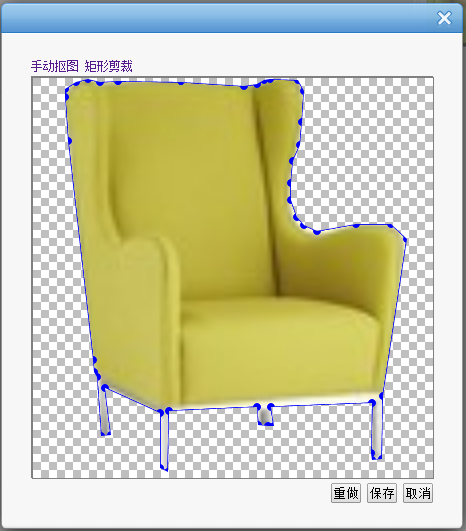
   不足:当光标移动到线上时,判断一点是否在两点连成的直线上计算方法不正确,应该计算为一点是否在两点圆两条外切线所围成的矩形

           内;钢笔点应为替换为小的p方格比较合理,像下面的矩形抠图;(思路:将存取的点坐标集合和动态添加的小p方格建立对应关系

           当拖动小方格时,触发事件更新坐标点集合,并重新渲染)。
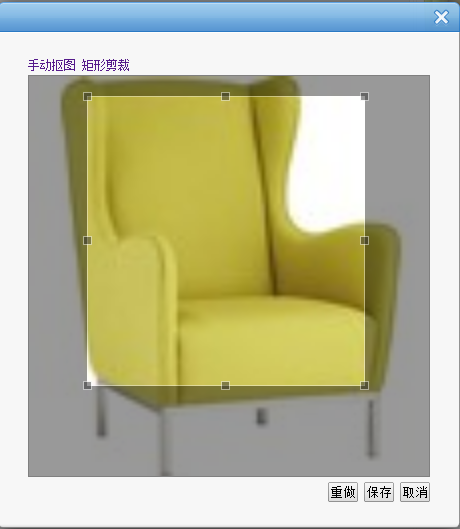
           html5 canvas+js实现ps钢笔抠图

6.这只是js钢笔抠图的一种解决方案,项目中现在这块还在改进,如果大家有好的方法或是资料的话,希望能分享一下。谢谢

 更多html5 canvas+js实现ps钢笔抠图相关文章请关注PHP中文网!

相关文章

HTML速学教程(入门课程)
HTML速学教程(入门课程)

HTML怎么学习?HTML怎么入门?HTML在哪学?HTML怎么学才快?不用担心,这里为大家提供了HTML速学教程(入门课程),有需要的小伙伴保存下载就能学习啦!

下载

本站声明:本文内容由网友自发贡献,版权归原作者所有,本站不承担相应法律责任。如您发现有涉嫌抄袭侵权的内容,请联系admin@php.cn

热门AI工具

更多
DeepSeek
DeepSeek

幻方量化公司旗下的开源大模型平台

豆包大模型
豆包大模型

字节跳动自主研发的一系列大型语言模型

通义千问
通义千问

阿里巴巴推出的全能AI助手

腾讯元宝
腾讯元宝

腾讯混元平台推出的AI助手

文心一言
文心一言

文心一言是百度开发的AI聊天机器人,通过对话可以生成各种形式的内容。

讯飞写作
讯飞写作

基于讯飞星火大模型的AI写作工具,可以快速生成新闻稿件、品宣文案、工作总结、心得体会等各种文文稿

即梦AI
即梦AI

一站式AI创作平台,免费AI图片和视频生成。

ChatGPT
ChatGPT

最最强大的AI聊天机器人程序,ChatGPT不单是聊天机器人,还能进行撰写邮件、视频脚本、文案、翻译、代码等任务。

相关专题

更多
pixiv网页版官网登录与阅读指南_pixiv官网直达入口与在线访问方法

本专题系统整理pixiv网页版官网入口及登录访问方式,涵盖官网登录页面直达路径、在线阅读入口及快速进入方法说明,帮助用户高效找到pixiv官方网站,实现便捷、安全的网页端浏览与账号登录体验。

616

2026.02.13

微博网页版主页入口与登录指南_官方网页端快速访问方法

本专题系统整理微博网页版官方入口及网页端登录方式,涵盖首页直达地址、账号登录流程与常见访问问题说明,帮助用户快速找到微博官网主页,实现便捷、安全的网页端登录与内容浏览体验。

194

2026.02.13

Flutter跨平台开发与状态管理实战
Flutter跨平台开发与状态管理实战

本专题围绕Flutter框架展开,系统讲解跨平台UI构建原理与状态管理方案。内容涵盖Widget生命周期、路由管理、Provider与Bloc状态管理模式、网络请求封装及性能优化技巧。通过实战项目演示,帮助开发者构建流畅、可维护的跨平台移动应用。

91

2026.02.13

TypeScript工程化开发与Vite构建优化实践

本专题面向前端开发者,深入讲解 TypeScript 类型系统与大型项目结构设计方法,并结合 Vite 构建工具优化前端工程化流程。内容包括模块化设计、类型声明管理、代码分割、热更新原理以及构建性能调优。通过完整项目示例,帮助开发者提升代码可维护性与开发效率。

20

2026.02.13

Redis高可用架构与分布式缓存实战
Redis高可用架构与分布式缓存实战

本专题围绕 Redis 在高并发系统中的应用展开,系统讲解主从复制、哨兵机制、Cluster 集群模式及数据分片原理。内容涵盖缓存穿透与雪崩解决方案、分布式锁实现、热点数据优化及持久化策略。通过真实业务场景演示,帮助开发者构建高可用、可扩展的分布式缓存系统。

54

2026.02.13

c语言 数据类型
c语言 数据类型

本专题整合了c语言数据类型相关内容,阅读专题下面的文章了解更多详细内容。

29

2026.02.12

雨课堂网页版登录入口与使用指南_官方在线教学平台访问方法

本专题系统整理雨课堂网页版官方入口及在线登录方式,涵盖账号登录流程、官方直连入口及平台访问方法说明,帮助师生用户快速进入雨课堂在线教学平台,实现便捷、高效的课程学习与教学管理体验。

15

2026.02.12

豆包AI网页版入口与智能创作指南_官方在线写作与图片生成使用方法

本专题汇总豆包AI官方网页版入口及在线使用方式,涵盖智能写作工具、图片生成体验入口和官网登录方法,帮助用户快速直达豆包AI平台,高效完成文本创作与AI生图任务,实现便捷智能创作体验。

598

2026.02.12

PostgreSQL性能优化与索引调优实战

本专题面向后端开发与数据库工程师,深入讲解 PostgreSQL 查询优化原理与索引机制。内容包括执行计划分析、常见索引类型对比、慢查询优化策略、事务隔离级别以及高并发场景下的性能调优技巧。通过实战案例解析,帮助开发者提升数据库响应速度与系统稳定性。

56

2026.02.12

热门下载

更多
网站特效
/
网站源码
/
网站素材
/
前端模板

精品课程

更多
相关推荐
/
热门推荐
/
最新课程
关于我们 免责申明 举报中心 意见反馈 讲师合作 广告合作 最新更新
php中文网:公益在线php培训,帮助PHP学习者快速成长!
关注服务号 技术交流群
PHP中文网订阅号
每天精选资源文章推送

Copyright 2014-2026 https://www.php.cn/ All Rights Reserved | php.cn | 湘ICP备2023035733号