



微信支付现在已经变得越来越流行了,随之也出现了很多以可以快速接入微信支付为噱头的产品,不过方便之余也使得我们做东西慢慢依赖第三方,丧失了独立思考的能力,这次打算分享下我之前开发过的微信支付。
一 、H5公众号支付
要点:正确获取openId以及统一下单接口,正确处理支付结果通知,正确配置支付授权目录
H5的支付方式是使用较为广泛的方式,这种支付方式主要用于微信内自定义菜单的网页,依赖手机上安装的微信客户端,高版本的微信才支持微信支付,下面按我的流程注意说明
1 编写用于支付的页面,由于是测试用就写的简单了点
立即学习“Java免费学习笔记(深入)”;
<%@ page language="java" import="java.util.*" pageEncoding="UTF-8"%> <% String path = request.getContextPath(); String basePath = request.getScheme()+"://"+request.getServerName()+":"+request.getServerPort()+path+"/"; %>微信支付样例
2 编写一个servlet用于通过Oauth获取code
package com.debug.weixin.servlet;

import java.io.IOException;
import java.io.PrintWriter;

import javax.servlet.RequestDispatcher;
import javax.servlet.ServletException;
import javax.servlet.http.HttpServlet;
import javax.servlet.http.HttpServletRequest;
import javax.servlet.http.HttpServletResponse;

import com.debug.weixin.util.CommonUtil;
import com.debug.weixin.util.ServerConfig;

public class OauthServlet extends HttpServlet {


 public void doGet(HttpServletRequest request, HttpServletResponse response)
   throws ServletException, IOException {

  this.doPost(request, response);
 }

 public void doPost(HttpServletRequest request, HttpServletResponse response)
   throws ServletException, IOException {

   String orderNo=request.getParameter("orderNo");
   //调用微信Oauth2.0获取openid
   String redirectURL=ServerConfig.SERVERDOMAIN+"/BasicWeixin/payServletForH5?orderNo="+orderNo;
   String redirectURI="";
   try {
    redirectURI=CommonUtil.initOpenId(redirectURL);
   } catch (Exception e) {
   // TODO Auto-generated catch block
   e.printStackTrace();
   }
   //System.out.println(redirectURI);
   //RequestDispatcher dis= request.getRequestDispatcher(redirectURI);
   //dis.forward(request, response);
   response.sendRedirect(redirectURI);
 }

}
3 获取到code后,通过REDIRECTURI获取openId,调用统一下单接口
package com.debug.weixin.servlet;

import java.io.IOException;
import java.io.PrintWriter;
import java.util.SortedMap;
import java.util.TreeMap;

import javax.servlet.RequestDispatcher;
import javax.servlet.ServletException;
import javax.servlet.http.HttpServlet;
import javax.servlet.http.HttpServletRequest;
import javax.servlet.http.HttpServletResponse;

import com.debug.weixin.pojo.WeixinOauth2Token;
import com.debug.weixin.pojo.WeixinQRCode;
import com.debug.weixin.util.AdvancedUtil;
import com.debug.weixin.util.CommonUtil;
import com.debug.weixin.util.ConfigUtil;
import com.debug.weixin.util.PayCommonUtil;

public class PayServletForH5 extends HttpServlet {


 public void doGet(HttpServletRequest request, HttpServletResponse response)
   throws ServletException, IOException {

  this.doPost(request, response);
 }

 public void doPost(HttpServletRequest request, HttpServletResponse response)
   throws ServletException, IOException {
   String orderNo=request.getParameter("orderNo");
   String code=request.getParameter("code");

   //获取AccessToken

   WeixinOauth2Token token=AdvancedUtil.getOauth2AccessToken(ConfigUtil.APPID, ConfigUtil.APP_SECRECT, code);

   String openId=token.getOpenId();

   //调用微信统一支付接口
   SortedMap parameters = new TreeMap();
  parameters.put("appid", ConfigUtil.APPID);

  parameters.put("mch_id", ConfigUtil.MCH_ID);
  parameters.put("device_info", "1000");
  parameters.put("body", "我的测试订单");
  parameters.put("nonce_str", PayCommonUtil.CreateNoncestr());


  parameters.put("out_trade_no", orderNo);
  //parameters.put("total_fee", String.valueOf(total));
  parameters.put("total_fee", "1");
  parameters.put("spbill_create_ip", request.getRemoteAddr());
  parameters.put("notify_url", ConfigUtil.NOTIFY_URL);
  parameters.put("trade_type", "JSAPI");
  parameters.put("openid", openId);

  String sign = PayCommonUtil.createSign("UTF-8", parameters);
  parameters.put("sign", sign);

  String requestXML = PayCommonUtil.getRequestXml(parameters);

  String result = CommonUtil.httpsRequestForStr(ConfigUtil.UNIFIED_ORDER_URL,"POST", requestXML);
  System.out.println("----------------------------------");
  System.out.println(result);
  System.out.println("----------------------------------");

  request.setAttribute("orderNo", orderNo);
  request.setAttribute("totalPrice", "0.01");
  String payJSON="";
  try {
   payJSON=CommonUtil.getH5PayStr(result,request);

  } catch (Exception e) {
   // TODO Auto-generated catch block
   e.printStackTrace();
  }
  //System.out.println(payJSON);
  request.setAttribute("unifiedOrder",payJSON);

  RequestDispatcher dis= request.getRequestDispatcher("h5Pay.jsp");
  dis.forward(request, response);
 }

}
调用微信统一下单接口,需要注意签名算法,只有签名计算正确才能顺利支付
public static String getH5PayStr(String result,HttpServletRequest request) throws Exception{

   Map map = XMLUtil.doXMLParse(result);


    SortedMap params = new TreeMap();
   params.put("appId", ConfigUtil.APPID);
   params.put("timeStamp", Long.toString(new Date().getTime()));
   params.put("nonceStr", PayCommonUtil.CreateNoncestr());
   params.put("package", "prepay_id="+map.get("prepay_id"));
   params.put("signType", ConfigUtil.SIGN_TYPE);
   String paySign = PayCommonUtil.createSign("UTF-8", params);

   params.put("paySign", paySign);  //paySign的生成规则和Sign的生成规则一致

   String json = JSONObject.fromObject(params).toString();

   return json;
 }
4 编写最终的支付界面调起微信H5支付
<%@ page language="java" import="java.util.*" pageEncoding="UTF-8"%> <% String path = request.getContextPath(); String basePath = request.getScheme()+"://"+request.getServerName()+":"+request.getServerPort()+path+"/"; %>微信H5支付
5 处理微信支付结果通知
package com.debug.weixin.servlet;

import java.io.ByteArrayOutputStream;
import java.io.IOException;
import java.io.InputStream;
import java.io.PrintWriter;
import java.util.Map;

import javax.servlet.ServletException;
import javax.servlet.http.HttpServlet;
import javax.servlet.http.HttpServletRequest;
import javax.servlet.http.HttpServletResponse;

import org.jdom.JDOMException;

import com.debug.weixin.util.PayCommonUtil;
import com.debug.weixin.util.XMLUtil;

public class PayHandlerServlet extends HttpServlet {


 public void doGet(HttpServletRequest request, HttpServletResponse response)
   throws ServletException, IOException {
   this.doPost(request, response);
 }


 public void doPost(HttpServletRequest request, HttpServletResponse response)
   throws ServletException, IOException {

  InputStream inStream = request.getInputStream();
  ByteArrayOutputStream outSteam = new ByteArrayOutputStream();
  byte[] buffer = new byte[1024];
  int len = 0;
  while ((len = inStream.read(buffer)) != -1) {
   outSteam.write(buffer, 0, len);
  }

  outSteam.close();
  inStream.close();
  String result = new String(outSteam.toByteArray(),"utf-8");//获取微信调用我们notify_url的返回信息
  Map map=null;
  try {
   map = XMLUtil.doXMLParse(result);
  } catch (JDOMException e) {
   // TODO Auto-generated catch block
   e.printStackTrace();
  }
  for(Object keyValue : map.keySet()){
   System.out.println(keyValue+"="+map.get(keyValue));
  }
  if (map.get("result_code").toString().equalsIgnoreCase("SUCCESS")) {

   //对订单进行业务操作
   System.out.println("-------------OK");
   response.getWriter().write(PayCommonUtil.setXML("SUCCESS", "")); //告诉微信服务器,我收到信息了,不要在调用回调action了

  }
 }

}
对于上面的代码,有很多都是参考http://blog.csdn.net/u011160656/article/details/41759195,因此这部分的代码就不贴出来了,需要的话看这个博客就知道了。

二 微信扫码支付(模式一)
要点:必须调用长链接转短链接接口、正确配置扫码支付回调URL
1 根据订单号生成微信支付二维码
下面是几个生成二维码的方法:
package com.debug.weixin.util;
import com.google.zxing.common.BitMatrix;

 import javax.imageio.ImageIO;
 import java.io.File;
 import java.io.OutputStream;
 import java.io.IOException;
 import java.awt.image.BufferedImage;


 public final class MatrixToImageWriter {

 private static final int BLACK = 0xFF000000;
 private static final int WHITE = 0xFFFFFFFF;

 private MatrixToImageWriter() {}


 public static BufferedImage toBufferedImage(BitMatrix matrix) {
  int width = matrix.getWidth();
  int height = matrix.getHeight();
  BufferedImage image = new BufferedImage(width, height, BufferedImage.TYPE_INT_RGB);
  for (int x = 0; x < width; x++) {
  for (int y = 0; y < height; y++) {
   image.setRGB(x, y, matrix.get(x, y) ? BLACK : WHITE);
  }
  }
  return image;
 }


 public static void writeToFile(BitMatrix matrix, String format, File file)
  throws IOException {
  BufferedImage image = toBufferedImage(matrix);
  if (!ImageIO.write(image, format, file)) {
  throw new IOException("Could not write an image of format " + format + " to " + file);
  }
 }


 public static void writeToStream(BitMatrix matrix, String format, OutputStream stream)
  throws IOException {
  BufferedImage image = toBufferedImage(matrix);
  if (!ImageIO.write(image, format, stream)) {
  throw new IOException("Could not write an image of format " + format);
  }
 }

 }
这个算是工具类,还有一个就是把二维码显示在界面上的方法,CreateQRCode主要用到代码块:
public static void createCodeStream(String text,HttpServletResponse response) throws Exception{

 // response.setContentType("image/jpeg");
 ServletOutputStream sos = response.getOutputStream();

 int width = 500;
 int height = 500;
 //二维码的图片格式
 String format = "jpg";
 MultiFormatWriter multiFormatWriter = new MultiFormatWriter();
 Map hints = new HashMap();
 //内容所使用编码
 hints.put(EncodeHintType.CHARACTER_SET, "UTF-8");
 BitMatrix bitMatrix = multiFormatWriter.encode(text, BarcodeFormat.QR_CODE, width, height, hints);


 //生成二维码

 MatrixToImageWriter.writeToStream(bitMatrix, format,sos);

 sos.close();


}
2 长链接转短链接生成二维码,编写扫码支付回调方法并调用统一下单接口
package com.debug.weixin.servlet;
import java.io.ByteArrayOutputStream;
import java.io.IOException;
import java.io.InputStream;
import java.io.PrintWriter;
import java.util.Date;
import java.util.Map;
import java.util.SortedMap;
import java.util.TreeMap;
import javax.servlet.ServletException;
import javax.servlet.http.HttpServlet;
import javax.servlet.http.HttpServletRequest;
import javax.servlet.http.HttpServletResponse;
import org.jdom.JDOMException;
import com.debug.weixin.util.CommonUtil;
import com.debug.weixin.util.ConfigUtil;
import com.debug.weixin.util.CreateQRCode;
import com.debug.weixin.util.PayCommonUtil;
import com.debug.weixin.util.XMLUtil;
import com.mongodb.DBObject;
public class ScanCodePayServlet extends HttpServlet {
public void doGet(HttpServletRequest request, HttpServletResponse response)
throws ServletException, IOException {
this.doPost(request, response);
}
public void doPost(HttpServletRequest request, HttpServletResponse response)
throws ServletException, IOException {
String flag=request.getParameter("flag");
if("createCode".equals(flag)){
createPayCode(request,response);
}else{
try {
wxScanCodeHandler(request,response);
} catch (Exception e) {
// TODO Auto-generated catch block
e.printStackTrace();
}
}
}
public void createPayCode(HttpServletRequest request,HttpServletResponse response){
String orderNo=request.getParameter("orderNo");
SortedMap paras = new TreeMap();
paras.put("appid", ConfigUtil.APPID);
paras.put("mch_id", ConfigUtil.MCH_ID);
paras.put("time_stamp", Long.toString(new Date().getTime()));
paras.put("nonce_str", PayCommonUtil.CreateNoncestr());
paras.put("product_id", orderNo);//商品号要唯一
String sign = PayCommonUtil.createSign("UTF-8", paras);
paras.put("sign", sign);
String url = "weixin://wxpay/bizpayurl?sign=SIGN&appid=APPID&mch_id=MCHID&product_id=PRODUCTID&time_stamp=TIMESTAMP&nonce_str=NOCESTR";
String nativeUrl = url.replace("SIGN", sign).replace("APPID", ConfigUtil.APPID).replace("MCHID", ConfigUtil.MCH_ID).replace("PRODUCTID", (String)paras.get("product_id")).replace("TIMESTAMP", (String)paras.get("time_stamp")).replace("NOCESTR", (String)paras.get("nonce_str"));
SortedMap parameters = new TreeMap();
parameters.put("appid", ConfigUtil.APPID);
parameters.put("mch_id", ConfigUtil.MCH_ID);
parameters.put("nonce_str", PayCommonUtil.CreateNoncestr());
parameters.put("long_url", CommonUtil.urlEncodeUTF8(nativeUrl));
String sign2 = PayCommonUtil.createSign("UTF-8", parameters);
parameters.put("sign", sign2);
String requestXML = PayCommonUtil.getRequestXml(parameters);
String result =CommonUtil.httpsRequestForStr(ConfigUtil.SHORT_URL, "POST", requestXML);
Map map=null;
try {
map = XMLUtil.doXMLParse(result);
} catch (JDOMException e) {
// TODO Auto-generated catch block
e.printStackTrace();
} catch (IOException e) {
// TODO Auto-generated catch block
e.printStackTrace();
}
String returnCode = map.get("return_code");
String resultCode = map.get("result_code");
if(returnCode.equalsIgnoreCase("SUCCESS")&&resultCode.equalsIgnoreCase("SUCCESS")){
String shortUrl = map.get("short_url");
//TODO 拿到shortUrl,写代码生成二维码
System.out.println("shortUrl="+shortUrl);
try {
CreateQRCode.createCodeStream(shortUrl,response);
} catch (Exception e) {
// TODO Auto-generated catch block
e.printStackTrace();
}
}
}
public void wxScanCodeHandler(HttpServletRequest request,HttpServletResponse response) throws Exception {
InputStream inStream = request.getInputStream();
ByteArrayOutputStream outSteam = new ByteArrayOutputStream();
byte[] buffer = new byte[1024];
int len = 0;
while ((len = inStream.read(buffer)) != -1) {
outSteam.write(buffer, 0, len);
}
outSteam.close();
inStream.close();
String result = new String(outSteam.toByteArray(),"utf-8");//获取微信调用我们notify_url的返回信息
Map map=null;
try {
map = XMLUtil.doXMLParse(result);
} catch (JDOMException e) {
// TODO Auto-generated catch block
e.printStackTrace();
}
for(Object keyValue : map.keySet()){
System.out.println(keyValue+"="+map.get(keyValue));
}
String orderNo=map.get("product_id").toString();
//接收到请求参数后调用统一下单接口
SortedMap parameters = new TreeMap();
parameters.put("appid", ConfigUtil.APPID);
parameters.put("mch_id", ConfigUtil.MCH_ID);
parameters.put("device_info", "1000");
parameters.put("body", "测试扫码支付订单");
parameters.put("nonce_str", PayCommonUtil.CreateNoncestr());
parameters.put("out_trade_no", map.get("product_id"));
//parameters.put("total_fee", String.valueOf(totalPrice));
parameters.put("total_fee", "1");
parameters.put("spbill_create_ip", request.getRemoteAddr());
parameters.put("notify_url", ConfigUtil.NOTIFY_URL);
parameters.put("trade_type", "NATIVE");
parameters.put("openid", map.get("openid"));
String sign = PayCommonUtil.createSign("UTF-8", parameters);
parameters.put("sign", sign);
String requestXML = PayCommonUtil.getRequestXml(parameters);
String result2 = CommonUtil.httpsRequestForStr(ConfigUtil.UNIFIED_ORDER_URL,"POST", requestXML);
System.out.println("-----------------------------统一下单结果---------------------------");
System.out.println(result2);
Map mm=null;
try {
mm=getH5PayMap(result2,request);
} catch (Exception e) {
// TODO Auto-generated catch block
e.printStackTrace();
}
//String prepayId=getPrepayId(result2,request);
//String returnNoneStr=getReturnNoneStr(result2,request);
String prepayId=mm.get("prepay_id");
String returnNoneStr=mm.get("nonce_str");;
SortedMap lastSign = new TreeMap();
lastSign.put("return_code", "SUCCESS");
lastSign.put("appid", ConfigUtil.APPID);
lastSign.put("mch_id", ConfigUtil.MCH_ID);
lastSign.put("nonce_str", returnNoneStr);
lastSign.put("prepay_id", prepayId);
lastSign.put("result_code", "SUCCESS");
lastSign.put("key", ConfigUtil.API_KEY);
String lastSignpara = PayCommonUtil.createSign("UTF-8", lastSign);
StringBuffer buf=new StringBuffer();
buf.append("");
buf.append("SUCCESS ");
buf.append(""+ConfigUtil.APPID+" ");
buf.append(""+ConfigUtil.MCH_ID+" ");
buf.append(""+returnNoneStr+" ");
buf.append(""+prepayId+"");
buf.append("SUCCESS ");
buf.append(""+lastSignpara+" ");
buf.append(" ");
response.getWriter().print(buf.toString());
}
public Map getH5PayMap(String result,HttpServletRequest request) throws Exception{
Map map = XMLUtil.doXMLParse(result);
return map;
}
} 最终看下公众号支付和扫码支付的微信配置:
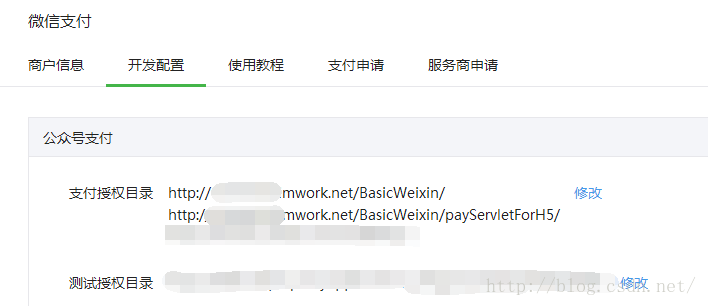
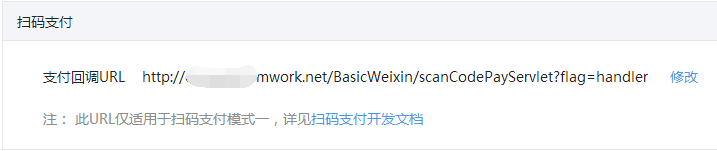
希望通过这篇文章,大家能明白就算通过Java来做微信公众号、微信支付而不借助github提供的那些坑人的代码也可以开发出另自己和客户满意的微信应用。虽然微信给出的demo都是PHP的,但这些都是浮云,开发语言是其次,理解接口调用需具备的底层只是才是程序员的必修课。
更多Java微信支付之公众号支付、扫码支付实例相关文章请关注PHP中文网!





