



toast用于向用户显示一些帮助/提示。下面我做了5中效果,来说明toast的强大,定义一个属于你自己的toast。
注意:
length_long—长时间显示视图或文本提示
length_short—短时间显示视图或文本提示
setgravity(int gravity,int xoffset,int yoffset)—设置提示应该在屏幕上的显示的位置
setduration(int duartion)—设置提示显示的持续时间
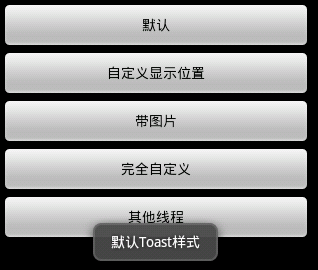
1.默认效果
代码
Toast.makeText(getApplicationContext(), "默认Toast样式",
Toast.LENGTH_SHORT).show();
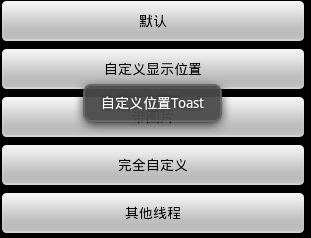
2.自定义显示位置效果
代码
toast = Toast.makeText(getApplicationContext(),
 "自定义位置Toast", Toast.LENGTH_LONG);
 toast.setGravity(Gravity.CENTER, 0, 0);
 toast.show();
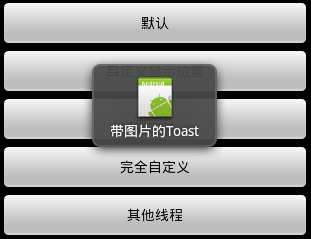
3.带图片效果
代码
toast = Toast.makeText(getApplicationContext(),
     "带图片的Toast", Toast.LENGTH_LONG);
   toast.setGravity(Gravity.CENTER, 0, 0);
   LinearLayout toastView = (LinearLayout) toast.getView();
   ImageView imageCodeProject = new ImageView(getApplicationContext());
   imageCodeProject.setImageResource(R.drawable.icon);
   toastView.addView(imageCodeProject, 0);
   toast.show();
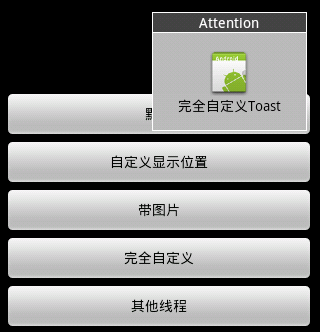
4.完全自定义效果

代码
LayoutInflater inflater = getLayoutInflater();
   View layout = inflater.inflate(R.layout.custom,
     (ViewGroup) findViewById(R.id.llToast));
   ImageView image = (ImageView) layout
     .findViewById(R.id.tvImageToast);
   image.setImageResource(R.drawable.icon);
   TextView title = (TextView) layout.findViewById(R.id.tvTitleToast);
   title.setText("Attention");
   TextView text = (TextView) layout.findViewById(R.id.tvTextToast);
   text.setText("完全自定义Toast");
   toast = new Toast(getApplicationContext());
   toast.setGravity(Gravity.RIGHT | Gravity.TOP, 12, 40);
   toast.setDuration(Toast.LENGTH_LONG);
   toast.setView(layout);
   toast.show();
5.其他线程
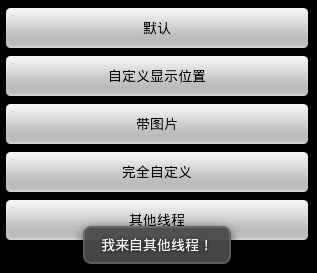
代码
new Thread(new Runnable() {
    public void run() {
     showToast();
    }
   }).start();
完整代码
1.Main,java
package com.wjq.toast;<br>import android.app.Activity;<br>import android.os.Bundle;
<br>import android.os.Handler;<br>import android.view.Gravity;<br>import android.view.LayoutInflater;
<br>import android.view.View;<br>import android.view.ViewGroup;<br>import android.view.View.OnClickListener;
<br>import android.widget.ImageView;<br>import android.widget.LinearLayout;<br>import android.widget.TextView;
<br>import android.widget.Toast;<br>public class Main extends Activity implements OnClickListener
{<br>Handler handler = new Handler();<br>@Override<br>public void onCreate(Bundle savedInstanceState)
{<br>  super.onCreate(savedInstanceState);<br>  setContentView(R.layout.main);<br>
findViewById(R.id.btnSimpleToast).setOnClickListener(this);<br>
findViewById(R.id.btnSimpleToastWithCustomPosition).setOnClickListener(<br>    this);<br>
findViewById(R.id.btnSimpleToastWithImage).setOnClickListener(this);<br>  findViewById(R.id.btnCustomToast).setOnClickListener(this);<br>
findViewById(R.id.btnRunToastFromOtherThread).setOnClickListener(this);<br>}<br>public void showToast() {<br>  handler.post(new Runnable() {<br>   @Override<br>
   public void run() {<br>    Toast.makeText(getApplicationContext(), "我来自其他线程!",<br>      Toast.LENGTH_SHORT).show();<br>   }<br>  });<br>}<br>@Override
   <br>public void onClick(View v) {<br>  Toast toast = null;<br>  switch (v.getId()) {<br>  case R.id.btnSimpleToast:<br>
   Toast.makeText(getApplicationContext(), "默认Toast样式",<br>     Toast.LENGTH_SHORT).show();<br>   break;<br>  case R.id.btnSimpleToastWithCustomPosition:<br>
     toast = Toast.makeText(getApplicationContext(),<br>     "自定义位置Toast", Toast.LENGTH_LONG);<br>   toast.setGravity(Gravity.CENTER, 0, 0);<br>
     toast.show();<br>   break;<br>  case R.id.btnSimpleToastWithImage:<br>   toast = Toast.makeText(getApplicationContext(),
     "带图片的Toast", Toast.LENGTH_LONG);
   toast.setGravity(Gravity.CENTER, 0, 0);
   LinearLayout toastView = (LinearLayout) toast.getView();
   ImageView imageCodeProject = new ImageView(getApplicationContext());
   imageCodeProject.setImageResource(R.drawable.icon);
   toastView.addView(imageCodeProject, 0);
   toast.show();<br>   break;<br>  case R.id.btnCustomToast:<br>   LayoutInflater inflater = getLayoutInflater();
   View layout = inflater.inflate(R.layout.custom,
     (ViewGroup) findViewById(R.id.llToast));
   ImageView image = (ImageView) layout
     .findViewById(R.id.tvImageToast);
   image.setImageResource(R.drawable.icon);
   TextView title = (TextView) layout.findViewById(R.id.tvTitleToast);
   title.setText("Attention");
   TextView text = (TextView) layout.findViewById(R.id.tvTextToast);
   text.setText("完全自定义Toast");
   toast = new Toast(getApplicationContext());
   toast.setGravity(Gravity.RIGHT | Gravity.TOP, 12, 40);
   toast.setDuration(Toast.LENGTH_LONG);
   toast.setView(layout);
   toast.show();<br>   break;<br>  case R.id.btnRunToastFromOtherThread:<br>   new Thread(new Runnable() {
    public void run() {
     showToast();
    }
   }).start();<br>   break;<br>  }<br>}<br>}
2.main,xml
<?xml version="1.0" encoding="utf-8"?>
<LinearLayout xmlns:android="http://schemas.android.com/apk/res/android"
android:orientation="vertical" android:layout_width="fill_parent"
android:layout_height="fill_parent" android:padding="5dip" android:gravity="center">
<Button android:layout_height="wrap_content"
  android:layout_width="fill_parent" android:id="@+id/btnSimpleToast"
  android:text="默认"></Button>
<Button android:layout_height="wrap_content"
  android:layout_width="fill_parent" android:text="自定义显示位置"
  android:id="@+id/btnSimpleToastWithCustomPosition"></Button>
<Button android:layout_height="wrap_content"
  android:layout_width="fill_parent" android:id="@+id/btnSimpleToastWithImage"
  android:text="带图片"></Button>
<Button android:layout_height="wrap_content"
  android:layout_width="fill_parent" android:text="完全自定义"
  android:id="@+id/btnCustomToast"></Button>
<Button android:layout_height="wrap_content"
  android:layout_width="fill_parent" android:text="其他线程"
  android:id="@+id/btnRunToastFromOtherThread"></Button>
</LinearLayout>
3.custom.xml
<?xml version="1.0" encoding="utf-8"?>
<LinearLayout
xmlns:android="http://schemas.android.com/apk/res/android"
android:layout_height="wrap_content" android:layout_width="wrap_content"
android:background="#ffffffff" android:orientation="vertical"
android:id="@+id/llToast" >
<TextView
  android:layout_height="wrap_content"
  android:layout_margin="1dip"
  android:textColor="#ffffffff"
  android:layout_width="fill_parent"
  android:gravity="center"
  android:background="#bb000000"
  android:id="@+id/tvTitleToast" />
<LinearLayout
  android:layout_height="wrap_content"
  android:orientation="vertical"
  android:id="@+id/llToastContent"
  android:layout_marginLeft="1dip"
  android:layout_marginRight="1dip"
  android:layout_marginBottom="1dip"
  android:layout_width="wrap_content"
  android:padding="15dip"
  android:background="#44000000" >
  <ImageView
   android:layout_height="wrap_content"
   android:layout_gravity="center"
   android:layout_width="wrap_content"
   android:id="@+id/tvImageToast" />
  <TextView
   android:layout_height="wrap_content"
   android:paddingRight="10dip"
   android:paddingLeft="10dip"
   android:layout_width="wrap_content"
   android:gravity="center"
   android:textColor="#ff000000"
   android:id="@+id/tvTextToast" />
</LinearLayout>
</LinearLayout>
以上就是Android UI控件系列:Toast(提示)的内容,更多相关内容请关注PHP中文网(www.php.cn)!




