



[ASP.NET
MVC 小牛之路]11 - Filter
filter(筛选器)是基于aop(面向方面编程)的设计,它的作用是对mvc框架处理客户端请求注入额外的逻辑,以非常简单优美的方式实现横切关注点(cross-cutting concerns)。横切关注点是指横越应该程序的多个甚至所有模块的功能,经典的横切关注点有日志记录、缓存处理、异常处理和权限验证等。本文将分别介绍mvc框架所支持的不同种类的filter的创建和使用,以及如何控制它们的执行。
本文目录
四种基本 Filter 概述
MVC框架支持的Filter可以归为四类,每一类都可以对处理请求的不同时间点引入额外的逻辑处理。这四类Filter如下表:
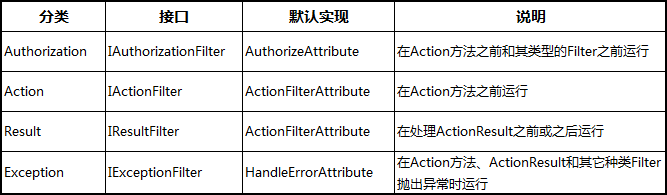
在MVC框架调用acion之前,它会先判断有没有实现上表中的接口的特性,如果有,则在请求管道的适当的点调用特性中定义的方法。
MVC框架为这些种类的Filter接口实现了默认的特性类。如上表,ActionFilterAttribute 类实现了 IActionFilter 和 IResultFilter 两个接口,这个类是一个抽象类,必须对它提供实现。另外两个特性类,AuthorizeAttribute 和 HandleErrorAttribute, 已经提供了一些有用的方法,可以直接使用。
Filter 既能应用在单个的ation方法上,也能应用在整个controller上,并可以在acion和controller上应用多个Filter。如下所示:
[Authorize(Roles="trader")]  // 对所有action有效
public class ExampleController : Controller {

    [ShowMessage]  // 对当前ation有效
    [OutputCache(Duration=60)] // 对当前ation有效
    public ActionResult Index() {
        // ...
    }
}
注意,对于自定义的controller的基类,应用于该基类的Filter也将对继承自该基类的所有子类有效。
Authorization Filter
Authorization Filter是在action方法和其他种类的Filter之前运行的。它的作用是强制实施权限策略,保证action方法只能被授权的用户调用。Authorization Filter实现的接口如下:
namespace System.Web.Mvc {
    public interface IAuthorizationFilter {
        void OnAuthorization(AuthorizationContext filterContext);
    }
}
自定义Authorization Filter
你可以自己实现 IAuthorizationFilter 接口来创建自己的安全认证逻辑,但一般没有这个必要也不推荐这样做。如果要自定义安全认证策略,更安全的方式是继承默认的 AuthorizeAttribute 类。
我们下面通过继承 AuthorizeAttribute 类来演示自定义Authorization Filter。新建一个空MVC应用程序,和往常的示例一样添加一个 Infrastructure 文件夹,然后添加一个 CustomAuthAttribute.cs 类文件,代码如下:
namespace MvcApplication1.Infrastructure {
    public class CustomAuthAttribute : AuthorizeAttribute {
        private bool localAllowed;
        public CustomAuthAttribute(bool allowedParam) {
            localAllowed = allowedParam;
        }
        protected override bool AuthorizeCore(HttpContextBase httpContext) {
            if (httpContext.Request.IsLocal) {
                return localAllowed;
            }
            else {
                return true;
            }
        }
    }
}
这个简单的Filter,通过重写 AuthorizeCore 方法,允许我们阻止本地的请求,在应用该Filter时,可以通过构造函数来指定是否允许本地请求。AuthorizeAttribte 类帮我们内置地实现了很多东西,我们只需把重点放在 AuthorizeCore 方法上,在该方法中实现权限认证的逻辑。
为了演示这个Filter的作用,我们新建一个名为 Home 的 controller,然后在 Index action方法上应用这个Filter。参数设置为false以保护这个 action 不被本地访问,如下:
public class HomeController : Controller {

    [CustomAuth(false)]
    public string Index() {
        return "This is the Index action on the Home controller";
    }
}
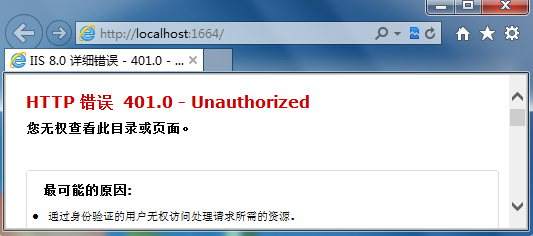
运行程序,根据系统生成的默认路由值,将请求 /Home/Index,结果如下:
我们通过把 AuthorizeAttribute 类作为基类自定义了一个简单的Filter,那么 AuthorizeAttribute 类本身作为Filter有哪些有用的功能呢?
使用内置的Authorization Filter
当我们直接使用 AuthorizeAttribute 类作为Filter时,可以通过两个属性来指定我们的权限策略。这两个属性及说明如下:
Users属性,string类型,指定允许访问action方法的用户名,多个用户名用逗号隔开。
Roles属性,string类型,用逗号分隔的角色名,访问action方法的用户必须属于这些角色之一。
使用如下:
public class HomeController : Controller {

    [Authorize(Users = "jim, steve, jack", Roles = "admin")]
    public string Index() {
        return "This is the Index action on the Home controller";
    }
}
这里我们为Index方法应用了Authorize特性,并同时指定了能访问该方法的用户和角色。要访问Index action,必须两者都满足条件,即用户名必须是 jim, steve, jack 中的一个,而且必须属性 admin 角色。
另外,如果不指定任何用户名和角色名(即 [Authorize] ),那么只要是登录用户都能访问该action方法。
你可以通过创建一个Internet模板的应用程序来看一下效果,这里就不演示了。
对于大部分应用程序,AuthorizeAttribute 特性类提供的权限策略是足够用的。如果你有特殊的需求,则可以通过继承AuthorizeAttribute 类来满足。
Exception Filter
Exception Filter,在下面三种来源抛出未处理的异常时运行:
另外一种Filter(如Authorization、Action或Result等Filter)。
Action方法本身。
Action方法执行完成(即处理ActionResult的时候)。
Exception Filter必须实现 IExceptionFilter 接口,该接口的定义如下:
namespace System.Web.Mvc {
    public interface IExceptionFilter {
        void OnException(ExceptionContext filterContext);
    }
    }
ExceptionContext 常用属性说明
在 IExceptionFilter 的接口定义中,唯一的 OnException 方法在未处理的异常引发时执行,其中参数的类型:ExceptionContext,它继承自 ControllerContext 类,ControllerContext 包含如下常用的属性:
Controller,返回当前请求的controller对象。
HttpContext,提供请求和响应的详细信息。
IsChildAction,如果是子action则返回true(稍后将简单介绍子action)。
RequestContext,提供请求上下文信息。
RouteData,当前请求的路由实例信息。
作为继承 ControllerContext 类的子类,ExceptionContext 类还提供了以下对处理异常的常用属性:
ActionDescriptor,提供action方法的详细信息。
Result,是一个 ActionResult 类型,通过把这个属性值设为非空可以让某个Filter的执行取消。
Exception,未处理异常信息。
ExceptionHandled,如果另外一个Filter把这个异常标记为已处理则返回true。
一个Exception Filter可以通过把 ExceptionHandled 属性设置为true来标注该异常已被处理过,这个属性一般在某个action方法上应用了多个Exception Filter时会用到。ExceptionHandled 属性设置为true后,就可以通过该属性的值来判断其它应用在同一个action方法Exception Filter是否已经处理了这个异常,以免同一个异常在不同的Filter中重复被处理。
示例演示
在 Infrastructure 文件夹下添加一个 RangeExceptionAttribute.cs 类文件,代码如下:
public class RangeExceptionAttribute : FilterAttribute, IExceptionFilter {
    public void OnException(ExceptionContext filterContext) {
        if (!filterContext.ExceptionHandled && filterContext.Exception is ArgumentOutOfRangeException) {
            filterContext.Result = new RedirectResult("~/Content/RangeErrorPage.html");
            filterContext.ExceptionHandled = true;
        }
    }
}
这个Exception Filter通过重定向到Content目录下的一个静态html文件来显示友好的 ArgumentOutOfRangeException 异常信息。我们定义的 RangeExceptionAttribute 类继承了FilterAttribute类,并且实现了IException接口。作为一个MVC Filter,它的类必须实现IMvcFilter接口,你可以直接实现这个接口,但更简单的方法是继承 FilterAttribute 基类,该基类实现了一些必要的接口并提供了一些有用的基本特性,比如按照默认的顺序来处理Filter。
在Content文件夹下面添加一个名为RangeErrorPage.html的文件用来显示友好的错误信息。如下所示:
    Range Error


    Sorry
    One of the arguments was out of the expected range.
在HomeController中添加一个值越限时抛出异常的action,如下所示:
public class HomeController : Controller {
        [RangeException]
        public string RangeTest(int id) {
            if (id > 100) {
                return String.Format("The id value is: {0}", id);
            } else {
                throw new ArgumentOutOfRangeException("id", id, "");
            }
        }
    }
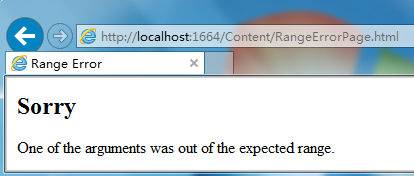
当对RangeTest应用自定义的的Exception Filter时,运行程序URL请求为 /Home/RangeTest/50,程序抛出异常后将重定向到RangeErrorPage.html页面:
由于静态的html文件是和后台脱离的,所以实际项目中更多的是用一个View来呈现友好的错误信息,以便很好的对它进行一些动态的控制。如下面把示例改动一下,RangeExceptionAttribute 类修改如下:
public class RangeExceptionAttribute : FilterAttribute, IExceptionFilter {
        public void OnException(ExceptionContext filterContext) {
            if (!filterContext.ExceptionHandled && filterContext.Exception is ArgumentOutOfRangeException) {                int val = (int)(((ArgumentOutOfRangeException)filterContext.Exception).ActualValue);
                filterContext.Result = new ViewResult {
                    ViewName = "RangeError",
                    ViewData = new ViewDataDictionary(val)
                };
                filterContext.ExceptionHandled = true;
            }
        }
    }
我们创建一个ViewResult对象,指定了发生异常时要重定向的View名称和传递的model对象。然后我们在Views/Shared文件夹下添加一个RangeError.cshtml文件,代码如下:
@model int


    Range Error


    Sorry
    The value @Model was out of the expected range.

        @Html.ActionLink("Change value and try again", "Index")
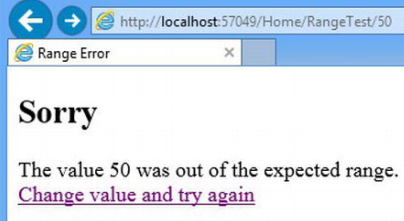
运行结果如下:
禁用异常跟踪
很多时候异常是不可预料的,在每个Action方法或Controller上应用Exception Filter是不现实的。而且如果异常出现在View中也无法应用Filter。如RangeError.cshtml这个View加入下面代码:
@model int

@{
    var count = 0;
    var number = Model / count;
}

...
运行程序后,将会显示如下信息:
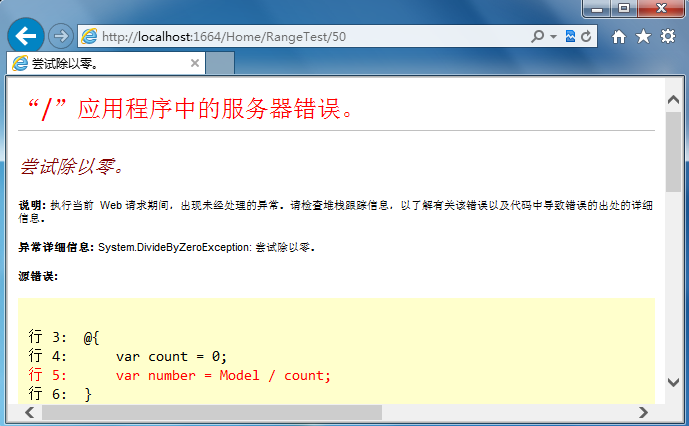
显然程序发布后不应该显示这些信息给用户看。我们可以通过配置Web.config让应用程序不管在何时何地引发了异常都可以显示统一的友好错误信息。在Web.config文件中的
...
这个配置只对远程访问有效,本地运行站点依然会显示跟踪信息。

使用内置的 Exceptin Filter
通过上面的演示,我们理解了Exceptin Filter在MVC背后是如何运行的。但我们并不会经常去创建自己的Exceptin Filter,因为微软在MVC框架中内置的 HandleErrorAttribute(实现了IExceptionFilter接口) 已经足够我们平时使用。它包含ExceptionType、View和Master三个属性。当ExceptionType属性指定类型的异常被引发时,这个Filter将用View属性指定的View(使用默认的Layout或Mast属性指定的Layout)来呈现一个页面。如下面代码所示:
...
[HandleError(ExceptionType = typeof(ArgumentOutOfRangeException), View = "RangeError")]
public string RangeTest(int id) {
    if (id > 100) {
        return String.Format("The id value is: {0}", id);
    } else {
        throw new ArgumentOutOfRangeException("id", id, "");
    }
}
...
使用内置的HandleErrorAttribute,将异常信息呈现到View时,这个特性同时会传递一个HandleErrorInfo对象作为View的model。HandleErrorInfo类包含ActionName、ControllerName和Exception属性,如下面的 RangeError.cshtml 使用这个model来呈现信息:
@model HandleErrorInfo
@{
ViewBag.Title = "Sorry, there was a problem!";
}
Range Error
Sorry
The value @(((ArgumentOutOfRangeException)Model.Exception).ActualValue)
was out of the expected range.
@Html.ActionLink("Change value and try again", "Index")
Action Filter
顾名思义,Action Filter是对action方法的执行进行“筛选”的,包括执行前和执行后。它需要实现 IActionFilter 接口,该接口定义如下:
namespace System.Web.Mvc {
    public interface IActionFilter {
        void OnActionExecuting(ActionExecutingContext filterContext);
        void OnActionExecuted(ActionExecutedContext filterContext);
    }
}
其中,OnActionExecuting方法在action方法执行之前被调用,OnActionExecuted方法在action方法执行之后被调用。我们来看一个简单的例子。
在Infrastructure文件夹下添加一个ProfileActionAttribute类,代码如下:
using System.Diagnostics;
using System.Web.Mvc;

namespace MvcApplication1.Infrastructure {
    public class ProfileActionAttribute : FilterAttribute, IActionFilter {
        private Stopwatch timer;
        public void OnActionExecuting(ActionExecutingContext filterContext) {
            timer = Stopwatch.StartNew();
        }
        public void OnActionExecuted(ActionExecutedContext filterContext) {
            timer.Stop();
            if (filterContext.Exception == null) {
                filterContext.HttpContext.Response.Write(
                    string.Format("Action method elapsed time: {0}", timer.Elapsed.TotalSeconds));
            }
        }
    }
}
在HomeController中添加一个Action并应用该Filter,如下:
...
[ProfileAction]
public string FilterTest() {
    return "This is the ActionFilterTest action";
}
...
运行程序,URL定位到/Home/FilterTest,结果如下:
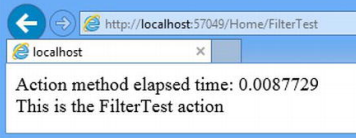
我们看到,ProfileAction的 OnActionExecuted 方法是在 FilterTest 方法返回结果之前执行的。确切的说,OnActionExecuted 方法是在action方法执行结束之后和处理action返回结果之前执行的。
OnActionExecuting方法和OnActionExecuted方法分别接受ActionExecutingContext和ActionExecutedContext对象参数,这两个参数包含了ActionDescriptor、Canceled、Exception等常用属性。
Result Filter
Result Filter用来处理action方法返回的结果。用法和Action Filter类似,它需要实现 IResultFilter 接口,定义如下:
namespace System.Web.Mvc {
    public interface IResultFilter {
        void OnResultExecuting(ResultExecutingContext filterContext);
        void OnResultExecuted(ResultExecutedContext filterContext);
    }
}
IResultFilter 接口和之前的 IActionFilter 接口类似,要注意的是Result Filter是在Action Filter之后执行的。两者用法是一样的,不再多讲,直接给出示例代码。
在Infrastructure文件夹下再添加一个 ProfileResultAttribute.cs 类文件,代码如下:
public class ProfileResultAttribute : FilterAttribute, IResultFilter {
    private Stopwatch timer;
    public void OnResultExecuting(ResultExecutingContext filterContext) {
        timer = Stopwatch.StartNew();
    }
    public void OnResultExecuted(ResultExecutedContext filterContext) {
        timer.Stop();
        filterContext.HttpContext.Response.Write(
            string.Format("Result elapsed time: {0}",  timer.Elapsed.TotalSeconds));
    }
}
应用该Filter:
...
[ProfileAction]
[ProfileResult] public string FilterTest() {
    return "This is the ActionFilterTest action";
}
...
内置的 Action 和 Result Filter
MVC框架内置了一个 ActionFilterAttribute 类用来创建action 和 result 筛选器,即可以控制action方法的执行也可以控制处理action方法返回结果。它是一个抽象类,定义如下:
public abstract class ActionFilterAttribute : FilterAttribute, IActionFilter, IResultFilter{
        public virtual void OnActionExecuting(ActionExecutingContext filterContext) {
        }
        public virtual void OnActionExecuted(ActionExecutedContext filterContext) {
        }
        public virtual void OnResultExecuting(ResultExecutingContext filterContext) {
        }
        public virtual void OnResultExecuted(ResultExecutedContext filterContext) {
        }
    }
}
使用这个抽象类方便之处是你只需要实现需要加以处理的方法。其他和使用 IActionFilter 和 IResultFilter 接口没什么不同。下面是简单做个示例。
在Infrastructure文件夹下添加一个 ProfileAllAttribute.cs 类文件,代码如下:
public class ProfileAllAttribute : ActionFilterAttribute {
    private Stopwatch timer;
    public override void OnActionExecuting(ActionExecutingContext filterContext) {
        timer = Stopwatch.StartNew();
    }
    public override void OnResultExecuted(ResultExecutedContext filterContext) {
        timer.Stop();
        filterContext.HttpContext.Response.Write(
        string.Format("Total elapsed time: {0}",  timer.Elapsed.TotalSeconds));
    }
}
在HomeController中的FilterTest方法上应用该Filter:
...
[ProfileAction]
[ProfileResult]
[ProfileAll]
public string FilterTest() {
    return "This is the FilterTest action";
}
...
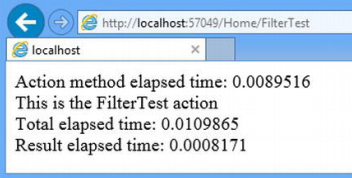
运行程序,URL定位到/Home/FilterTest,可以看到一个Action从执行之前到结果处理完毕总共花的时间:
我们也可以Controller中直接重写 ActionFilterAttribute 抽象类中定义的四个方法,效果和使用Filter是一样的,例如:
public class HomeController : Controller {
    private Stopwatch timer;
    ...
    public string FilterTest() {
        return "This is the FilterTest action";
    }
    protected override void OnActionExecuting(ActionExecutingContext filterContext) {
        timer = Stopwatch.StartNew();
    }
    protected override void OnResultExecuted(ResultExecutedContext filterContext) {
        timer.Stop();
        filterContext.HttpContext.Response.Write(
            string.Format("Total elapsed time: {0}",
            timer.Elapsed.TotalSeconds));
    }
注册为全局 Filter
全局Filter对整个应用程序的所有controller下的所有action方法有效。在App_Start/FilterConfig.cs文件中的RegisterGlobalFilters方法,可以把一个Filter类注册为全局,如:
using System.Web;
using System.Web.Mvc;
using MvcApplication1.Infrastructure;

namespace MvcApplication1 {
    public class FilterConfig {
        public static void RegisterGlobalFilters(GlobalFilterCollection filters) {
            filters.Add(new HandleErrorAttribute());
            filters.Add(new ProfileAllAttribute());
        }
    }
}
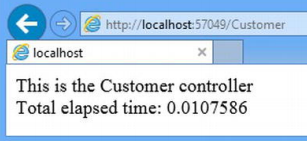
我们增加了filters.Add(new ProfileAllAttribute())这行代码,其中的filters参数是一个GlobalFilterCollection类型的集合。为了验证 ProfileAllAttribute 应用到了所有action,我们另外新建一个controller并添加一个简单的action,如下:
public class CustomerController : Controller {
        public string Index() {
            return "This is the Customer controller";
        }
}
运行程序,将URL定位到 /Customer ,结果如下:
其它常用 Filter
MVC框架内置了很多Filter,常见的有RequireHttps、OutputCache、AsyncTimeout等等。下面例举几个常用的。
RequireHttps,强制使用HTTPS协议访问。它将浏览器的请求重定向到相同的controller和action,并加上 https:// 前缀。
OutputCache,将action方法的输出内容进行缓存。
AsyncTimeout/NoAsyncTimeout,用于异步Controller的超时设置。(异步Controller的内容请访问 xxxxxxxxxxxxxxxxxxxxxxxxxxx)
ChildActionOnlyAttribute,使用action方法仅能被Html.Action和Html.RenderAction方法访问。
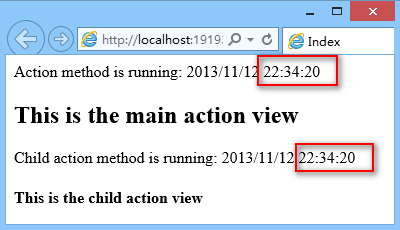
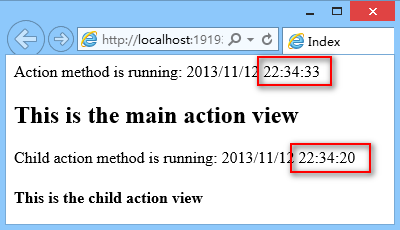
这里我们选择 OutputCache 这个Filter来做个示例。新建一个 SelectiveCache controller,代码如下:
public class SelectiveCacheController : Controller {
    public ActionResult Index() {
        Response.Write("Action method is running: " + DateTime.Now);
        return View();
    }

    [OutputCache(Duration = 30)]
    public ActionResult ChildAction() {
        Response.Write("Child action method is running: " + DateTime.Now);
        return View();
    }
}
这里的 ChildAction 应用了 OutputCache filter,这个action将在view内被调用,它的父action是Index。
现在我们分别创建两个View,一个是ChildAction.cshtml,代码如下:
@{
    Layout = null;
}

This is the child action view
另一个是它的Index.cshtml,代码如下:
@{
    ViewBag.Title = "Index";
}

This is the main action view

@Html.Action("ChildAction")
运行程序,将URL定位到 /SelectiveCache ,过几秒刷新一下,可看到如下结果:
以上就是[ASP.NET MVC 小牛之路]11 - Filter的内容,更多相关内容请关注PHP中文网(www.php.cn)!




