



.net framework 中的 garbage collection 会帮助程序员自动回收托管资源,这对类库的调用者而言,是个相当惬意的体验:可以在任何位置,任何时候,创建任何对象,gc 最后总是会兜底。易地而处,当自己是类库提供者的时候,则需要如何才能提供这样良好的体验呢?
首先,.Net framework 里面哪些是托管的资源,哪些是非托管的资源?
基本上,在 .Net framework 里面的所有类,都是托管资源,包括各种各样的 stream(例如 FileStream, MemoryStream), database connection, components 等等。。
可以写一个简单的小程序验证:(以 FileStream 为例)
一个方法,在后台线程中监控文件是否正在被占用:
        private static void MonitorFileStatus(string fileName)
        {
            Console.WriteLine("Start to monitor file: {0}", fileName);
            Task.Factory.StartNew(() =>
            {
                while(true)
                {
                    bool isInUse = IsFileInUse(fileName);

                    string messageFormat = isInUse ? "File {0} is in use." : "File {0} is released.";
                    Console.WriteLine(messageFormat, fileName);
                    Thread.Sleep(oneSeconds);
                }
            });
        }


        private static bool IsFileInUse(string fileName)
        {
            bool isInUse = true;
            FileStream stream = null;
            try
            {
                stream = File.Open(fileName, FileMode.Append, FileAccess.Write);
                isInUse = false;
            }
            catch
            {
            }
            finally
            {
                if (stream != null)
                {
                    stream.Dispose();
                }
            }
            return isInUse;
        }
再写一个占着文件不用的方法, FileStream 只是个局部变量,这个方法返回的时候,它应该被回收:
        private static void OpenFile()
        {
            FileStream stream  = File.Open(TestFileName, FileMode.Append, FileAccess.Write);
            Wait(fiveSeconds);
        }
最后是一个必不可少的等待:
        private static void Wait(TimeSpan time)
        {
            Console.WriteLine("Wait for {0} seconds...", time.TotalSeconds);
            Thread.Sleep(time);
        }
合并起来就是一个测试:
首先启动文件监视线程,然后打开文件不用。
OpenFile 方法返回,预测 FileStream 被回收
接着调用 GC, 看文件是否被释放了
        private static void FileTest()
        {
            MonitorFileStatus(TestFileName);

            OpenFile();

            CallGC();
            Wait(fiveSeconds);
        }
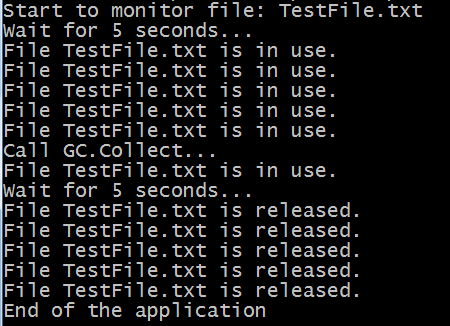
运行结果,可见 GC 自动把 FileStream 自动回收。无须调用 Dispose 方法,也无须使用 using
那么,非托管资源包括哪些呢?
通常,涉及到 windows api 的 pinvoke,各种的 intptr 都是非托管资源。例如,同样是打开文件,如果写成以下的样子,就包括了非托管资源
    [Flags]
    internal enum OpenFileStyle : uint
    {
        OF_CANCEL = 0x00000800,  // Ignored. For a dialog box with a Cancel button, use OF_PROMPT.
        OF_CREATE = 0x00001000,  // Creates a new file. If file exists, it is truncated to zero (0) length.
        OF_DELETE = 0x00000200,  // Deletes a file.
        OF_EXIST = 0x00004000,  // Opens a file and then closes it. Used to test that a file exists
        OF_PARSE = 0x00000100,  // Fills the OFSTRUCT structure, but does not do anything else.
        OF_PROMPT = 0x00002000,  // Displays a dialog box if a requested file does not exist
        OF_READ = 0x00000000,  // Opens a file for reading only.
        OF_READWRITE = 0x00000002,  // Opens a file with read/write permissions.
        OF_REOPEN = 0x00008000,  // Opens a file by using information in the reopen buffer.

        // For MS-DOS–based file systems, opens a file with compatibility mode, allows any process on a
        // specified computer to open the file any number of times.
        // Other efforts to open a file with other sharing modes fail. This flag is mapped to the
        // FILE_SHARE_READ|FILE_SHARE_WRITE flags of the CreateFile function.
        OF_SHARE_COMPAT = 0x00000000,

        // Opens a file without denying read or write access to other processes.
        // On MS-DOS-based file systems, if the file has been opened in compatibility mode
        // by any other process, the function fails.
        // This flag is mapped to the FILE_SHARE_READ|FILE_SHARE_WRITE flags of the CreateFile function.
        OF_SHARE_DENY_NONE = 0x00000040,

        // Opens a file and denies read access to other processes.
        // On MS-DOS-based file systems, if the file has been opened in compatibility mode,
        // or for read access by any other process, the function fails.
        // This flag is mapped to the FILE_SHARE_WRITE flag of the CreateFile function.
        OF_SHARE_DENY_READ = 0x00000030,

        // Opens a file and denies write access to other processes.
        // On MS-DOS-based file systems, if a file has been opened in compatibility mode,
        // or for write access by any other process, the function fails.
        // This flag is mapped to the FILE_SHARE_READ flag of the CreateFile function.
        OF_SHARE_DENY_WRITE = 0x00000020,

        // Opens a file with exclusive mode, and denies both read/write access to other processes.
        // If a file has been opened in any other mode for read/write access, even by the current process,
        // the function fails.
        OF_SHARE_EXCLUSIVE = 0x00000010,

        // Verifies that the date and time of a file are the same as when it was opened previously.
        // This is useful as an extra check for read-only files.
        OF_VERIFY = 0x00000400,

        // Opens a file for write access only.
        OF_WRITE = 0x00000001
    }

    [StructLayout(LayoutKind.Sequential)]
    internal struct OFSTRUCT
    {
        public byte cBytes;
        public byte fFixedDisc;
        public UInt16 nErrCode;
        public UInt16 Reserved1;
        public UInt16 Reserved2;
        [MarshalAs(UnmanagedType.ByValTStr, SizeConst = 128)]
        public string szPathName;
    }

    class WindowsApi
    {
        [DllImport("kernel32.dll", BestFitMapping = false, ThrowOnUnmappableChar = true)]
        internal static extern IntPtr OpenFile([MarshalAs(UnmanagedType.LPStr)]string lpFileName, out OFSTRUCT lpReOpenBuff, OpenFileStyle uStyle);

        [DllImport("kernel32.dll", SetLastError = true)]
        [ReliabilityContract(Consistency.WillNotCorruptState, Cer.Success)]
        [SuppressUnmanagedCodeSecurity]
        [return: MarshalAs(UnmanagedType.Bool)]
        internal static extern bool CloseHandle(IntPtr hObject);
    }
处理非托管资源,需要实现 IDisposable interface。原因有两个:

一款非常包包、衣服、鞋子类网站,页面干净清洁、一目了然,mttshop打造精致、简单、易用、免费的商城。 系统要求:IIS5.1以后,必须安装.net 3.5 安装步骤: 1、下载完成后,直接解压文件mttshop.rar 2、附加数据库:解压后的可以找一个叫db的文件夹,解压后直接附加就可以,支持SQL 2000、2005、2008 3、配置web.config文件,找到key=&qu
不能依赖析构函数,因为异构函数的调用由 GC 决定。无法实时释放紧缺的资源。
有一通用的处理原则:析构函数处理托管资源,IDisposable interface 处理托管与非托管资源。
如上述的例子,完成的实现代码如下:
    public class UnmanagedFileHolder : IFileHolder, IDisposable
    {
        private IntPtr _handle;
        private string _fileName;

        public UnmanagedFileHolder(string fileName)
        {
            _fileName = fileName;
        }

        public void OpenFile()
        {
            Console.WriteLine("Open file with windows api.");
            OFSTRUCT info;
            _handle = WindowsApi.OpenFile(_fileName, out info, OpenFileStyle.OF_READWRITE);
        }

        #region IDisposable Support
        private bool disposed = false;

        protected virtual void Dispose(bool disposing)
        {
            if (!disposed)
            {
                if (disposing)
                {
                    // no managed resource
                }
                WindowsApi.CloseHandle(_handle);
                _handle = IntPtr.Zero;

                disposed = true;
            }
        }

        ~UnmanagedFileHolder()
        {
            Dispose(false);
        }

        public void Dispose()
        {
            Dispose(true);
            GC.SuppressFinalize(this);
        }
        #endregion
    }
如果同一个类里面既有托管资源,也有非托管资源,那样应该怎么办呢?
可以依照下面的模式:
    class HybridPattern : IDisposable
    {
        private bool _disposed = false;

        ~HybridPattern()
        {
            Dispose(false);
        }

        protected void Dispose(bool disposing)
        {
            if (_disposed)
            {
                return;
            }

            if (disposing)
            {
                // Code to dispose the managed resources of the class
                // internalComponent1.Dispose();
            }

            // Code to dispose the un-managed resources of the class
            // CloseHandle(handle);
            // handle = IntPtr.Zero;

            _disposed = true;
        }

        public void Dispose()
        {
            Dispose(true);
            GC.SuppressFinalize(this);
        }
    }
以下为完整的例子,有托管的 FileStream, 以及非托管的 Handler
    public class HybridHolder : IFileHolder, IDisposable
    {
        private string _unmanagedFile;
        private string _managedFile;

        private IntPtr _handle;
        private FileStream _stream;

        public HybridHolder(string unmanagedFile, string managedFile)
        {
            _unmanagedFile = unmanagedFile;
            _managedFile = managedFile;
        }

        public void OpenFile()
        {
            Console.WriteLine("Open file with windows api.");
            OFSTRUCT info;
            _handle = WindowsApi.OpenFile(_unmanagedFile, out info, OpenFileStyle.OF_READWRITE);

            Console.WriteLine("Open file with .Net libray.");
            _stream = File.Open(_managedFile, FileMode.Append, FileAccess.Write);
        }

        #region IDisposable Support
        private bool disposed = false;

        protected virtual void Dispose(bool disposing)
        {
            if (!disposed)
            {
                //Console.WriteLine("string is null? {0}", _stream == null);
                if (disposing && _stream != null)
                {
                    Console.WriteLine("Clean up managed resource.");
                    _stream.Dispose();
                }

                Console.WriteLine("Clean up unmanaged resource.");
                WindowsApi.CloseHandle(_handle);
                _handle = IntPtr.Zero;

                disposed = true;
            }
        }

        ~HybridHolder()
        {
            Dispose(false);
        }

        public void Dispose()
        {
            Dispose(true);
            GC.SuppressFinalize(this);
        }
        #endregion
    }
最后,如果是没有实现 IDisposable interface 的类呢? 例如 byte[], StringBuilder
完全不要插手干预它们的回收, GC 做得很好。
尝试过在析构函数中把一个庞大的 byte[] 设置为 null,唯一的结果是导致它的回收被延迟到下一次 GC 周期。
原因也很简单,每一次引用到会导致它的引用树上的计数加一。。
完整代码见 Github:




