



先看看效果图,效果比较简单:
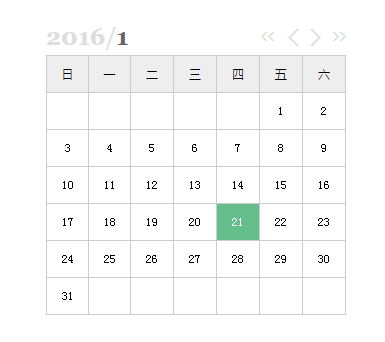
具体代码:
<html>
  <head>
    <title>javaScript日历</title>
    <meta charset="utf-8"/>
    <style type="text/css">
      *{
        margin:0;
        padding:0;
      }

      .calendar{
        width:300px;
        margin:100px auto;
        text-align:center;
        font-size:12px;
      }

      .calendar .wrap{
        width:100%;
        height:36px;
        line-height:36px;
      }

      .calendar .wrap .theYear{

      }

      .calendar .wrap .theMonth{
        color:#666;
      }

      .calendar .wrap span{
        font-size:24px;
        color: #DDD;
        cursor:pointer;
        font-family: Georgia, "Times New Roman", Times, serif;
      }

      .calendar .wrap span b:hover{
        color: #777;
      }

      .calendar .wrap .span{
        float:left;
      }

      .calendar .wrap .prev_year{
        float:right;
        margin-right:12px;
        font-family:"sans-serif";
        font-weight:bold;
        font-size:14px;

      }

      .calendar .wrap .next_year{
        float:right;
        font-family:"sans-serif";
        font-weight:bold;
        font-size:14px;
      }

      .calendar .wrap .prev_month{
        float:right;
        margin-right:12px;
        font-family:"sans-serif";
        font-weight:bold;
        margin-right:10px;
      }

      .calendar .wrap .next_month{
        float:right;
        font-family:"sans-serif";
        font-weight:bold;
        margin-right:10px;
      }

      .calendar .wrap .next_year:hover,.calendar .wrap .prev_year:hover,
      .calendar .wrap .next_month:hover,.calendar .wrap .prev_month:hover{
        color:#999;
      }

      .calendar table{
        width:100%;
        border-collapse:collapse;
      }

      .calendar .header{
        background-color:#EEE;
        font-family:"Microsoft YaHei";
      }

      .calendar .header td{
        cursor:default;
      }

      .calendar td{
        border:1px solid #CCC;
        line-height:36px;
        cursor:pointer;
      }

      .calendar td:hover{
        background-color:#EEE;
      }

      .calendar .empty{
        cursor:default;
      }

      .calendar .empty:hover{
        background-color:#FFF;
      }

      .calendar .today{
        background-color:#66BE8C;
        color:#FFF;
      }

      .calendar .today:hover{
        background-color:#66BE8C;
        color:#FFF;
      }

    </style>
    <script src="jquery-1.8.2.js"></script>
    <script src="func.js"></script>
  </head>
  <body>
    <div id="calendar" class="calendar">
      <div class="wrap">
        <span class="span"><b id="theYear" class="theYear">2016</b>/<b id="theMonth" class="theMonth">1</b></span>
        <span class="next_year" id="next_year" title="下一年">>></span>
        <span class="next_month" id="next_month" title="下一月">></span>
        <span class="prev_month" id="prev_month" title="上一月"><</span>
        <span class="prev_year" id="prev_year" title="上一年"><<</span>
      </div>
      <table cellpadding="0" cellspacing="0">
        <tr class="header">
          <td>日</td>
          <td>一</td>
          <td>二</td>
          <td>三</td>
          <td>四</td>
          <td>五</td>
          <td>六</td>
        </tr>
      </table>
    </div>

    <script type="text/javascript">

      $("#prev_month").click(function(){
        var theMonth=eval($("#theMonth").html());
        var theYear=eval($("#theYear").html());
        if(theMonth<=1){
          $("#theMonth").html("12");
          if(theYear<=1){
            $("#theYear").html(1);
          }else{
            $("#theYear").html(theYear-1);
          }
        }else{
          $("#theMonth").html(theMonth-1);
        }
        cur_year=eval($("#theYear").html());
        cur_mon=eval($("#theMonth").html());
        $("#calendar table tr").not(".header").remove();
        $("#calendar table").append(createCalendar(cur_year,cur_mon));
        $("#calendar table tr").not(".header").hide().fadeIn(500);
      })


      $("#next_month").click(function(){
        var theMonth=eval($("#theMonth").html());
        if(theMonth>=12){
          var theYear=eval($("#theYear").html());
          if(theYear>=2200){
            $("#theYear").html(2200);
          }else{
            $("#theYear").html(eval(theYear+1));
          }
          $("#theMonth").html(1);
        }else{
          $("#theMonth").html(eval(theMonth+1));
        }
        cur_year=eval($("#theYear").html());
        cur_mon=eval($("#theMonth").html());
        $("#calendar table tr").not(".header").remove();
        $("#calendar table").append(createCalendar(cur_year,cur_mon));
        $("#calendar table tr").not(".header").hide().fadeIn(500);
      })


      $("#prev_year").click(function(){
        var theYear=eval($("#theYear").html());
        if(theYear<=1){
          $("#theYear").html(1);
        }else{
          $("#theYear").html(eval(theYear-1));
        }
        cur_year=eval($("#theYear").html());
        cur_mon=eval($("#theMonth").html());
        $("#calendar table tr").not(".header").remove();
        $("#calendar table").append(createCalendar(cur_year,cur_mon));
        $("#calendar table tr").not(".header").hide().fadeIn(500);
      })


      $("#next_year").click(function(){
        var theYear=eval($("#theYear").html());
        if(theYear>=2200){
          $("#theYear").html(2200);
        }else{
          $("#theYear").html(eval(theYear+1));
        }
        cur_year=eval($("#theYear").html());
        cur_mon=eval($("#theMonth").html());
        $("#calendar table tr").not(".header").remove();
        $("#calendar table").append(createCalendar(cur_year,cur_mon));
        $("#calendar table tr").not(".header").hide().fadeIn(500);
      })

      $("#calendar table").append(createCalendar());

    </script>

  </body>
</html>
JavaScript代码

// 判断是否为闰年
function IsLeapYear(year){
  if((year%400==0)||(year%4==0 && year%100!=0)){
    return true;
  }
  return false;
}

// 日历
function createCalendar(year,month,date){
  var d=new Date();
  if(!year || year<=0){
    cur_year=d.getFullYear();  // 年份
  }else{
    cur_year=year;
  }

  if(!month || month<=0){
    cur_mon=d.getMonth();  // 日期
  }else{
    cur_mon=month-1;
  }

  if(!date || date<=0){
    cur_date=d.getDate();  // 日期
  }else{
    cur_date=date;
  }

  month_days=new Array(31,28+IsLeapYear(d.getFullYear()),31,30,31,30,31,31,30,31,30,31); // 月份天数数组
  month_firstday_date=new Date(cur_year,cur_mon,1);
  monthDays=month_days[cur_mon];
  monthFirstday=month_firstday_date.getDay(); // 月份的第一天是星期几
  lines=Math.ceil((monthDays+monthFirstday)/7);  // 表格所需行数
  var calendarBody="";
  for(var i=0;i<lines;i++){
    calendarBody+="<tr class='line'>";
    for(var j=0;j<7;j++){
      idx=i*7+j; //  单元格自然序列号
      if(i==0 && idx<monthFirstday){
        calendarBody+="<td class='empty'></td>";
      }else if(idx<monthDays+monthFirstday){
        var date=idx+1-monthFirstday;
        if(date==cur_date && cur_mon==d.getMonth() && cur_year==d.getFullYear()){
          calendarBody+="<td class='today'>"+date+"</td>";
        }else{
          calendarBody+="<td>"+date+"</td>";
        }
      }else{
        calendarBody+="<td class='empty'></td>";
      }
    }
    calendarBody+="</tr>";
  }
  return calendarBody;
}





