



基础知识1
我们熟知的\n实际上包含两个操作:换行与回车。回车操作将光标移到行首,而换行操作则将光标移到下一行。相比之下,\r仅执行回车操作。
我们可以通过例子来观察差异:
使用 \n 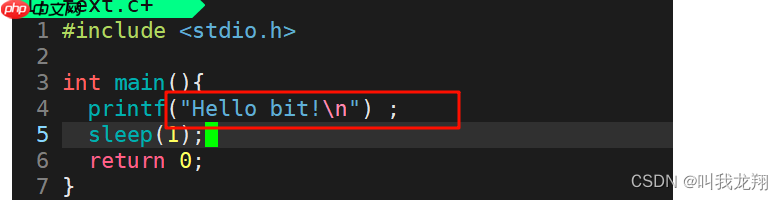 的效果:
的效果:

不使用 \n 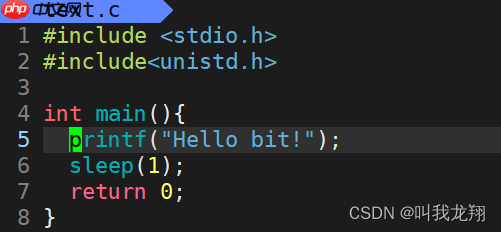 的效果:
的效果:

为什么会出现这样的差异?原因在于缓冲区。
缓冲区是内存的一部分,用于存储输入或输出的数据。根据与输入设备或输出设备的对应关系,缓冲区分为输入缓冲区和输出缓冲区。
\n 可以清空缓冲区,使内容显示在屏幕上。fflush() 函数也可以实现类似的功能。
函数介绍
Sleep 函数:Sleep 函数可以使计算机程序(进程、任务或线程)进入休眠状态,使其在一段时间内不活动。注意,在 VC 中,Sleep 函数的首字母为大写的 "S",而在标准 C 中,sleep 函数的首字母为小写的 "s"。具体使用哪个取决于所使用的编译器。VC 使用 Sleep,其他情况使用 sleep。Sleep() 函数的单位是毫秒,因此如果希望函数暂停 1 秒,应使用 Sleep(1000)。还需要包含头文件 #include <windows.h></windows.h>。
usleep 函数:usleep 函数可以将进程挂起一段时间,单位为微秒(百万分之一秒)。注意需要包含头文件 #include <unistd.h></unistd.h>,此函数不适用于 Windows 操作系统,适用于 Linux 测试环境。
进度条实现版本 1

TGroupon团购系统是以php+MySQL进行开发的团购网站系统,首页能同时显示多个正在进行中的团购商品,将团购中的商品最大限度的展示在用户面前,对提升网站整体销售量有着很大的帮助。安装说明:1:环境:windows/LINUX/UNIX/apache,mysql,php2:所用语言: php,javascript,xml,html3:将程序放置空间或者服务器上,要求uploadfiles目录
代码实现 progressbar.h:
#include <stdio.h>
#include <string.h>
#include <unistd.h>
<p>void progressbar();
progressbar.c:
#include "progressbar.h"</p><h1>define style '#'</h1><h1>define Length 101</h1><p>void progressbar(){
char str[Length];
memset(str, '\0', sizeof(str));</p><p>int cnt = 0;</p><p>while(cnt < 100){
str[cnt] = style;
printf("[%-100s][%d%%]\r", str, cnt + 1);
fflush(stdout);
usleep(50000);
cnt++;
}
printf("\n");
}main.c:
#include "progressbar.h"</p><p>int main(){
progressbar();
return 0;
}
运行效果 
显然,进度条通常不会单独使用,通常与下载过程结合使用。接下来我们来模拟一些下载过程:
progressbar.c:
#include "progressbar.h"</p><h1>define style '#'</h1><h1>define Length 101</h1><p>void progressbar(double total, double current){
char str[Length];
memset(str, '\0', sizeof(str));</p><p>int cnt = 0;
double rate = (current * 100.0) / total;
int loop = (int)rate;</p><p>while(cnt < loop && cnt < 100){
str[cnt] = style;
cnt++;
}</p><p>if(cnt == 100){
printf("[%-100s][%0.1lf%%]\r", str, 100.0);
}
else{
printf("[%-100s][%0.1lf%%]\r", str, rate);
}</p><p>fflush(stdout);
}
main.c:
#include "progressbar.h"</p><p>double bandwidth = 1.0 <em> 1024 </em> 1024;</p><p>void download(double total){
double current = 0;
printf("Download Begin!\n");</p><p>while(current < total){
current += bandwidth;
if(current > total) current = total;
progressbar(total, current);
usleep(100000);
}
printf("\nDownload Complete!\n");
}</p><p>int main(){
double total = 100.0 <em> 1024 </em> 1024; // 100MB
download(total);
return 0;
}
看看效果:

这样就非常接近我们的下载过程了!
Thanks♪(・ω・)ノ 谢谢阅读!!!下一篇文章见!!!




