



alpine linux是一种基于musl和busybox的linux发行版,专注于安全性、简洁性和资源效率。其体积非常小巧,非常适合用作docker镜像。最近,xiaoz在为ccaa/zdir打包容器镜像时发现了alpine linux,尽管其体积小巧,但功能齐全,使用起来非常方便。

在Docker中使用Alpine Linux可以通过命令docker run -it alpine /bin/sh来运行。由于Alpine Linux没有内置bash,因此这里使用sh作为伪终端。在编写Alpine Linux的shell脚本时,也需要注意使用sh而不是bash。
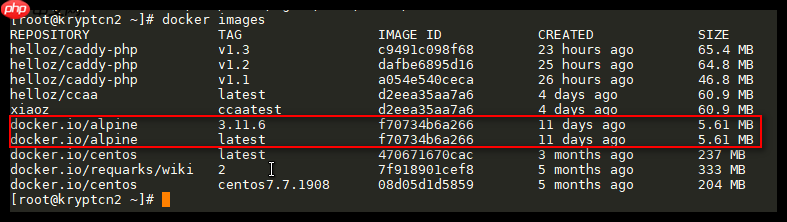
Alpine Linux镜像非常小巧,不到6M的大小,因此特别适合用于容器打包。
Alpine Linux使用apk指令来管理软件,类似于CentOS的yum或Debian的apt-get。首次使用时,建议使用apk update更新软件,以避免出现异常。以下是apk的常用指令:
# 更新软件
apk update
<h1>搜索某个软件</h1><p>apk search xxx</p><h1>安装软件</h1><p>apk add xxx</p><h1>卸载软件</h1><p>apk del xxx</p><h1>查看使用帮助</h1><p>apk -h
设置Alpine Linux时区时,由于其默认时区并非东八区,某些项目需要与北京时间同步,因此我们需要修改Alpine Linux的默认时区,方法如下:
# 安装时区数据
apk add -U tzdata</p><h1>查看时区列表</h1><p>ls /usr/share/zoneinfo</p><div class="aritcle_card flexRow">
                                                        <div class="artcardd flexRow">
                                                                <a class="aritcle_card_img" href="/ai/2254" title="ModelGate"><img
                                                                                src="https://img.php.cn/upload/ai_manual/000/000/000/175680205110116.png" alt="ModelGate"  onerror="this.onerror='';this.src='/static/lhimages/moren/morentu.png'" ></a>
                                                                <div class="aritcle_card_info flexColumn">
                                                                        <a href="/ai/2254" title="ModelGate">ModelGate</a>
                                                                        <p>一站式AI模型管理与调用工具</p>
                                                                </div>
                                                                <a href="/ai/2254" title="ModelGate" class="aritcle_card_btn flexRow flexcenter"><b></b><span>下载</span> </a>
                                                        </div>
                                                </div><h1>拷贝需要的时区文件到localtime</h1><p>cp /usr/share/zoneinfo/Asia/Shanghai /etc/localtime</p><h1>查看当前时间</h1><p>date</p><h1>为了精简镜像,可以删除tzdata</h1><p>apk del tzdata
如果在国内网络使用Alpine Linux,可以使用国内镜像源以获得更快的速度。常用的国内镜像源包括:
- 清华TUNA镜像源:https://www.php.cn/link/d2d6abcb8d26945763acf5d5b7872bce
- 中科大镜像源:https://www.php.cn/link/0f56e1045e205122bb0dd4233c0b944f
软件源的配置文件位于/etc/apk/repositories,内容如下:
<a href="https://www.php.cn/link/16f0fd52ff1008af716ba556886e37d0">https://www.php.cn/link/16f0fd52ff1008af716ba556886e37d0</a><a href="https://www.php.cn/link/3478a1d3a06a8e6de7d8f7dcba944a8e">https://www.php.cn/link/3478a1d3a06a8e6de7d8f7dcba944a8e</a>
可以看到这里使用的alpine软件源版本为v3.11,因此在修改时需要保持版本一致。例如,修改为阿里的软件源:
<a href="https://www.php.cn/link/961e4b86bf690651cf87d52d714bc7f1">https://www.php.cn/link/961e4b86bf690651cf87d52d714bc7f1</a><a href="https://www.php.cn/link/d6305e4149bc8b9672b74d1021bb7eef">https://www.php.cn/link/d6305e4149bc8b9672b74d1021bb7eef</a>
更多软件源可以参考官方列表:https://www.php.cn/link/7cbc8120edbc9108520a43532f5439a6
总结:
- Alpine Linux默认没有
bash,需要使用sh - Alpine Linux使用
apk作为包管理器 - 首次使用建议更新软件
apk update,以避免出现异常 - Alpine Linux体积非常小巧,但功能不输其它Linux发行版,非常适合用来打包Docker镜像。在Docker Hub搜索镜像时,您会发现很多都是基于Alpine Linux的,简直就是为容器量身定制的。
此文部分内容参考了:
- Alpine修改时区
- Alpine Linux 配置使用技巧




