



01 Introduction
前几天老板让测一下一些open source lp solver的稳定性。先看看本次上场的主角:
lp_solve is a free (see LGPL for the GNU lesser general public license) linear (integer) programming solver based on the revised simplex method and the Branch-and-bound method for the integers. http://web.mit.edu/lpsolve/doc/Clp (Coin-or linear programming) is an open-source linear programming solver. It is primarily meant to be used as a callable library, but a basic, stand-alone executable version is also available. It is designed to find solutions of mathematical optimization problems of the form. https://github.com/coin-or/clpCPLEX Optimizer provides flexible, high-performance mathematical programming solvers for linear programming, mixed integer programming, quadratic programming and quadratically constrained programming problems. These solvers include a distributed parallel algorithm for mixed integer programming to leverage multiple computers to solve difficult problems.CPLEX可不是open-source的哦,这里主要是作为baseline,这样就可以看看lp_solve和Clp跟目前state of the art commercial solver的差距了。
02 Setting开始之前,还是先做一些准备工作。首先是测试数据集,本次测试了两个数据集:
NETLIB (91 cases) : http://www.netlib.org/lp/data/index.htmlL1 (34 cases) : http://www-eio.upc.edu/~jcastro/mindist_sdc.html数据集中的文件有些是.mps,部分solver可以直接读取。而NETLIB中的是compressed MPS,需要用他提供的工具进行解压。当然也可以从这里下载现成的:
https://github.com/zrjer/LP-TEST-PROBLEM-FROM-NETLIB/tree/master/netlib_mps
测试平台是ubuntu 18.04,lp_solve和clp用的是python调用,而CPLEX还是用Java调用的(别问,问就是使起来顺手),反正这些平台只是起到一个调用的作用,应该不会影响求解的时间(I think so~错了麻烦多多指正)。
然后讲讲python下怎么配置lp_solve和clp吧:
lp_solvewindows平台:直接到 https://www.lfd.uci.edu/~gohlke/pythonlibs/#lp_solve 这里下载对应版本的轮子然后pip进行安装,注意版本对应。linux平台:用conda安装,参考这里 https://anaconda.org/conda-forge/lpsolve55ClpClp是一个solver,Coin-or团队又为python开发了一个包叫CyLP(https://github.com/coin-or/CyLP) ,可以直接用来调用他们家的求解器 (CLP, CBC, and CGL),所以下面讲讲怎么装CyLP。windows平台:直接pip install cylp,会自动安装clp等求解器。linux平台:比较麻烦,需要用conda先安装cbc等求解器,具体方法参照CyLP的说明,比较麻烦。然后把测试的code准备好,再写个shell脚本进行批量测试:
代码语言:javascript代码运行次数:0运行复制<code class="javascript">dir=MPS_Filesfor file in $dir/*; do python lpsolve_run.py $filedone</code>
意思是读取中的所有文件,然后挨个传入code里面让他跑,当然跑完了记得在程序中把一些结果记录一下哦。最后把code和脚本upload到服务器上,执行一下./run_lpsolve.sh,然后就可以安心去刷剧摸鱼等结果啦。
由于lpsolve只能使用单线程模式,因此在实验中也限制了CPLEX也只能使用单线程。关于表格一些列的说明:
variable: 模型中变量的个数。constraint: 模型中约束的个数。non_zero: 约束Ax=b中,矩阵A中非0元素的个数。objective: 问题的目标值。time: 求解所花的时间。3.1 Netlib一共有96个算例,其中有5个CPLEX读取错误(我也不知道为啥。。),剩下91个算例中(平均variable=2524,平均constraint=978,平均non_zero=14763):
cplex能全部解到最优,平均求解时间为0.48s(yyds?)。lpsolve只求得了88个算例的最优解,这87个的平均求解的时间为0.89s。有三个算例在长时间内(大于2000s)无法得出可行解(表中标NA的单元格),手动终止了(用我导的话说,that's why lpsolve is free...)。clp比lpsolve更稳定一点,得出的所有结果和cplex一致,时间上也低于lpsolve。不同的地方在表格中已经加粗了。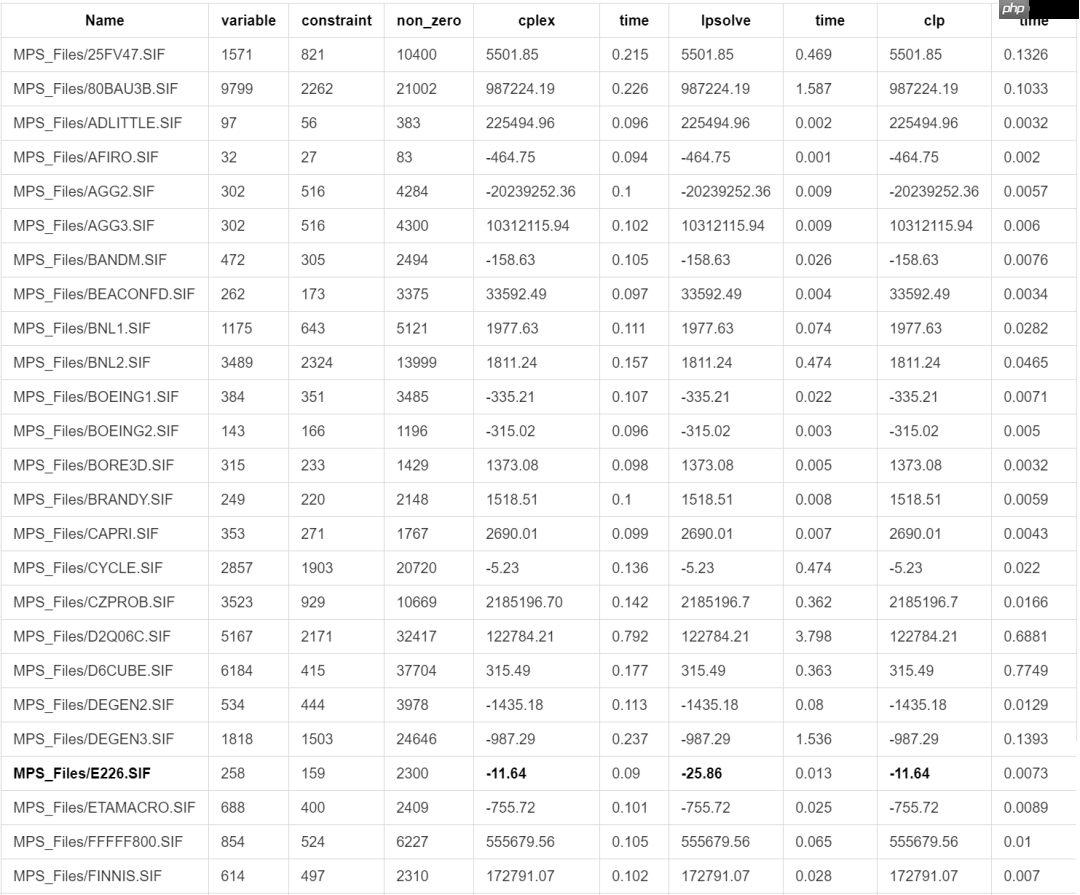

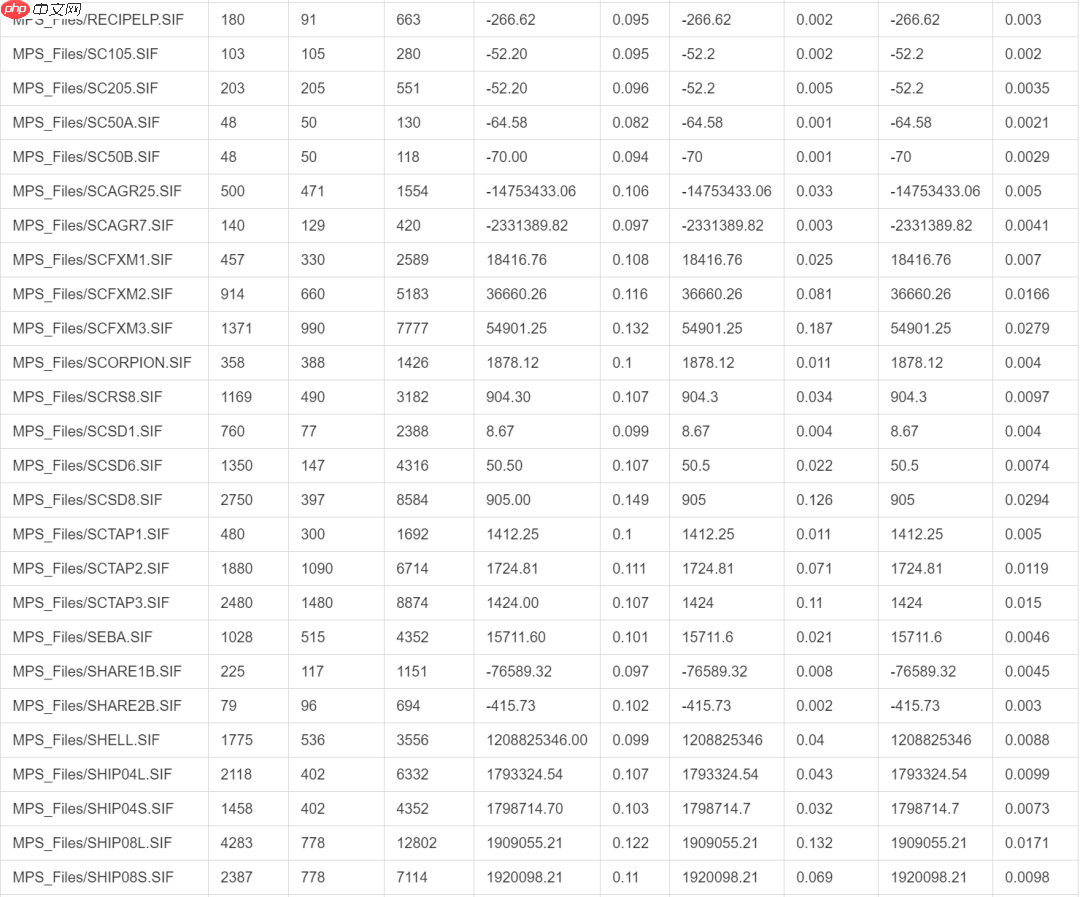

对于E226.SIF这个case,对比了几个solver,求解结果分别如下:
会不会是模型解析的问题呢?我把他们的模型打出来看过了,模型都是一样的,只是求解的结果不一样。
至于为什么会这样,看到网上一个比较有趣的回答:

MIP solvers work with floating-point data. For problems such as yours that have wide variations in the magnitude in the data, this leads to round-off errors. Any LP solver will have to perform operations on this data that can amplify the problem. In some cases like your problem, this can make the solver conclude that the problem is infeasible when it isn't. When you fix variables, the solver does fewer floating point operations.
the commercial solvers solvers like Gurobi or cplex generally do a better job of working with numerically difficult data like yours. Gurobi has a parameter QuadPrecision that works with higher-precision floating point numbers. Most solvers have a parameter that will make the solver work better with numerically-difficult data. For example LPSolve has a parameter epsint that will make it relax what the it considers an integer. The default for the parameter is 10e-7, so 0.9999999 would be considered to be an integer, but 0.9999998 would not be. You can make this value larger, but you risk receiving unacceptable results.
You are experiencing a leaky abstrction. Your problem is technically in the scope of Mixed-Integer Programming, but MIP solvers are not designed to solve it. Mixed Integer Programming is an NP-Hard problem. It is impossible to have a solver that works quickly and reliably on all inputs. MIP solvers try to work well on problems that come from diverse areas like portfolio optimization, supply chain planning, and network flows. They aren't designed to solve cryptology problems.
出处:https://stackoverflow.com/questions/16001462/solving-an-integer-linear-program-why-are-solvers-claiming-a-solvable-instance
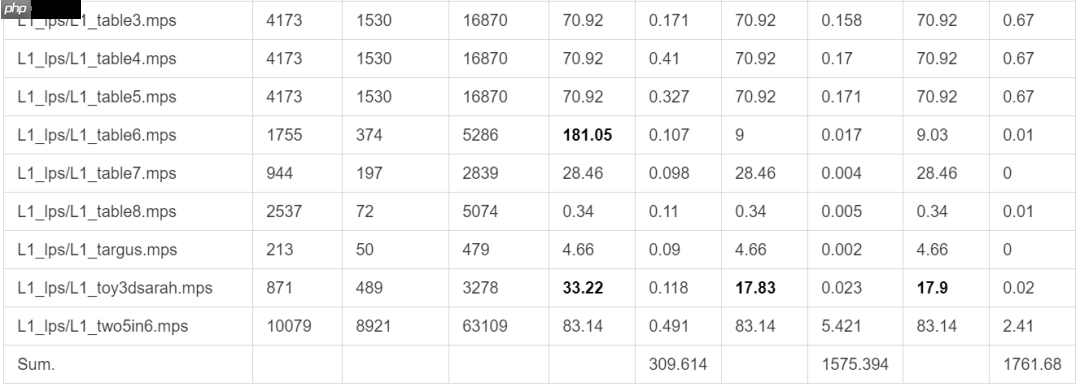
3.2 L1数据集共34个cases,初步观察有以下的结论:
lpsolve和clp差不多,cplex依然领先很多。有好几个cases,几个solver得出的解不一样,表中标粗的部分。
最后经过测试发现,CPLEX中的pre_solve有可能会影响到最后的结果,按理说不应该影响才是,摘一点官网的介绍:
Presolve consists in modifying the model to improve it so that it can be solved more efficiently.
CP Optimizer presolves the input model before search. Presolve consists in modifying the model to improve it so that it can be solved more efficiently. Presolve works by
simplifying the model by reducing linear constraints by removing redundancies and fixed expressions andstrengthening the model to achieve more domain reduction by aggregating constraints or factorizing common subexpressions.As a consequence, the overall engine memory consumption can increase because an internal model is created to perform the improvement operations
有可能是solver的一些bug。在lpsolve中也遇到过,用pre_solve以后居然直接说问题infeasible了???interesting。
04 Conclusion这里有份开源的榜单,里面测了更多的solver,数据也更加权威,可以看到有很多国产的solver在榜单中都取得了很不错的成绩,希望国产的MILP也快快提上日程。
http://plato.asu.edu/ftp/lpsimp.html
总结一下,作为开源免费的LP solver, clp是一个不错的选择,目前cylp也还在逐渐开发。Google的or tools没有测因为他们的python接口还没有很完善。lp_solve比较出名了,但是感觉还是不太稳定吧,帮助文档倒是写得不错。




