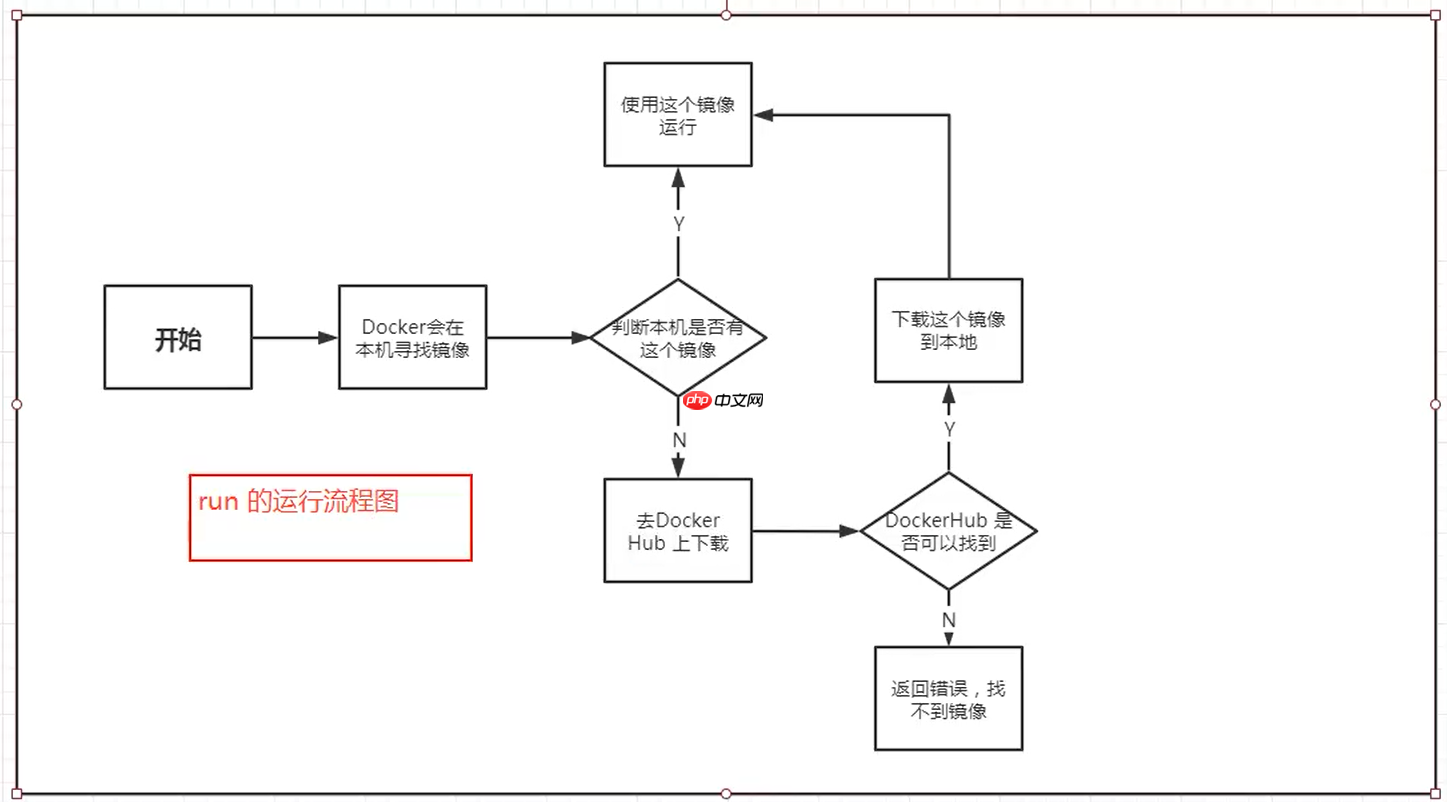
阅读量: 118
Docker的基本组成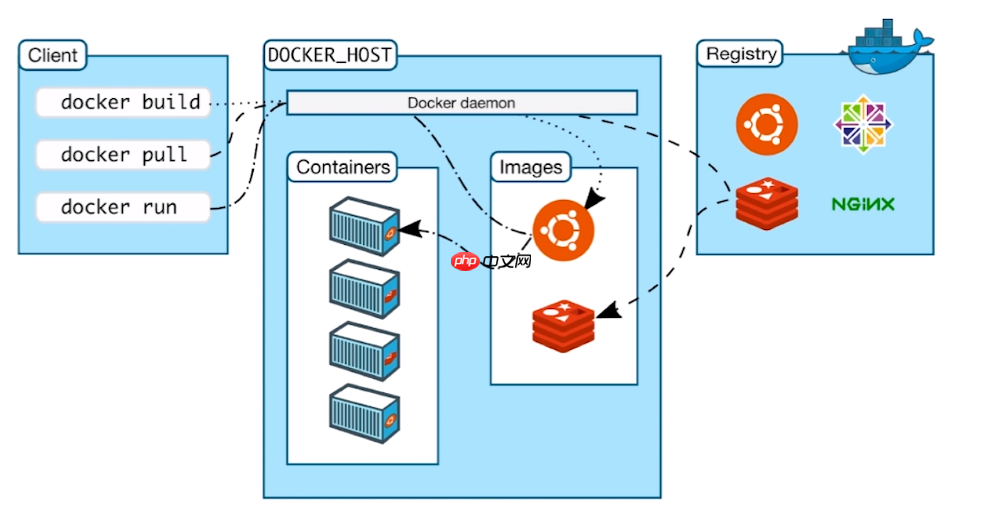
Docker镜像就好比是一个模板,可以通过这个模板来创建容器服务,通过这种技术可以创建多个容器(最终服务运行或者项目运行就是在容器中的)。
二、容器(container)Docker利用容器技术,独立运行一个或者一个组应用,通过镜像来创建的。其中:“启动、停止、删除、暂停”为基本的命令!
三、仓库(repository)仓库就是存放镜像的地方!
仓库分为公有仓库和私有仓库
Docker Hub默认是国外的!

<code class="javascript">$ sudo apt-get remove docker docker-engine docker.io containerd runc</code>2、更新 apt 包索引代码语言:javascript代码运行次数:0运行复制
<code class="javascript">$ sudo apt-get update</code>3、需要的安装包
安装 apt 依赖包,用于通过HTTPS来获取仓库:
代码语言:javascript代码运行次数:0运行复制<code class="javascript">$ sudo apt-get install \ apt-transport-https \ ca-certificates \ curl \ gnupg-agent \ software-properties-common</code>4、安装docker相关的服务代码语言:javascript代码运行次数:0运行复制
<code class="javascript">$ sudo add-apt-repository \ "deb [arch=amd64] https://mirrors.ustc.edu.cn/docker-ce/linux/ubuntu/ \ $(lsb_release -cs) \ stable"$ sudo apt-get update$ sudo apt-get install docker-ce docker-ce-cli containerd.io</code>5、检测Docker是否安装成功代码语言:javascript代码运行次数:0运行复制
<code class="javascript">$ sudo docker run hello-world</code>
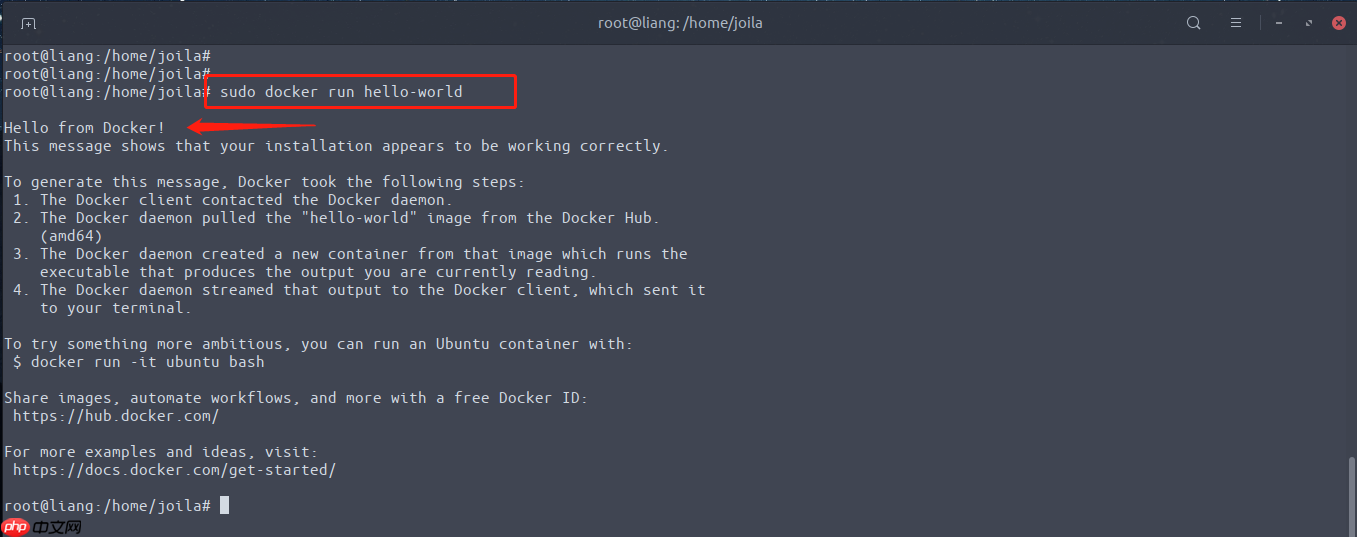
更多详细,请参考帮助文档:https://docs.docker.com/engine/install/
了解如何卸载Docker代码语言:javascript代码运行次数:0运行复制<code class="javascript">// 1、卸载软件包$ sudo apt-get remove docker docker-engine docker.io containerd runc// 2、删除资源(这个是docker的默认工作路径)$ sudo rm-rf /var/lib/docker</code>设置镜像加速
由于访问的镜像都是在国外,我们这里可以设置一些国内加速服务:
Docker中国区官方镜像https://registry.docker-cn.com网易http://hub-mirror.c.163.comustchttps://docker.mirrors.ustc.edu.cn中国科技大学https://docker.mirrors.ustc.edu.cn首页点击“创建我的容器镜像” 得到一个专属的镜像加速地址,类似于“https://1234abcd.mirror.aliyuncs.com”一、配置方式1、文件配置添加”https://registry.docker-cn.com” 到 registry-mirrors 数组
代码语言:javascript代码运行次数:0运行复制<code class="javascript">$ sudo vim /etc/docker/daemon.json { "registry-mirrors": ["https://registry.docker-cn.com"]}$ sudo systemctl restart docker.service</code>2、命令配置代码语言:javascript代码运行次数:0运行复制<code class="javascript">$ sudo dockerd --registry-mirror=https://registry.docker-cn.com</code>回顾镜像运行的流程