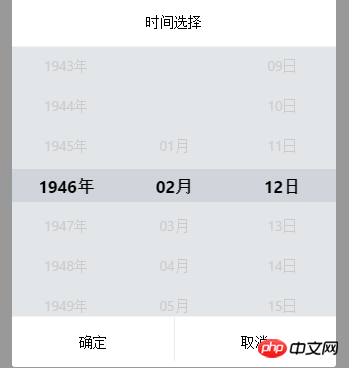
1.是一个在网上找的时间选择插件如图,点击日期弹出下面的框,在第一次启动ionic不在这个页面进行刷新$ionicScrollDelegate.getScrollPosition() 无法获取到高度,如果用了scrollTo方法,高度会固定到你直接跳转的高度,无论你如何拉动滑条都没法获取到高度。但是如果进行一次页面刷新就能获取到了,找到一个下午原因没找到,麻烦各位大大了。

2.用过resize()方法,但是貌似没什么效果。
3.代码很多:
(function () {
'use strict';
angular.module('CoderYuan', [])
.service('timePickerService', function () {
var _this = this;
//页面中选择器数量 default : 0
_this.globalId = 0;
return _this;
})
/*日期时间选择*/
.directive('timePicker', [
'$timeout',
'$compile', '$ionicScrollDelegate', '$ionicBackdrop', '$q', 'timePickerService',
function ($timeout, $compile, $ionicScrollDelegate, $ionicBackdrop, $q, timePickerService) {
return {
// template: '{{selectDateTime.show}}
',
restrict: 'AE',
replace: true,
scope: {
timePickerResult: '=', //双向绑定
loadDateTime: '=', // 用于从服务端加载(或其他方式加载时间,反正是延迟的就对了) 初始 时间日期数值 //要配合options 中的loadLazy 属性使用 如果默认时间是从服务端加载回来的
//要做如下设置 " +
"
" +
"
{{options.title}}
"
+ ""
+ "
" +
"
" + "" + "- {{year.text}}
" + "
" + "
" +
"" + "" + "- {{month.text}}
" + "
" + "
" +
"" + "" + "- {{date.text}}
" + "
" + "
" +
""
+ "" +
"" +
"" +
"" +
"";
var options = {
title: attrs.title || "时间选择",
height: 40,// 每个滑动 li 的高度 这里如果也配置的话 要修改css文件中的高度的定义
timeNum: parseInt(attrs.timenum) || 24,//可选时间数量
yearStart: (attrs.yearstart && parseInt(attrs.yearstart)) || dateTimeNow.getFullYear() - 80,//开始年份
yearEnd: (attrs.yearend && parseInt(attrs.yearend)) || dateTimeNow.getFullYear() , //结束年份
monthStart: 12,//开始月份
monthEnd: 1,//结束月份
DateTime: attrs.datetime && new Date(attrs.datetime) || dateTimeNow, //开始时间日期 不给默认是当天
timeSpan: attrs.timespan && parseInt(attrs.timespan) || 15, //时间间隔 默认 15分钟一个间隔 15/30
hideYear: attrs.hideyear || false, //选择器中隐藏年份选择栏
hideMoth: attrs.hidemoth || false,//选择器中隐藏月份选择栏
hideDate: attrs.hidedate || false,//选择器中隐藏日期选择栏
}
scope.options = options;
scope.yearScrollTimer = null; //年份滑动定时器
scope.monthScrollTimer = null; //月份滑动定时器
scope.dateScrollTimer = null; //日期滑动定时器
scope.dateList = [];
scope.yearList = [];
scope.monthList = [];
scope.selectDateTime = {
year: {item: null, index: 0},
month: {item: null, index: 0},
date: {item: null, index: 0},
show: ""
};
scope.specialDateTime = {
bigMoth: [1, 3, 5, 7, 8,10, 12],
isBigMonth: function (month) {
var length = this.bigMoth.length;
while (length--) {
if (this.bigMoth[length] == month) {
return true;
}
}
return false;
},
isLoopYear: function (year) { //是否是闰年
return (year % 4 == 0) && (year % 100 != 0 || year % 400 == 0);
}
};
//进行属性获取和初始化
scope.options = options;
init(options);
elm.on("click", function () {
show();
// scrollToElm(scope.yearScroll, scope.yearList[scope.selectDateTime.year.index - 3]);
// scrollToElm(scope.monthScroll, scope.monthList[scope.selectDateTime.month.index - 3]);
// scrollToElm(scope.dateScroll, scope.dateList[scope.selectDateTime.date.index - 3]);
$ionicScrollDelegate.resize();
});
//滑动Event
scope.scrollingEvent = function (type) {
var opEntity = getOperateEntity(type);
//当前存在滑动则取消
scope[opEntity.scrollTimer] && $timeout.cancel(scope[opEntity.scrollTimer]);
var posi = scope[opEntity.scrollHandler].getScrollPosition();
console.log(opEntity.scrollHandler+" "+scope+" "+scope[opEntity.scrollHandler]);
var index = Math.abs(Math.round(posi.top / scope.options.height));
console.log(index+" "+scope.options.height+" "+posi.top);
if (posi.top == index * scope.options.height) {
// console.log("meijinru gundong ");
updateSelect(index + 3, type);
} else {
// console.log("jinru gundong ");
scope[opEntity.scrollTimer] = $timeout(function () {
posi.top = index * 40;
updateSelect(index + 3, type);
scrollToPosi(scope[opEntity.scrollHandler], posi);
}, 200);
}
}
//点击Event
// scope.selectEvent = function (type, index) {
// var opEntity = getOperateEntity(type);
// if (index > 2 && index <= scope[opEntity.data].length - 3) {
// scrollToElm(scope[opEntity.scrollHandler], scope[opEntity.data][index - 3]);
// }
// }
//初始化
function init(options) {
initYear(options);
initMoth(options);
initDate(options);
tem = angular.element(tem);
$compile(tem)(scope);
angular.element(document.body).append(tem);
scope.yearScroll = $ionicScrollDelegate.$getByHandle("yearScroll_" + globalId);
scope.monthScroll = $ionicScrollDelegate.$getByHandle("monthScroll_" + globalId);
scope.dateScroll = $ionicScrollDelegate.$getByHandle("dateScroll_" + globalId);
setDateTimeShow(options.DateTime);
}
//从其他地方传来的日期初始化
function setDateTimeShow(datetime){
var year = datetime.getFullYear();
var month = prependZero(datetime.getMonth()+1,10);
var date = prependZero(datetime.getDate(),10);
scope.timePickerResult = year+"-"+month+"-"+date;
}
//年份初始化
function initYear(options) {
var defaultYear = options.DateTime.getFullYear();
var yearSpan = options.yearEnd - options.yearStart;
console.log(defaultYear+" "+yearSpan);
var text, data, top, item, defaultItem, defaultIndex;
console.log(options.height);
prependLi(scope.yearList, 3, "b");
for (var i = 0; i <= yearSpan; i++) {
text = options.yearStart + i + "年";
data = options.yearStart + i;
top = options.height + scope.yearList[scope.yearList.length - 1].top;
item = createDateTimeLi(0, top, data, data == defaultYear, text);
if (data == defaultYear) {
defaultItem = item;
defaultIndex = scope.yearList.length;
}
scope.yearList.push(item);
}
//设置默认选择
scope.selectDateTime.year.item = defaultItem;
scope.selectDateTime.year.index = defaultIndex;
prependLi(scope.yearList, 3, "e");
$ionicScrollDelegate.resize();
}
//月份初始化
function initMoth(options) {
var defaultMonth = options.DateTime.getMonth() + 1 == 0 ? 12 : prependZero(options.DateTime.getMonth() + 1, 10);
var text, data, original, top, item, defaultItem, defaultIndex;
prependLi(scope.monthList, 3, "b");
for (var i = 1; i <= 12; i++) {
original = i;
data = prependZero(i, 10);
text = prependZero(i, 10) + "月";
top = options.height + scope.monthList[scope.monthList.length - 1].top;
item = createDateTimeLi(0, top, data, data == defaultMonth, text);
if (data == defaultMonth) {
defaultItem = item;
defaultIndex = scope.monthList.length;
}
scope.monthList.push(item);
}
//设置默认选择
scope.selectDateTime.month.item = defaultItem;
scope.selectDateTime.month.index = defaultIndex;
prependLi(scope.monthList, 3, "e");
$ionicScrollDelegate.resize();
}
//日期初始化
function initDate(options) {
//开始时间
var defaultDate = prependZero(options.DateTime.getDate(), 10);
var text, data, top, item, defaultItem, defaultIndex;
var dateNum = getDateNum(options.DateTime.getFullYear(), options.DateTime.getMonth() + 1);
prependLi(scope.dateList, 3, "b")
for (var i = 1; i <= dateNum; i++) {
data = prependZero(i, 10);
text = prependZero(i, 10) + "日";
top = options.height + scope.dateList[scope.dateList.length - 1].top;
item = createDateTimeLi(0, top, data, data == defaultDate, text);
if (data == defaultDate) {
defaultItem = item;
defaultIndex = scope.dateList.length;
}
scope.dateList.push(item);
}
//设置默认选择
scope.selectDateTime.date.item = defaultItem;
scope.selectDateTime.date.index = defaultIndex;
prependLi(scope.dateList, 3, "e");
}
function prependZero(data, num) {
return data >= num ? data : "0" + data;
}
function createDateTimeLi(left, top, data, selected, text) {
var li = {left: left, top: top, data: data, selected: selected, text: text};
return li;
}
function prependLi(arr, num, loc) {
loc = loc || "b";
switch (loc) {
case "b":
for (var i = 0; i < num; i++) {
arr.push(createDateTimeLi(0, options.height * i, "", false, ""));
}
break;
case "e":
//最后那个li元素的 top
var lastPosiTop = arr[arr.length - 1].top;
for (var j = 0; j < num; j++) {
arr.push(createDateTimeLi(0, (options.height * (j + 1) + lastPosiTop), "", false, ""));
}
break;
}
}
//滑动到指定元素
function scrollToElm(scorllHandler, elm) {
$timeout(function(){scorllHandler.scrollTo(elm.left, elm.top, true)},2000);
}
//滑动到指定位置
function scrollToPosi(scorllHandler, posi) {
scorllHandler.scrollTo(posi.left, posi.top, true);
}
function updateSelect(index, type) {
switch (type) {
case "year":
//强制
$timeout(function () {
scope.selectDateTime.year.item.selected = false;
scope.yearList[index].selected = true;
scope.selectDateTime.year.item = scope.yearList[index];
scope.selectDateTime.year.index = index;
resettingDate(scope.selectDateTime.year.item.data, parseInt(scope.selectDateTime.month.item.data)); //年份变化 重置日期栏
},200);
break;
case "month":
//强制
$timeout(function () {
scope.selectDateTime.month.item.selected = false;
scope.monthList[index].selected = true;
scope.selectDateTime.month.item = scope.monthList[index];
scope.selectDateTime.month.index = index;
resettingDate(scope.selectDateTime.year.item.data, parseInt(scope.selectDateTime.month.item.data)); //月份变化 重置日期栏
});
break;
case "date":
$timeout(function () {
scope.selectDateTime.date.item.selected = false;
scope.dateList[index].selected = true;
scope.selectDateTime.date.item = scope.dateList[index];
scope.selectDateTime.date.index = index;
});
break;
}
}
//获取选中的datetime
function getSelectDateTime() {
var year, month, date, time;
for (var i = 0; i < scope.yearList.length; i++) {
if (scope.yearList[i].selected) {
year = scope.yearList[i].data;
scope.selectDateTime.year.item = scope.yearList[i];
scope.selectDateTime.year.index = i;
break;
}
}
for (var i = 0; i < scope.monthList.length; i++) {
if (scope.monthList[i].selected) {
month = scope.monthList[i].data;
scope.selectDateTime.month.item = scope.monthList[i];
scope.selectDateTime.month.index = i;
break;
}
}
for (var i = 0; i < scope.dateList.length; i++) {
if (scope.dateList[i].selected) {
date = scope.dateList[i].data;
scope.selectDateTime.date.item = scope.dateList[i];
scope.selectDateTime.date.index = i;
break;
}
}
if (!year) {
year = scope.selectDateTime.year.item.data;
}
if (!month) {
year = scope.selectDateTime.month.item.data;
}
if (!date) {
date = scope.selectDateTime.date.item.data;
}
var value = year + "-" + month + "-" + date ;
value = new Date(value);
return value;
}
//根据年份和月份计算日期数量
function getDateNum(year, month) {
var dateNum = 30;
if (scope.specialDateTime.isBigMonth(month)) { //大小月判断
dateNum++;
} else {
if (scope.specialDateTime.isLoopYear(year)) {
if (month == 2)
dateNum--;
} else {
if (month == 2)
dateNum -= 2;
}
}
return dateNum;
}
//重置日期选择栏数据
function resettingDate(year, month) {
var dateNum = getDateNum(year, month);
if (dateNum != scope.dateList.length - 6) { //数量变化 需要进行重置
var text, data, top, item, defaultItem, defaultIndex;
var refreshNum = dateNum - (scope.dateList.length - 6)
if (refreshNum > 0) {//追加日期数量
var lastData = scope.dateList[scope.dateList.length - 4];
for (var i = 1; i <= refreshNum; i++) {
data = lastData.data + i;
text = data + "日";
top = options.height + scope.dateList[scope.dateList.length - 4].top;
item = createDateTimeLi(0, top, data, false, text);
scope.dateList.splice(scope.dateList.length - 3, 0, item);
}
} else { //移除多余的日期数量
var refreshNum_ = Math.abs(refreshNum);
scope.dateList.splice(scope.dateList.length - 4 - refreshNum_ + 1, refreshNum_);
if (scope.selectDateTime.date.item.data > scope.dateList[scope.dateList.length - 4].data) {
scope.dateList[scope.dateList.length - 4].selected = true;
scope.selectDateTime.date.item = scope.dateList[scope.dateList.length - 4];
scope.selectDateTime.date.item.index = scope.dateList.length - 4;
scrollToElm(scope.dateScroll, scope.dateList[scope.selectDateTime.date.index - 3]);
}
}
}
}
function getOperateEntity(type) {
var entity = new Object();
var scrollTimer, scrollHandler, data, defaultSelected, selectedItem;
switch (type) {
case "year":
entity.scrollTimer = "yearScrollTimer";
entity.type = type;
entity.scrollHandler = "yearScroll";
entity.data = "yearList";
entity.defaultSelected = scope.selectDateTime.year.item.data;
entity.selectedItem = "year";
break;
case "month":
entity.scrollTimer = "monthScrollTimer";
entity.type = type;
entity.scrollHandler = "monthScroll";
entity.data = "monthList";
entity.defaultSelected = scope.selectDateTime.month.item.data;
entity.selectedItem = "month";
break;
case "date":
entity.scrollTimer = "dateScrollTimer";
entity.type = type;
entity.scrollHandler = "dateScroll";
entity.data = "dateList";
entity.defaultSelected = scope.selectDateTime.date.item.data;
entity.selectedItem = "date";
break;
}
return entity;
}
scope.ok = function () {
var datetime = getSelectDateTime();
setDateTimeShow(datetime);
hide();
}
scope.cancel = function () {
hide();
}
function show() {
$ionicBackdrop.retain();
tem.css("display", "block");
}
function hide() {
tem.css("display", "none");
$ionicBackdrop.release();
}
function remove() {
tem.remove();
}
scope.$on("$destroy", function () {
remove();
})
}
}
}
]);
})(window, document);html那边只是用了一下指令和设置了一下初始时间没有过多的操作。


Copyright 2014-2025 https://www.php.cn/ All Rights Reserved | php.cn | 湘ICP备2023035733号


 1
1 1260
1260





 收藏
收藏











1.Ionic如果发布成应用,本身Input是支持手机原生的DatePicker的。所以没有必要使用这个。
2.如果不想用原生picker或者想在网页上也能实现,官方已经提供ionic datepicker,或者NPM上的datepicker-for-ionic。
PS:原本是个平地,你非要挖坑自己跳下去,然后问别人怎么爬上来...网上随便抓个picker拿来就用,又要调兼容又要填坑,只是降低效率。Ionic 2已经自带DataPicker了。