扫码关注官方订阅号
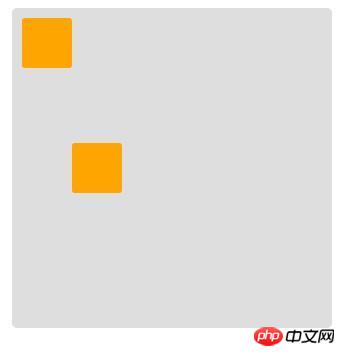
明显黄色小标标没有在中间
我怎么换方向 怎么调都没有真正的居中,怎么去布局它呢?
拥有18年软件开发和IT教学经验。曾任多家上市公司技术总监、架构师、项目经理、高级软件工程师等职务。 网络人气名人讲师,...
你可以先查下手册 align-self: center 是弹性盒子元素在该行的侧轴(纵轴)上居中放置。
align-self: center
水平居中的是justify-content:center
==================以下更新=========================
justify-content:center 是应用在容器上的,你想实现一个在开始位置,然后一个居中,那就自己实现,比如默认容器上 justify-content:flex-start 然后
justify-content:center
justify-content:flex-start
.item1:nth-child(2) { margin-left: calc(50% - 75px); /* 75px 是第一个盒子的宽度加上自身宽度的一半 */ }
基本是从书和教程抄的,你看看哪个适合你。
1
.flex-container { padding: 0; margin: 0; list-style: none; /* 定义流动方向,包装项目 *记住这是相同的: * flex-direction:row; * flex-wrap:wrap; */ display: -webkit-box; display: -moz-box; display: -ms-flexbox; display: -webkit-flex; display: flex; /* 分配剩余空间 */ -webkit-flex-flow: row wrap; justify-content: space-around; } .flex-item { background: black; padding: 2px; width: 100px; height: 100px; margin-top: 10px; }
2HTML:
<p class="flex-container"> <p></p> <p></p> <p></p> </p>
CSS:
* { margin: 0; padding: 0; } .flex-container { width: 960px; margin: 20px auto; min-height: 300px; font-weight: bold; display: -webkit-flex; display: flex; -webkit-flex-flow: row nowrap; flex-flow: row nowrap; -webkit-justify-content: space-around; justify-content: space-around; -webkit-align-items: stretch; align-items: stretch } .flex-container>p { padding: 10px } .flex-container>p:nth-child(1) { background-color: #e4f1e4; -webkit-flex: 1; flex: 1 } .flex-container>p:nth-child(2) { background-color: #d2d4eb; -webkit-flex: 1; flex: 1 } .flex-container>p:nth-child(3) { background-color: #f9e7e9; -webkit-flex: 1; flex: 1 }
我改了一下题主的代码、不知道题主是不是要这种效果
<style> .box1 { display: flex; width: 300px; height:300px; background: #dedede; border-radius: 5px; padding: 10px; margin: 10px; justify-content:center; } .item1 { width: 50px; height: 50px; background: orange; border-radius: 3px; } .item1{ align-self: center; } </style> <p class="box1"> <span class="item1"></span> </p>
微信扫码关注PHP中文网服务号
QQ扫码加入技术交流群
Copyright 2014-2025 https://www.php.cn/ All Rights Reserved | php.cn | 湘ICP备2023035733号
PHP学习
技术支持
返回顶部
你可以先查下手册
align-self: center是弹性盒子元素在该行的侧轴(纵轴)上居中放置。水平居中的是justify-content:center
==================以下更新=========================
justify-content:center是应用在容器上的,你想实现一个在开始位置,然后一个居中,那就自己实现,比如默认容器上
justify-content:flex-start然后基本是从书和教程抄的,你看看哪个适合你。
1

2
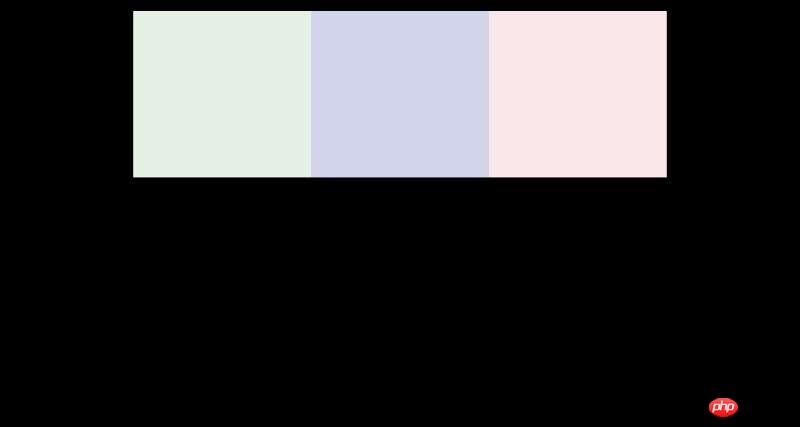
HTML:
CSS:
我改了一下题主的代码、不知道题主是不是要这种效果