html - css3中多列高度 统一
怪我咯
怪我咯 2017-04-17 11:34:22
[CSS3讨论组]


column-fill_CSS参考手册_web前端开发参考手册系列


column-fill:balance

This module describes multi-column layout in CSS. By using functionality described in this document, style sheets can declare that the content of an element is to be laid out in multiple columns.

This module describes multi-column layout in CSS. By using functionality described in this document
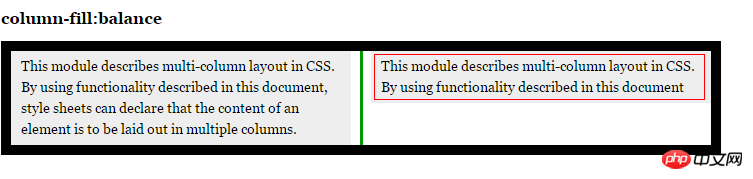
怎么使第2个p段落高度跟第一个一致,我这里已经加了column-fill:balance;属性。求高手分析下,谢谢!

怪我咯
怪我咯

走同样的路,发现不同的人生

全部回复(2)
高洛峰

display: block;
再设置宽高不好?

伊谢尔伦
<!DOCTYPE html>
<html lang="zh-cmn-Hans">
<head>
<meta charset="utf-8" />
<title>column-fill_CSS参考手册_web前端开发参考手册系列</title>
<meta name="author" content="Joy Du(飘零雾雨), dooyoe@gmail.com, www.doyoe.com" />
<style>
body{font:14px/1.5 georgia,serif,sans-serif;}
p{margin:0;padding:5px 10px;background:#eee;}
h1{margin:10px 0;font-size:16px;}
.test{
    width:700px;
    border:10px solid #000;
    -moz-column-count:2;
    -moz-column-gap:20px;
    -moz-column-rule:3px solid #090;
    -moz-column-fill:balance;
    -webkit-column-count:2;
    -webkit-column-gap:20px;
    -webkit-column-rule:3px solid #090;
    -webkit-column-fill:balance;
    column-count:2;
    column-gap:20px;
    column-rule:3px solid #090;
    column-fill:balance;
}
</style>
</head>
<body>
<h1>column-fill:balance</h1>
<p class="test">
    这个是column要解决的CSS问题,也算是column真正使用的领域;这个是column要解决的CSS问题,也算是column真正使用的领域;这个是column要解决的CSS问题,也算是column真正使用的领域;这个是column要解决的CSS问题,也算是column真正使用的领域;这个是column要解决的CSS问题,也算是column真正使用的领域;这个是column要解决的CSS问题,也算是column真正使用的领域;这个是column要解决的CSS问题,也算是column真正使用的领域;这个是column要解决的CSS问题,也算是column真正使用的领域;这个是column要解决的CSS问题,也算是column真正使用的领域;这个是column要解决的CSS问题,也算是column真正使用的领域;这个是column要解决的CSS问题,也算是column真正使用的领域;
</p>
</body>
</html>

应对您的解决方案:

<!DOCTYPE html>
<html lang="zh-cmn-Hans">
<head>
<meta charset="utf-8" />
<title>column-fill_CSS参考手册_web前端开发参考手册系列</title>
<meta name="author" content="Joy Du(飘零雾雨), dooyoe@gmail.com, www.doyoe.com" />
<style>
body{font:14px/1.5 georgia,serif,sans-serif;}
p{margin:0;padding:5px 10px;background:#eee;}
h1{margin:10px 0;font-size:16px;}
.test{
    width:700px;
    border:10px solid #000;
    -moz-column-count:2;
    -moz-column-gap:20px;
    -moz-column-rule:3px solid #090;
    -moz-column-fill:balance;
    -webkit-column-count:2;
    -webkit-column-gap:20px;
    -webkit-column-rule:3px solid #090;
    -webkit-column-fill:balance;
    column-count:2;
    column-gap:20px;
    column-rule:3px solid #090;
    column-fill:balance;
}
.test p{
    -moz-column-break-before:always;
    -webkit-column-break-before:always;
    column-break-before:always;
    min-height:6em;
}
</style>
</head>
<body>
<h1>column-fill:balance</h1>
<p class="test">
    <p>This module describes multi-column layout in CSS. By using functionality described in this document, style sheets can declare that the content of an element is to be laid out in multiple columns.</p>
    <p>This module describes multi-column layout in CSS. By using functionality described in this document</p>
</p>
</body>
</html>

觉得建议您先想一下column的出现时为了解决什么问题的;起码不是替代float之类的老标准的;如果像您这样使用也算一种自找苦吃;

热门教程
更多>
最新下载
更多>
网站特效
网站源码
网站素材
前端模板
关于我们 免责申明 举报中心 意见反馈 讲师合作 广告合作 最新更新 English
php中文网:公益在线php培训,帮助PHP学习者快速成长!
关注服务号 技术交流群
PHP中文网订阅号
每天精选资源文章推送
PHP中文网APP
随时随地碎片化学习

Copyright 2014-2025 https://www.php.cn/ All Rights Reserved | php.cn | 湘ICP备2023035733号