
Linux的find命令用法有:1、查找当前路径名字叫“hello.txt”的文件,用法为“find ./ -name 文件名全程”;2、查找根目录名字叫“hello.txt”的文件,用法为“find ./ -name 文件名|xargs rm";3、查找删除名为“hello.txt”文件,用法为“find ./ -name 文件名|xargs rm”。

详细的了解一下find命令用法及参数吧。
准备条件:
Centos7.9的操作系统的服务器一台;
Xshell终端已经链接了该服务器;
1、查找当前路径名字叫“hello.txt”的文件;
用法:find ./ -name 文件名全程
例如:find ./ -name hello.txt
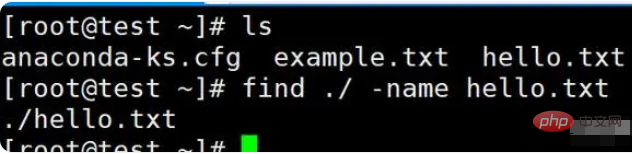
批量查找名为hello的文件:
find ./ -name hel*

第1章Linux入门 1-1操作系统的特性 1-2安装设置 1-2-1硬盘分区 1-2-2设置LILO 1-2-3网络地址和时区设置 l-2-4设置系统管理员及一般用户的帐号密码 1-2-5系统安全认证 l-2-6选取安装套件 1-2-7设置显示卡及测试Xwindows l-2-8开始安装套件 l-3常用命令 l-4网络基本设
 471
471

“*”为模糊匹配

2、查找根目录名字叫“hello.txt”的文件;
用法:find / -name 文件名全程
例如:find / -name hello.txt

3、查找删除名为“hello.txt”文件;
用法:find ./ -name 文件名|xargs rm
例如:find ./ -name hello.txt|xargs rm
以上就是Linux 的find命令怎么用的详细内容,更多请关注php中文网其它相关文章!

每个人都需要一台速度更快、更稳定的 PC。随着时间的推移,垃圾文件、旧注册表数据和不必要的后台进程会占用资源并降低性能。幸运的是,许多工具可以让 Windows 保持平稳运行。

Copyright 2014-2025 https://www.php.cn/ All Rights Reserved | php.cn | 湘ICP备2023035733号


 159
159









 收藏
收藏













