
在HTML中,可以使用type属性将密码隐藏起来,只需要给input元素添加“type="password"”代码即可。type属性规定input元素的类型,当值为password时,表示定义密码字段。该字段中的字符被掩码。
本教程操作环境:windows7系统、CSS3&&HTML5版、Dell G3电脑。
input标签用于搜集用户信息。 根据不同的 type 属性值,输入字段拥有很多种形式。输入字段可以是文本字段、复选框、掩码后的文本控件、单选按钮、按钮等等。
type 属性规定 input 元素的类型,值为password是,可以将密码隐藏
语法:
<input type="password" name="你需要的名称">
type用来指定input的属性,name用来指定该表单项的标示
立即学习“前端免费学习笔记(深入)”;
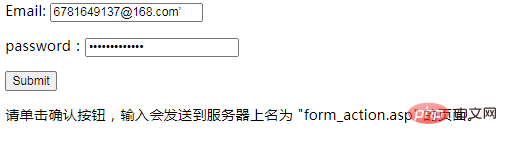
实例:
<html>
<body>

<form action="/example/html/form_action.asp" method="get">
  <p>Email: <input type="text" name="email" /></p>
  <p>password:<input type="password" name="password" /></p>
                    <div class="aritcle_card">
                        <a class="aritcle_card_img" href="/ai/948">
                            <img src="https://img.php.cn/upload/ai_manual/001/503/042/68b6d1bfbc739395.png" alt="Type Studio">
                        </a>
                        <div class="aritcle_card_info">
                            <a href="/ai/948">Type Studio</a>
                            <p>一个视频编辑器,提供自动转录、自动生成字幕、视频翻译等功能</p>
                            <div class="">
                                <img src="/static/images/card_xiazai.png" alt="Type Studio">
                                <span>61</span>
                            </div>
                        </div>
                        <a href="/ai/948" class="aritcle_card_btn">
                            <span>查看详情</span>
                            <img src="/static/images/cardxiayige-3.png" alt="Type Studio">
                        </a>
                    </div>

  <input type="submit" value="Submit" />
</form>

<p>请单击确认按钮,输入会发送到服务器上名为 "form_action.asp" 的页面。</p>

</body>
</html>效果:
扩展:
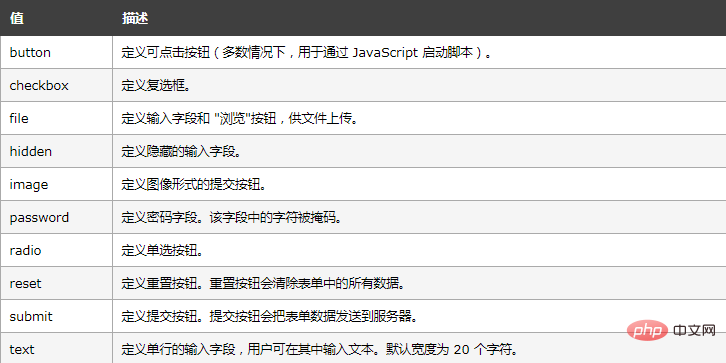
type属性值
推荐学习:html视频教程
以上就是html怎么把密码隐藏起来的详细内容,更多请关注php中文网其它相关文章!

HTML怎么学习?HTML怎么入门?HTML在哪学?HTML怎么学才快?不用担心,这里为大家提供了HTML速学教程(入门课程),有需要的小伙伴保存下载就能学习啦!

Copyright 2014-2025 https://www.php.cn/ All Rights Reserved | php.cn | 湘ICP备2023035733号


 872
872




 收藏
收藏













