
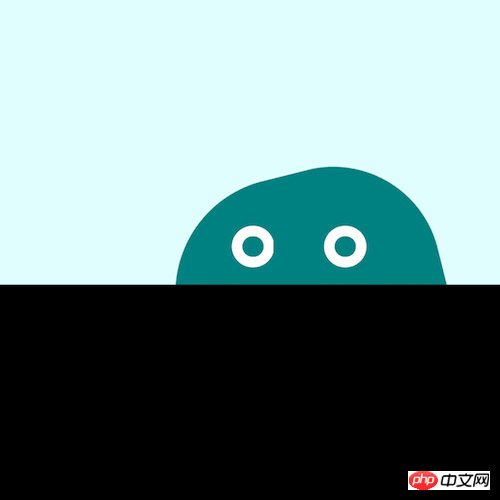
本篇文章给大家带来的内容是关于如何使用纯css实现徘徊的果冻怪兽,有一定的参考价值,有需要的朋友可以参考一下,希望对你有所帮助。
https://github.com/comehope/front-end-daily-challenges
定义 dom,容器中包含 2 个元素,分别代表怪兽的身体和眼睛:
<p class="monster">
    <span class="body"></span>
    <span class="eyes"></span>
</p>设置背景色:
body {
    margin: 0;
    height: 100vh;
    background-color: black;
}设置前景色:
立即学习“前端免费学习笔记(深入)”;
.monster {
    width: 100vw;
    height: 50vh;
    background-color: lightcyan;
}画出怪兽的身体:
.monster {
    position: relative;
}

.body {
    position: absolute;
    width: 32vmin;
    height: 32vmin;
    background-color: teal;
    border-radius: 43% 40% 43% 40%;
    bottom: calc(-1 * 32vmin / 2 - 4vmin);
}定义怪兽眼睛所在的容器:
.eyes {
    width: 24vmin;
    height: 5vmin;
    position: absolute;
    bottom: 2vmin;
    left: calc(32vmin - 24vmin - 2vmin);
}用伪元素画出怪兽的眼睛:
.eyes::before,
.eyes::after {
    content: '';
    position: absolute;
    width: 5vmin;
    height: 5vmin;
    border: 1.25vmin solid white;
    box-sizing: border-box;
    border-radius: 50%;
}

.eyes::before {
    left: 4vmin;
}

.eyes::after {
    right: 4vmin;
}为怪兽定义轻轻跳起的动画,结合后面的动画效果,让它具有果冻的弹性:
.body {
    animation:
        bounce 1s infinite alternate;
}

@keyframes bounce {
    to {
        bottom: calc(-1 * 32vmin / 2 - 2vmin);
    }
}让怪兽的身体转动起来:
@keyframes wave {
    to {
        transform: rotate(360deg);
    }
}让怪兽徘徊行走:
.monster {
    overflow: hidden;
}

.body {
    left: -2vmin;
    animation:
        wander 5s linear infinite alternate,
        wave 3s linear infinite,
        bounce 1s infinite alternate;
}

.eyes {
    animation: wander 5s linear infinite alternate;
}

@keyframes wander {
    to {
        left: calc(100% - 32vmin + 2vmin);
    }
}最后,让怪兽的眼睛眨一眨:
.eyes::before,
.eyes::after {
    animation: blink 3s infinite linear;
}

@keyframes blink {
    4%, 10%, 34%, 40% {
        transform: scaleY(1);
    }

    7%, 37% {
        transform: scaleY(0);
    }
}大功告成!
相关推荐:
以上就是如何使用纯CSS实现徘徊的果冻怪兽(附源码)的详细内容,更多请关注php中文网其它相关文章!

每个人都需要一台速度更快、更稳定的 PC。随着时间的推移,垃圾文件、旧注册表数据和不必要的后台进程会占用资源并降低性能。幸运的是,许多工具可以让 Windows 保持平稳运行。

 广告
广告Copyright 2014-2025 https://www.php.cn/ All Rights Reserved | php.cn | 湘ICP备2023035733号


 709
709








 收藏
收藏













