
这篇文章主要介绍了vue和react等项目中更简单的实现展开收起更多等效果示例,具有一定的参考价值,感兴趣的小伙伴们可以参考一下
前言
本文题目中虽然写有vue和react,但是并非vue和react相关知识,而是最基本的html5和css3的一些知识,之所以写vue,是因为我最近项目中用到了类似效果,我用vue相关知识实现并不雅观,用html5和css3实现,则更加完美。
项目案例
项目中有如下效果:
立即学习“前端免费学习笔记(深入)”;
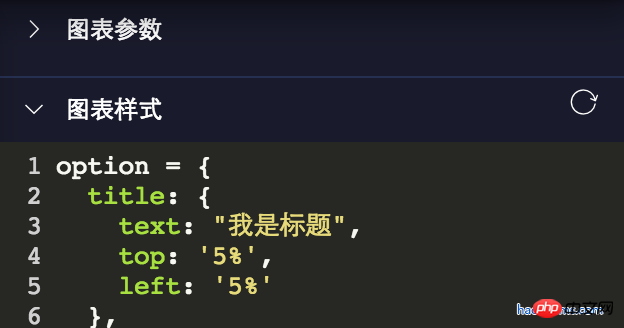
好多展开收起,对于这个的实现,我一开始用了vue一些比较挫的dom操作,就是父元素toggleClass一个类名,进行子元素的显示和隐藏。
由于这个方法是通用方法,项目中好多地方使用,代码大概如下:
toggleShow() {
 let target = window.event.srcElement;
 if (target.nodeName == "SPAN") {
  target.parentNode.parentNode.classList.toggle("toggleclass");
  target.classList.toggle("el-icon-arrow-right");
 } else {
  target.parentNode.classList.toggle("toggleclass");
  target.children[0].classList.toggle("el-icon-arrow-right");
 }
}这样写,既不友好,后期又难以维护。最近重构项目的时候,把这些地方都重构了,用了今天介绍的方法!更多重构要点,请点击vue项目重构技术要点 这篇文章。
html5和css3实现展开收起
代码如下:
<details class="haorooms" open>
  <summary>图表参数</summary>
  <content>这里是包含的p等其他展示元素</content>
</details>
css代码
.haorooms{position:relative}
.haorooms summary{
  -webkit-user-select: none;
  -moz-user-select: none;
  -ms-user-select: none;
  user-select: none;
  outline: 0;
}
/* 自定义的三角 */
.haorooms summary::after {
  content: '';
  position: absolute;
  left:0;
  top:0;
  width: 15px; height: 15px;
  background: url(./haorooms.png) no-repeat; /* 自定义的三角图片 */
  background-size: 100% 100%;
  transition: transform .2s;
}
.haorooms:not([open]) summary::after {
  transform: rotate(90deg);
}
/* 隐藏默认三角 */
.haorooms ::-webkit-details-marker {
  display: none;
}
.haorooms ::-moz-list-bullet {
  font-size: 0;
}代码解释
html5的detail和summary本身就是一个展开收起的效果。假如不了解, 可以查看 。
隐藏默认三角如下:
.haorooms ::-webkit-details-marker {
  display: none;
}
.haorooms ::-moz-list-bullet {
  font-size: 0;
}details和summary的ui优化
张鑫旭有篇文章,对details和summary介绍的很详细
对应其UI的优化,主要有如下几个方面:
1、小三角的优化,包括颜色、隐藏、位置、替换。
2、outline轮廓的去除
小三角颜色修改
Countly 是一个实时的、开源的移动分析应用,通过收集来自手机的数据,并将这些数据通过可视化效果展示出来以分析移动应用的使用和最终用户的行为。截至2019年,支持超过2500个网站,16000个移动应用程序和多个桌面应用程序。它从移动,桌面,Web收集数据包括Apple Watch,TvOS和其他互联网连接设备的应用程序,并将这些信息可视化以分析应用程序使用情况和最终用户行为。
 0
0

.haorooms ::-webkit-details-marker {
  color: gray;
}
.haorooms ::-moz-list-bullet {
  color: gray;
}小三角位置修改-右侧显示
.haorooms summary {
  width: -moz-fit-content;
  width: fit-content;
  direction: rtl;
}
.haorooms ::-webkit-details-marker {
  direction: ltr;
}
.haorooms ::-moz-list-bullet {
  direction: ltr;
}outline轮廓的去除
我上面用的是
-webkit-user-select: none;
    -moz-user-select: none;
    -ms-user-select: none;
    user-select: none;
outline: 0;这样对无障碍访问非常不友好,优化方案可以看张鑫旭大神的做法。
details和summary其他应用
1、更多效果
<details>
  <summary>
    <p>测试内容测试内容</p>
    <p class="more">
      <p>haorooms测试内容测试内容...</p>
    </p>
    <a>更多</a>
  </summary>
</details>css代码
::-webkit-details-marker {
  display: none;
}
::-moz-list-bullet {
  font-size: 0;
  float: left;
}
summary {
  user-select: none;
  outline: 0;
}
.more {
  display: none;
}
[open] .more {
  display: block;
}
[open] summary a {
  font-size: 0;
}
[open] summary a::before {
  content: '收起';
  font-size: 14px;
}2、悬浮菜单效果
CSS代码:
/* 隐藏默认三角 */
::-webkit-details-marker {
  display: none;
}
::-moz-list-bullet {
  font-size: 0;
  float: left;
}
summary {
  display: inline-block;
  padding: 5px 28px;
  text-indent: -15px;
  user-select: none;
  position: relative;
  z-index: 1;
}
summary::after {
  content: '';
  position: absolute;
  width: 12px; height: 12px;
  margin: 4px 0 0 .5ch;
  background: url(./arrow-on.svg) no-repeat;
  background-size: 100% 100%;
  transition: transform .2s;
}
[open] summary,
summary:hover {
  background-color: #fff;
  box-shadow: inset 1px 0 #ddd, inset -1px 0 #ddd;
}
[open] summary::after {
  transform: rotate(180deg);
}
.box {
  position: absolute;
  border: 1px solid #ddd;
  background-color: #fff;
  min-width: 100px;
  padding: 5px 0;
  margin-top: -1px;
}
.box a {
  display: block;
  padding: 5px 10px;
  color: inherit;
}
.box a:hover {
  background-color: #f0f0f0;
}
.box sup {
  position: absolute;
  color: #cd0000;
  font-size: 12px;
  margin-top: -.25em;
}HTML代码:
<p class="bar">
  <details>
    <summary>我的消息</summary>
    <p class="box">
      <a href>我的回答<sup>12</sup></a>
      <a href>我的私信</a>
      <a href>未评价订单<sup>2</sup></a>
      <a href>我的关注</a>
    </p>
  </details>
</p>
<p>这里放一段文字表明上面的是悬浮效果。</p>3、树形菜单效果
CSS代码:
/* 隐藏默认三角 */
::-webkit-details-marker {
  display: none;
}
::-moz-list-bullet {
  font-size: 0;
  float: left;
}
details {
  padding-left: 20px;
}
summary::before {
  content: '';
  display: inline-block;
  width: 12px; height: 12px;
  border: 1px solid #999;
  background: linear-gradient(to right, #999, #999) no-repeat center, linear-gradient(to top, #999, #999) no-repeat center;
  background-size: 2px 10px, 10px 2px;
  vertical-align: -2px;
  margin-right: 6px;
  margin-left: -20px;
}
[open] > summary::before {
  background: linear-gradient(to right, #999, #999) no-repeat center;
  background-size: 10px 2px;
}HTML代码:
<details>
  <summary>我的视频</summary>
  <details>
    <summary>爆肝工程师的异世界狂想曲</summary>
    <p>tv1-720p.mp4</p>
    <p>tv2-720p.mp4</p>
    ...
    <p>tv10-720p.mp4</p>
  </details>
  <details>
    <summary>七大罪</summary>
    <p>七大罪B站00合集.mp4</p>
  </details>
  <p>珍藏动漫网盘地址.txt</p>
  <p>我们的小美好.mp4</p>
</details>上面是我整理给大家的,希望今后会对大家有帮助。
相关文章:
以上就是使用vue和react来实现展开收起等效果的详细内容,更多请关注php中文网其它相关文章!

每个人都需要一台速度更快、更稳定的 PC。随着时间的推移,垃圾文件、旧注册表数据和不必要的后台进程会占用资源并降低性能。幸运的是,许多工具可以让 Windows 保持平稳运行。

 广告
广告
 收藏
收藏
 收藏
收藏
 收藏
收藏
Copyright 2014-2025 https://www.php.cn/ All Rights Reserved | php.cn | 湘ICP备2023035733号


 595
595














