这篇文章介绍的内容是关于html 学习笔记二 ,有着一定的参考价值,现在分享给大家,有需要的朋友可以参考一下
1、表格
<table border="1">
<tr>
<td>row 1, cell 1</td>
<td>row 1, cell 2</td>
</tr>
<tr>
<td>row 2, cell 1</td>
<td>row 2, cell 2</td>
</tr>
</table>
登录后复制
...... 定义行,...... 定义列表头表示:
<tr>
<th>heading</th>
</tr>
登录后复制
如果要表示一个空行,可以用 空格占位符填充。
立即学习 “前端免费学习笔记(深入) ”;
2、列表
第一种:无序列表——
,使用数字标记<ol>
<li>Coffee</li>
<li>Milk</li>
</ol> 登录后复制
或者使用
……表示数字从50开始标记。第三种:自定义列表——
<dl>
<dt>Coffee</dt>
<dd>Black hot drink</dd>
<dt>Milk</dt>
<dd>White cold drink</dd>
</dl>
登录后复制
说明:
表示列表开始
表示列表项
表示列表项的定义注意,列表项内部可以使用段落、换行符、图片、链接以及其他列表等等。
3、HTML类
对HTML进行分类,能为元素的类定义CSS样式。
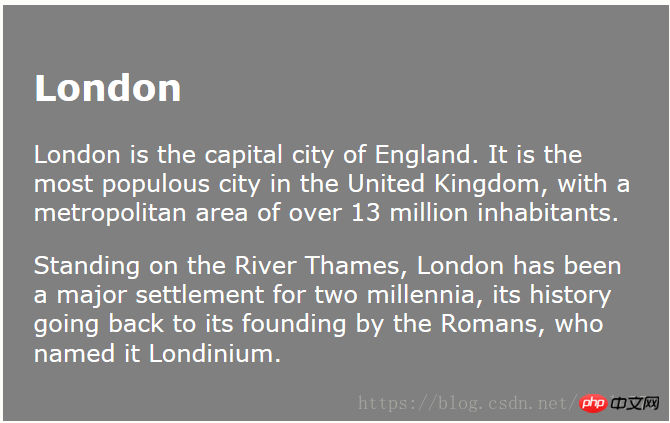
对相同的类设置相同的样式。
<!DOCTYPE html>
<html>
<head>
<style>
.cities {
    background-color:black;
    color:white;
    margin:20px;
    padding:20px;
}
</style>
</head>

<body>

<p class="cities">
<h2>London</h2>
<p>
London is the capital city of England.
It is the most populous city in the United Kingdom,
with a metropolitan area of over 13 million inhabitants.
</p>
</p>

</body>
</html>
登录后复制
是块级元素,用于设置相同类。
是行内元素。
<html>
<head>
<style>
  span.red {color:red;}
</style>
</head>
<body>

<h1>My <span class="red">Important</span> Heading</h1>

</body>
</html>
登录后复制
4、HTML网站布局
(1)使用
进行布局
<head>
<style>
#header {
    background-color:black;
    color:white;
    text-align:center;
    padding:5px;
}
#nav {
    line-height:30px;
    background-color:#eeeeee;
    height:300px;
    width:100px;
    float:left;
    padding:5px;
}
#section {
    width:350px;
    float:left;
    padding:10px;
}
#footer {
    background-color:black;
    color:white;
    clear:both;
    text-align:center;
   padding:5px;
}
</style>
</head>
登录后复制
使用
(2)HTML5提供的新语义元素
定义导航链接的容器
定义独立的自包含文章
定义内容之外的内容(侧栏)(?还没搞清楚这是什么)
定义额外的细节
定义details元素的标题
5、框架
通过使用框架,可以在同一个浏览器窗口显示不止一个页面。每份HTML文档成为一个框架,并且每个框架都独立与其他的框架。
(1)框架结构标签
每个
定义列一系列行、列rows/columns的值规定了每行或每列占据屏幕的面积
<frameset cols="25%,75%">
   <frame src="frame_a.htm">
   <frame src="frame_b.htm">
</frameset>
登录后复制
(2)其他
一般地,一个框架有可见边框,用户可以拖动边框来改变它的大小。若想避免,可以在
不能将
标签与标签同时使用。不过添加包含一段文本的标签,就必须将这段文字嵌套于标签内。<div class="code" style="position:relative; padding:0px; margin:0px;"><pre class="brush:html;toolbar:false;">&lt;html&gt;
&lt;frameset cols=&quot;25%,50%,25%&quot;&gt;
&lt;frame src=&quot;/example/html/frame_a.html&quot;&gt;
&lt;frame src=&quot;/example/html/frame_b.html&quot;&gt;
&lt;frame src=&quot;/example/html/frame_c.html&quot;&gt;
&lt;noframes&gt;
&lt;body&gt;您的浏览器无法处理框架!&lt;/body&gt;
&lt;/noframes&gt;
&lt;/frameset&gt;
&lt;/html&gt;</pre><div class="contentsignin">登录后复制</div></div><p><frame>中可以使用name锚属性,来转跳到指定节。<br></p>
<p><iframe>用于在网页内显示网页</iframe></p>
<p>用法:<iframe src="URL" width="200" height="200" frameborder="0"></iframe></p>
<p>iframe可用作链接的目标(target),该链接的target属性必须引用iframe的name属性。</p><div class="code" style="position:relative; padding:0px; margin:0px;"><pre class="brush:html;toolbar:false;">&lt;iframe src=&quot;demo_iframe.htm&quot; name=&quot;iframe_a&quot;&gt;&lt;/iframe&gt;
&lt;p&gt;&lt;a href=&quot;http://www.w3school.com.cn&quot; target=&quot;iframe_a&quot;&gt;W3School.com.cn&lt;/a&gt;&lt;/p&gt;</pre><div class="contentsignin">登录后复制</div></div><p>注意,由于链接的目标匹配iframe的名称,所以链接会在iframe中打开。</p>
<p>相关推荐:</p>
<p><a href="http://www.php.cn/div-tutorial-393431.html" target="_self">HTML学习笔记一</a></p>
以上就是HTML学习笔记二的详细内容,更多请关注php中文网其它相关文章!







 341
341








 收藏
收藏













