这篇文章主要介绍了c#实现的windows登录功能,结合实例形式分析了简单的windows图形化登陆功能实现技巧,需要的朋友可以参考下
本文实例讲述了C#实现的WINDOWS登录功能。分享给大家供大家参考,具体如下:
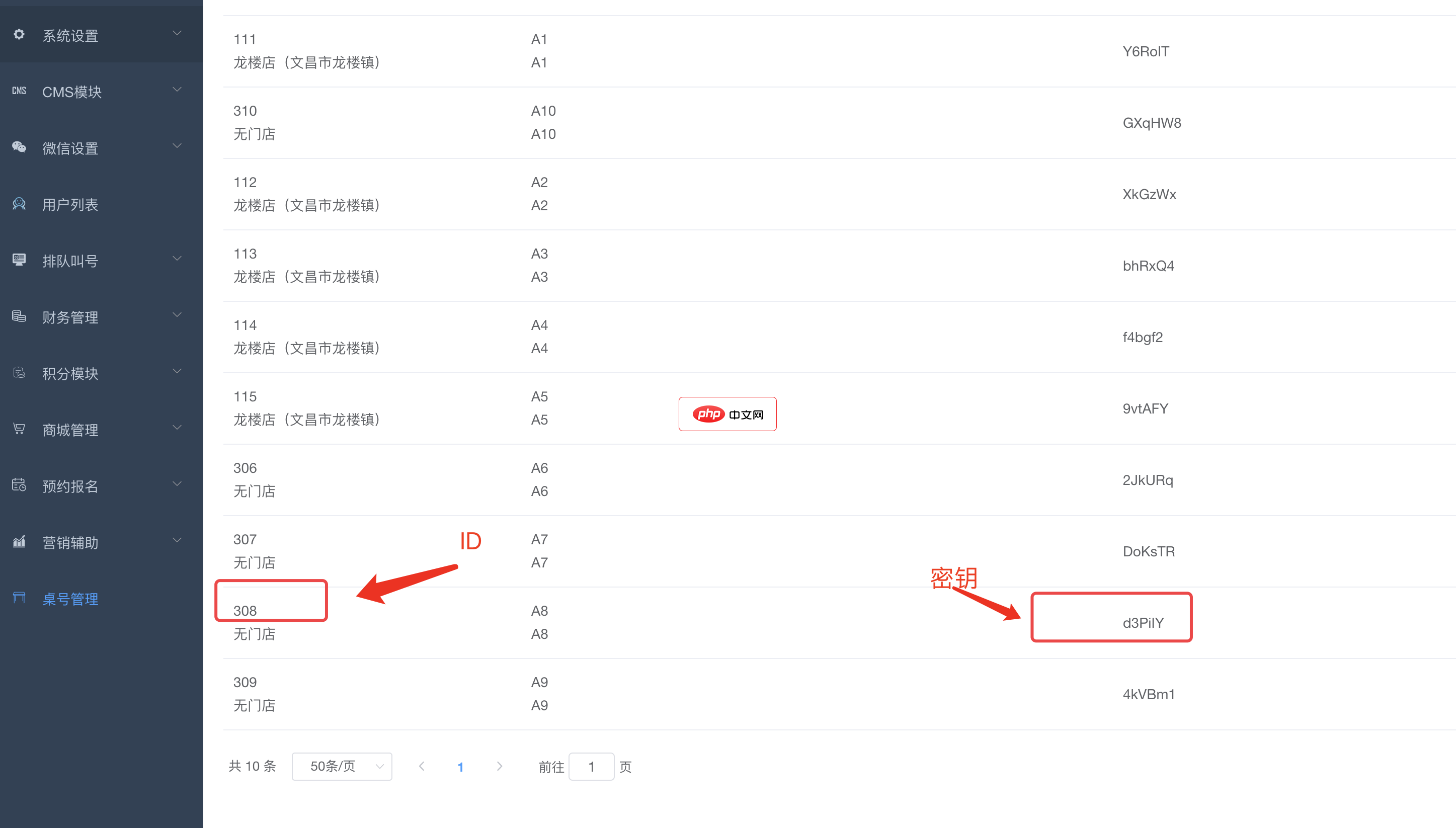
bee餐饮点餐外卖小程序是针对餐饮行业推出的一套完整的餐饮解决方案,实现了用户在线点餐下单、外卖、叫号排队、支付、配送等功能,完美的使餐饮行业更高效便捷!功能演示:1、桌号管理登录后台,左侧菜单 “桌号管理”,添加并管理你的桌号信息,添加以后在列表你将可以看到 ID 和 密钥,这两个数据用来生成桌子的二维码2、生成桌子二维码例如上面的ID为 308,密钥为 d3PiIY,那么现在去左侧菜单微信设置
 1
1

using System;
using System.Data;
using System.Configuration;
using System.Collections;
using System.Web;
using System.Web.Security;
using System.Web.UI;
using System.Web.UI.WebControls;
using System.Web.UI.WebControls.WebParts;
using System.Web.UI.HtmlControls;
using System.Runtime.InteropServices;
using System.Security.Principal;
namespace yutest
{
  public partial class _Default : System.Web.UI.Page
  {
    [DllImport("advapi32.dll", CharSet = CharSet.Auto)]
    public static extern bool LogonUser(string lpszUsername,string lpszDomain,string lpszPassword,int dwLogonType,int dwLogonProvider,out int phToken);
    protected void Page_Load(object sender, EventArgs e)
    {
      string aaa = System.Threading.Thread.CurrentPrincipal.Identity.Name;
      //string bbb = System.Threading.Thread.CurrentPrincipal.Identity.n;
      //System.Environment.UserDomainName
      //System.Environment.UserName
    }
    protected void Button1_Click(object sender, System.EventArgs e)
    {
      //验证用户的输入是否为空
      if (tDomain.Text.Trim().Length > 0 && tUserName.Text.Trim().Length > 0&& tPassword.Text.Trim().Length > 0)
      {  //调用函数Login(string UserName, string Password, string Domain)
        //实现Windows登录
        if (Login(tUserName.Text.Trim(), tPassword.Text.Trim(),tDomain.Text.Trim()) == true)
        {  //显示登录成功信息
          LoginMsg.Text = "登录成功!!!";
          LoginMsg.Visible = true;
          return;
        }
        else
        {  //显示登录失败信息
          LoginMsg.Text = "登录失败,请重新输入用户名称、密码及其系统域名!!!";
          LoginMsg.Visible = true;
        }
      }
    }
    private bool Login(string UserName, string Password, string Domain)
    {    //获取用户名称和系统域名
      string text1 = Domain.Trim();
      string text2 = UserName.Trim();
      text2 = text2.Replace("/", @"");   //处理符号“/”
      int num1 = text2.IndexOf('\');    //获取符号“”的索引
      if (num1 != -1)
      {  //格式化用户名称和系统域名
        text1 = text2.Substring(0, num1);
        text2 = text2.Substring(num1 + 1);
      }
      else
      {  //格式化用户名称和系统域名
        num1 = text2.IndexOf('@');
        if (num1 != -1)
        {
          text1 = text2.Substring(num1 + 1);
          text2 = text2.Substring(0, num1);
        }
      }
      //调用函数AuthenticateUser()实现用户Windows登录
      return AuthenticateUser(text2, Password.Trim(), text1);
    }
    private bool AuthenticateUser(string UserName, string Password,string Domain)
    {       //设置用户登录成功的标志
      bool flag1 = false;
      try
      {
        int num1; IntPtr ptr1;
        //调用Windows登录的API
        if (!LogonUser(UserName, Domain, Password, 2, 0, out num1))
        {  //返回登录结果
          return flag1;
        }
        //调用.NET中的Windows登录
        ptr1 = new IntPtr(num1);
        WindowsIdentity identity1 = new WindowsIdentity(ptr1);
        WindowsPrincipal principal1 = new WindowsPrincipal(identity1);
        HttpContext.Current.User = principal1;
        //设置系统Cookie和重定向页面
        FormsAuthentication.SetAuthCookie(principal1.Identity.Name, false);
        FormsAuthentication.RedirectFromLoginPage(UserName, false);
        flag1 = true;
      }
      catch (Exception) { }
      return flag1;
    }
  }
}以上就是Windows登录功能使用C#实现的示例的详细内容,更多请关注php中文网其它相关文章!

每个人都需要一台速度更快、更稳定的 PC。随着时间的推移,垃圾文件、旧注册表数据和不必要的后台进程会占用资源并降低性能。幸运的是,许多工具可以让 Windows 保持平稳运行。

 广告
广告Copyright 2014-2025 https://www.php.cn/ All Rights Reserved | php.cn | 湘ICP备2023035733号


 901
901



 收藏
收藏