
项目结构如下
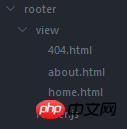
代码如下

【router.js】
// 加载所需模块var http = require('http');var url = require('url');var fs = require('fs');var host = '127.0.0.1';var port = 8080;

http.createServer(function(req,res){var pathname = url.parse(req.url).pathname;
    console.log('Request for ' + pathname + ' received.');function showPaper(path,status){var content = fs.readFileSync(path);
            res.writeHead(status, { 'Content-Type': 'text/html;charset=utf-8' });
            res.write(content);
            res.end();
        }switch(pathname){//'首页'case '/':case '/home':
            showPaper('./view/home.html',200);break;//'about页'case '/about':
            showPaper('./view/about.html',200);   break;//'404页'default:
            showPaper('./view/404.html',404);break;
    }
}).listen(port, host);【404.html】
bee餐饮点餐外卖小程序是针对餐饮行业推出的一套完整的餐饮解决方案,实现了用户在线点餐下单、外卖、叫号排队、支付、配送等功能,完美的使餐饮行业更高效便捷!功能演示:1、桌号管理登录后台,左侧菜单 “桌号管理”,添加并管理你的桌号信息,添加以后在列表你将可以看到 ID 和 密钥,这两个数据用来生成桌子的二维码2、生成桌子二维码例如上面的ID为 308,密钥为 d3PiIY,那么现在去左侧菜单微信设置
 1
1

<!DOCTYPE html>
<html lang="en">
<head>
    <meta charset="UTF-8">
    <title>Document</title>
</head>
<body>
404
</body>
</html>【about.html】
<!DOCTYPE html>
<html lang="en">
<head>
    <meta charset="UTF-8">
    <title>Document</title>
</head>
<body>about
</body>
</html>【home.html】
<!DOCTYPE html>
<html lang="en">
<head>
    <meta charset="UTF-8">
    <title>Document</title>
</head>
<body>home
</body>
</html>


以上就是nodeJS实现路由功能实例详解的详细内容,更多请关注php中文网其它相关文章!

Copyright 2014-2025 https://www.php.cn/ All Rights Reserved | php.cn | 湘ICP备2023035733号


 267
267




 收藏
收藏













