
本文主要介绍了html的select控件美化以及js实现select选择功能的方法步骤。具有很好的参考价值。下面跟着小编一起来看下吧
CSS:
.p-select
{
  border: solid 1px #999;
  height: 40px;
  line-height: 40px;
  cursor: default;
}
.p-select-text
{
  float: left;
  background-color: #fff;
  height: 100%;
  word-break: keep-all;
  overflow: hidden;
  cursor: default;
}
  .p-select-text > p
  {
    padding: 3px;
    line-height: 34px;
  }
.p-select-arrow
{
  background-color: #fff;
  float: right;
  width: 40px;
  height: 100%;
  color: #999;
  cursor: default;
}
  .p-select-arrow > p
  {
    border: solid 1px #999;
    margin: 2px;
    height: 34px;
    background-color: #f2f2f2;
    text-align: center;
    line-height: 34px;
    font-size: 22px;
  }
.p-select-list
{
  position: absolute;
  float: left;
  top: 100px;
  left: 100px;
  border: solid 1px #999;
  max-height: 300px;
  overflow: auto;
  background-color: #9f9;
  display: none;
  z-index: 9100;
}
  .p-select-list .p-select-item:nth-child(2n+1)
  {
    background-color: #fff;
  }
.p-select-item
{
  height: 50px;
  line-height: 50px;
  padding-left: 3px;
  padding-right: 3px;
  background-color: #f2f2f2;
  word-break: keep-all;
  overflow: hidden;
  cursor: default;
}
.p-select-item-hover
{
  background-color: #3399ff!important;
}
.p-select-selected
{
  background-color: #3399ff !important;
}
启科网络商城系统由启科网络技术开发团队完全自主开发,使用国内最流行高效的PHP程序语言,并用小巧的MySql作为数据库服务器,并且使用Smarty引擎来分离网站程序与前端设计代码,让建立的网站可以自由制作个性化的页面。 系统使用标签作为数据调用格式,网站前台开发人员只要简单学习系统标签功能和使用方法,将标签设置在制作的HTML模板中进行对网站数据、内容、信息等的调用,即可建设出美观、个性的网站。
 0
0

立即学习“前端免费学习笔记(深入)”;
JS:
//2015年2月8日
//select美化
var pSelectListIndex = 0;
$(function () {
  initpSelect();
});
//初始化select美化插件
function initpSelect() {
  $(".p-select-target").each(function () {
    pSelectListIndex++;
    var select = $(this);
    if (select.css("display") == "none") {
      return;
    }
    else {
      select.css("display", "none")
    }
    if (select.next("p").find(".p-select-list").length == 0) {
      select.after('<p><p class="p-select"><p class="p-select-text"><p></p></p><p class="p-select-arrow"><p>∨</p></p></p></p>');
      $("body").append('<p class="p-select-list p-select-list-' + pSelectListIndex + '"></p>');
    }
    var p = select.next("p");
    var pText = p.find(".p-select-text");
    var pSelect = p.find(".p-select");
    var pArrow = p.find(".p-select-arrow");
    var list = $(".p-select-list-" + pSelectListIndex);
    function updateText(item) {
      pText.find("p").html(item.html());
    }
    select.find("option").each(function () {
      var option = $(this);
      var text = option.html();
      var value = option.attr("value");
      list.append('<p class="p-select-item" value="' + value + '">' + text + '</p>');
      list.find(".p-select-item:last").click(function () {
        var item = $(this);
        var value = item.attr("value");
        select.val(value);
        select.change();
        list.find(".p-select-selected").removeClass("p-select-selected");
        item.addClass("p-select-selected");
        updateText(item);
        list.hide();
      });
      list.find(".p-select-item:last").mouseenter(function () {
        var item = $(this);
        var selectedMark = list.find(".p-select-selected");
        selectedMark.removeClass("p-select-selected");
        selectedMark.addClass("p-select-selected-mark");
        list.find(".p-select-item-hover").removeClass("p-select-item-hover");
        item.addClass("p-select-item-hover");
        updateText(item);
      });
    });
    list.mouseleave(function () {
      var selectedMark = list.find(".p-select-selected-mark");
      if (list.find(".p-select-selected").length == 0) {
        selectedMark.addClass("p-select-selected");
        updateText(selectedMark);
      }
      selectedMark.removeClass("p-select-selected-mark");
      list.find(".p-select-item-hover").removeClass("p-select-item-hover");
    });
    if (select.attr("width")) {
      pSelect.width(select.attr("width") - 2);
      pText.width(pSelect.width() - pArrow.width());
      if (select.attr("width") > list.width()) {
        list.width(pSelect.width());
      }
    }
    p.keydown(function (e) {
      list.find(".p-select-selected-mark").removeClass("p-select-selected-mark");
      list.find(".p-select-item-hover").addClass("p-select-selected");
      list.find(".p-select-item-hover").removeClass("p-select-item-hover");
      if (e.keyCode == 40) {
        var currentSelected = list.find(".p-select-selected");
        var nextSelected = currentSelected.next(".p-select-item");
        if (nextSelected.length == 0) {
          nextSelected = list.find(".p-select-item:first");
          nextSelected.addClass("p-select-selected");
          currentSelected.removeClass("p-select-selected");
          list.scrollTop(0);
        } else {
          nextSelected.addClass("p-select-selected");
          currentSelected.removeClass("p-select-selected");
          var i = 0;
          while (nextSelected.position().top < 0
            || nextSelected.position().top > list.height() - nextSelected.height()) {
            list.scrollTop(list.scrollTop() + nextSelected.height());
            if (i++ > 100) break;
          }
        }
        updateText(nextSelected);
        return false;
      }
      if (e.keyCode == 38) {
        var currentSelected = list.find(".p-select-selected");
        var nextSelected = currentSelected.prev(".p-select-item");
        if (nextSelected.length == 0) {
          nextSelected = list.find(".p-select-item:last");
          nextSelected.addClass("p-select-selected");
          currentSelected.removeClass("p-select-selected");
          list.scrollTop(list.find(".p-select-item").length * nextSelected.height());
        }
        else {
          nextSelected.addClass("p-select-selected");
          currentSelected.removeClass("p-select-selected");
          var i = 0;
          while (nextSelected.position().top < 0
            || nextSelected.position().top > list.height() - nextSelected.height()) {
            list.scrollTop(list.scrollTop() - nextSelected.height());
            if (i++ > 100) break;
          }
        }
        updateText(nextSelected);
        return false;
      }
      if (e.keyCode == 13) {
        var selectedItem = list.find(".p-select-selected");
        var value = selectedItem.attr("value");
        select.val(value);
        list.hide();
        select.change();
      }
    });
    pSelect.click(function () {
      $("a").bind("click", function () {
        $("a").unbind("click");
        list.hide();
      });
      if (list.css("display") == "none") {
        list.show();
      }
      else {
        list.hide();
      }
      list.css("top", pSelect.offset().top + pSelect.height() + 1);
      list.css("left", pSelect.offset().left);
      if ($(window).scrollTop() + $(window).height() < list.offset().top + list.height() + 2) {
        list.css("top", $(window).scrollTop() + $(window).height() - list.height() - 2);
      }
      if (list.width() < pSelect.width()) {
        list.width(pSelect.width());
      }
      var currentSelected = list.find(".p-select-selected");
      if (currentSelected.position().top > list.height() - currentSelected.height()) {
        list.scrollTop(currentSelected.position().top - currentSelected.height() * 2);
      }
      return false;
    });
    $("html,body").bind("click", function () {
      list.hide();
    });
    list.click(function () {
      return false;
    });
    function initSelect() {
      list.find(".p-select-selected").removeClass("p-select-selected");
      var matchItem = list.find(".p-select-item[value='" + select.val() + "']");
      if (matchItem.length > 0) {
        matchItem.addClass("p-select-selected");
        updateText(matchItem);
      }
    }
    initSelect();
    select.change(function () {
      initSelect();
    });
  }); // $(".p-select-target").each
}立即学习“前端免费学习笔记(深入)”;
如何使用:
第1步、引用CSS和JS:
<link type="text/css" href="~/scripts/pSelect/pSelect.css" rel="external nofollow" rel="external nofollow" rel="stylesheet" />
<script type="text/javascript" src="~/scripts/jquery-1.7.1.min.js"></script>
<script type="text/javascript" src="~/scripts/pSelect/pSelect.js"></script>
立即学习“前端免费学习笔记(深入)”;
第2步、给select控件加上class="p-select-target" width="200",其中class="p-select-target"是必须的,width="200"是可选的。完整HTML代码如下:
<link type="text/css" href="~/scripts/pSelect/pSelect.css" rel="external nofollow" rel="external nofollow" rel="stylesheet" />
<script type="text/javascript" src="~/scripts/jquery-1.7.1.min.js"></script>
<script type="text/javascript" src="~/scripts/pSelect/pSelect.js"></script>

<p style="border: solid 1px #f99; margin: 50px; padding: 50px;">
  <select name="sel" class="p-select-target" width="200" >
    <option value="1">中国</option>
    <option value="2">美国</option>
    <option value="3">法国</option>
    <option value="4">英国</option>
    <option value="5">俄罗斯</option>
    <option value="6">德国</option>
    <option value="7">韩国</option>
    <option value="8">日本</option>
    <option value="9">印度</option>
    <option value="10">巴西</option>
    <option value="11">意大利</option>
    <option value="12">这个国家的名称很长很长很长很长很长很长很长很长</option>
    <option value="13">瑞士</option>
    <option value="14">越南</option>
    <option value="15">缅甸</option>
    <option value="16">泰国</option>
    <option value="17">加拿大</option>
    <option value="18" selected="selected">南非</option>
    <option value="19">澳大利亚</option>
    <option value="20">新西兰</option>
    <option value="21">挪威</option>
    <option value="22">巴勒斯坦</option>
    <option value="23">以色列</option>
    <option value="24">新加坡</option>
    <option value="25">马来西亚</option>
    <option value="26">波兰</option>
    <option value="27">国家27</option>
    <option value="28">国家28</option>
    <option value="29">国家29</option>
    <option value="30">国家30</option>
    <option value="31">国家31</option>
    <option value="32">国家32</option>
    <option value="33">国家33</option>
    <option value="34">国家34</option>
    <option value="35">国家35</option>
    <option value="36">国家36</option>
    <option value="37">国家37</option>
    <option value="38">国家38</option>
  </select>
</p>
<p style="border: solid 1px #f99; margin: 50px; padding: 50px; margin-top: 700px; margin-bottom: 700px;">
  <select name="sel" class="p-select-target" width="200" >
    <option value="1">中国</option>
    <option value="2">美国</option>
    <option value="3">法国</option>
    <option value="4">英国</option>
    <option value="5">俄罗斯</option>
    <option value="6" selected="selected">德国</option>
    <option value="7">韩国</option>
    <option value="8">日本</option>
  </select>
</p>立即学习“前端免费学习笔记(深入)”;
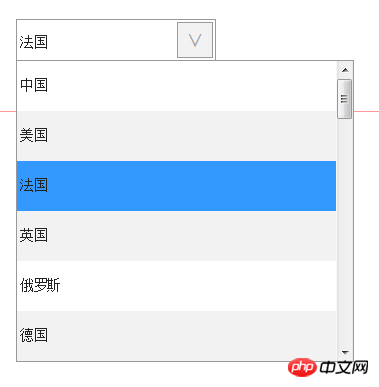
效果图:
滚动条美化版:
CSS:
.p-select
{
  border: solid 1px #999;
  height: 40px;
  line-height: 40px;
  cursor: default;
}

.p-select-text
{
  float: left;
  background-color: #fff;
  height: 100%;
  word-break: keep-all;
  overflow: hidden;
  cursor: default;
  font-size: 16px;
  font-family: 微软雅黑,雅黑;
}

  .p-select-text > p
  {
    padding: 3px;
    line-height: 34px;
  }

.p-select-arrow
{
  background-color: #fff;
  float: right;
  width: 40px;
  height: 100%;
  color: #999;
  cursor: default;
}

  .p-select-arrow > p
  {
    border: solid 1px #999;
    margin: 2px;
    height: 34px;
    background-color: #f2f2f2;
    text-align: center;
    line-height: 34px;
    font-size: 22px;
  }

.p-select-list
{
  position: absolute;
  float: left;
  top: 100px;
  left: 100px;
  border: solid 1px #999;
  max-height: 300px;
  overflow: hidden;
  background-color: #9f9;
  display: none;
  z-index: 9100;
  font-size: 16px;
  font-family: 微软雅黑,雅黑;
}

  .p-select-list .p-select-item:nth-child(2n+1)
  {
    background-color: #fff;
  }

.p-select-item
{
  height: 50px;
  line-height: 50px;
  padding-left: 3px;
  padding-right: 3px;
  background-color: #f2f2f2;
  word-break: keep-all;
  overflow: hidden;
  cursor: default;
}

.p-select-item-hover
{
  background-color: #3399ff!important;
}

.p-select-selected
{
  background-color: #3399ff !important;
}
.p-select-list-scrollbar
{
  position: absolute;
  float: left;
  border: solid 1px #999;
  border-left: 0;
  background-color: #e8e8ec;
  width: 40px;
  height: 300px;
  display: none;
  cursor: default;
  z-index: 9101;
}
.p-select-scrollbar-up
{
  border-bottom: solid 1px #fff;
  height: 39px;
  font-size: 22px;
  line-height: 39px;
  color: #999;
  background-color: #cdcdcd;
  text-align: center;
}
.p-select-scrollbar-pos
{
  height: 220px;
}
  .p-select-scrollbar-pos > p:last-child
  {
    width: 40px;
    height: 20px;
    background-color: #cdcdcd;
  }
.p-select-scrollbar-down
{
  border-top: solid 1px #fff;
  height: 39px;
  font-size: 22px;
  line-height: 39px;
  color: #999;
  background-color: #cdcdcd;
  text-align: center;
}立即学习“前端免费学习笔记(深入)”;
JS:
//2015年2月8日
//select美化
var pSelectListIndex = 0;

$(function () {
  initpSelect();
});
//初始化select美化插件
function initpSelect() {
  $(".p-select-target").each(function () {
    pSelectListIndex++;
    var select = $(this);
    if (select.css("display") == "none") {
      return;
    }
    else {
      select.css("display", "none")
    }
    if (select.next("p").find(".p-select-list").length == 0) {
      select.after('<p><p class="p-select"><p class="p-select-text"><p></p></p><p class="p-select-arrow"><p>∨</p></p></p></p>');
      $("body").append('<p class="p-select-list p-select-list-' + pSelectListIndex + '"></p>');
    }
    var p = select.next("p");
    var pText = p.find(".p-select-text");
    var pSelect = p.find(".p-select");
    var pArrow = p.find(".p-select-arrow");
    var list = $(".p-select-list-" + pSelectListIndex);
    var scrollbar;
    var scrollbarPosTop;
    var scrollbarPos;
    var scrollbarScrollHeight;
    var scrollbarUp;
    var scrollbarDown;
    var itemHeight;
    var itemCount;
    var itemsHeight;
    var scrollFlag = false;
    function updateText(item) {
      pText.find("p").html(item.html());
    }
    select.find("option").each(function () {
      var option = $(this);
      var text = option.html();
      var value = option.attr("value");
      list.append('<p class="p-select-item" value="' + value + '">' + text + '</p>');
      list.find(".p-select-item:last").click(function () {
        var item = $(this);
        var value = item.attr("value");
        select.val(value);
        select.change();
        list.find(".p-select-selected").removeClass("p-select-selected");
        item.addClass("p-select-selected");
        updateText(item);
        list.hide();
        if (scrollbar) scrollbar.hide();
      });
      list.find(".p-select-item:last").mouseenter(function () {
        var item = $(this);
        var selectedMark = list.find(".p-select-selected");
        selectedMark.removeClass("p-select-selected");
        selectedMark.addClass("p-select-selected-mark");
        list.find(".p-select-item-hover").removeClass("p-select-item-hover");
        item.addClass("p-select-item-hover");
        updateText(item);
      });
    });
    list.mouseleave(function () {
      var selectedMark = list.find(".p-select-selected-mark");
      if (list.find(".p-select-selected").length == 0) {
        selectedMark.addClass("p-select-selected");
        updateText(selectedMark);
      }
      selectedMark.removeClass("p-select-selected-mark");
      list.find(".p-select-item-hover").removeClass("p-select-item-hover");
    });
    if (select.attr("width")) {
      pSelect.width(select.attr("width") - 2);
      pText.width(pSelect.width() - pArrow.width());
    }
    else {
      pText.width(list.width());
    }
    p.keydown(function (e) {
      list.find(".p-select-selected-mark").removeClass("p-select-selected-mark");
      list.find(".p-select-item-hover").addClass("p-select-selected");
      list.find(".p-select-item-hover").removeClass("p-select-item-hover");
      if (e.keyCode == 40) {
        var currentSelected = list.find(".p-select-selected");
        var nextSelected = currentSelected.next(".p-select-item");
        if (nextSelected.length == 0) {
          nextSelected = list.find(".p-select-item:first");
          nextSelected.addClass("p-select-selected");
          currentSelected.removeClass("p-select-selected");
          list.scrollTop(0);
        } else {
          nextSelected.addClass("p-select-selected");
          currentSelected.removeClass("p-select-selected");
          var i = 0;
          while (nextSelected.position().top < 0
            || nextSelected.position().top > list.height() - nextSelected.height()) {
            list.scrollTop(list.scrollTop() + nextSelected.height());
            if (i++ > 100) break;
          }
        }
        updateText(nextSelected);
        updateScrollbarPos();
        return false;
      }
      if (e.keyCode == 38) {
        var currentSelected = list.find(".p-select-selected");
        var nextSelected = currentSelected.prev(".p-select-item");
        if (nextSelected.length == 0) {
          nextSelected = list.find(".p-select-item:last");
          nextSelected.addClass("p-select-selected");
          currentSelected.removeClass("p-select-selected");
          list.scrollTop(list.find(".p-select-item").length * nextSelected.height());
        }
        else {
          nextSelected.addClass("p-select-selected");
          currentSelected.removeClass("p-select-selected");
          var i = 0;
          while (nextSelected.position().top < 0
            || nextSelected.position().top > list.height() - nextSelected.height()) {
            list.scrollTop(list.scrollTop() - nextSelected.height());
            if (i++ > 100) break;
          }
        }
        updateText(nextSelected);
        updateScrollbarPos();
        return false;
      }
      if (e.keyCode == 13) {
        var selectedItem = list.find(".p-select-selected");
        var value = selectedItem.attr("value");
        select.val(value);
        list.hide();
        if (scrollbar) scrollbar.hide();
        select.change();
      }
    });
    itemHeight = list.find(".p-select-item:first").height();
    itemCount = list.find(".p-select-item").length;
    itemsHeight = itemHeight * itemCount;
    if (itemsHeight > list.height()) {
      $("body").append('<p class="p-select-list-scrollbar p-select-list-scrollbar-' + pSelectListIndex + '"><p class="p-select-scrollbar-up">∧</p><p class="p-select-scrollbar-pos"><p></p><p></p></p><p class="p-select-scrollbar-down">∨</p></p>');
    }
    scrollbar = $(".p-select-list-scrollbar-" + pSelectListIndex);
    scrollbarPosTop = scrollbar.find(".p-select-scrollbar-pos").find("p:first");
    scrollbarPos = scrollbar.find(".p-select-scrollbar-pos").find("p:last");
    scrollbarScrollHeight = scrollbarPos.parent().height() - scrollbarPos.height();
    scrollbarUp = scrollbar.find(".p-select-scrollbar-up");
    scrollbarDown = scrollbar.find(".p-select-scrollbar-down");
    scrollbar.click(function () {
      return false;
    });
    scrollbarUp.click(function () {
      list.scrollTop(list.scrollTop() - list.height());
      updateScrollbarPos();
    });
    scrollbarDown.click(function () {
      list.scrollTop(list.scrollTop() + list.height());
      updateScrollbarPos();
    });
    scrollbar.mousedown(function () {
      scrollFlag = true;
    });
    scrollbar.mouseup(function () {
      scrollFlag = false;
    });
    scrollbar.mousemove(function (e) {
      if (scrollFlag) {
        var pos = e.pageY - scrollbar.offset().top - 50;
        if (pos <= scrollbarScrollHeight) {
          scrollbarPosTop.height(pos);
          list.scrollTop(scrollbarPosTop.height() / scrollbarScrollHeight * (itemsHeight - list.height()));
        }
      }
    });
    function updateScrollbarPos() {
      scrollbarPosTop.height(scrollbarScrollHeight * list.scrollTop() * 1.0 / (itemsHeight - list.height()));
      if (list.scrollTop() + list.height() == itemsHeight) {
        scrollbarPosTop.height(scrollbarScrollHeight);
      }
    }
    pSelect.click(function () {
      $("a").bind("click", function () {
        $("a").unbind("click");
        list.hide();
        scrollbar.hide();
      });
      if (list.css("display") == "none") {
        list.show();
        scrollbar.show();
      }
      else {
        list.hide();
        scrollbar.hide();
      }
      list.css("top", pSelect.offset().top + pSelect.height() + 1);
      list.css("left", pSelect.offset().left);
      var listOffsetTop = list.offset().top;
      if ($(window).scrollTop() + $(window).height() < list.offset().top + list.height() + 2) {
        list.css("top", $(window).scrollTop() + $(window).height() - list.height() - 2);
      }
      if (list.width() < pSelect.width()) {
        if (!(itemsHeight > list.height())) {
          list.width(pSelect.width());
        }
        else {
          list.width(pSelect.width() - scrollbar.width());
        }
      }
      scrollbar.find(".p-select-scrollbar-pos").find("p:first").height(0);
      scrollbar.css("left", pSelect.offset().left + list.width() + 1);
      scrollbar.css("top", pSelect.offset().top + pSelect.height() + 1);
      if ($(window).scrollTop() + $(window).height() < listOffsetTop + list.height() + 2) {
        scrollbar.css("top", $(window).scrollTop() + $(window).height() - list.height() - 2);
      }
      var currentSelected = list.find(".p-select-selected");
      if (currentSelected.position().top > list.height() - currentSelected.height()) {
        list.scrollTop(currentSelected.position().top - currentSelected.height() * 2);
      }
      updateScrollbarPos();
      return false;
    });
    $("html,body").bind("click", function () {
      list.hide();
      scrollbar.hide();
    });
    list.click(function () {
      return false;
    });
    function initSelect() {
      list.find(".p-select-selected").removeClass("p-select-selected");
      var matchItem = list.find(".p-select-item[value='" + select.val() + "']");
      if (matchItem.length > 0) {
        matchItem.addClass("p-select-selected");
        updateText(matchItem);
      }
    }
    initSelect();
    select.change(function () {
      initSelect();
    });
  }); // $(".p-select-target").each
}立即学习“前端免费学习笔记(深入)”;
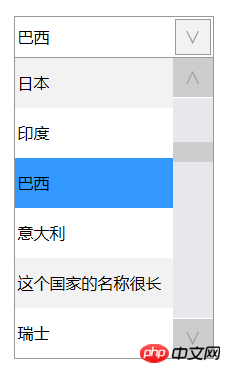
效果图:
以上就是HTML的select控件美化功能的详细内容,更多请关注php中文网其它相关文章!

HTML怎么学习?HTML怎么入门?HTML在哪学?HTML怎么学才快?不用担心,这里为大家提供了HTML速学教程(入门课程),有需要的小伙伴保存下载就能学习啦!

Copyright 2014-2025 https://www.php.cn/ All Rights Reserved | php.cn | 湘ICP备2023035733号


 123
123




 收藏
收藏













