操作系统:windows server 2008 r2
集成开发环境(IDE):Microsoft Visual Studio 2010
开发语言:c#
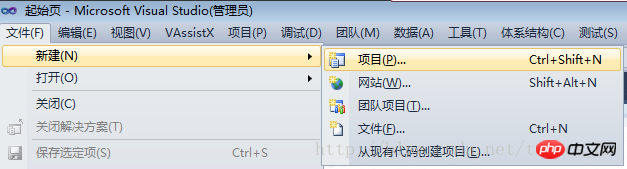
文件》新建》项目
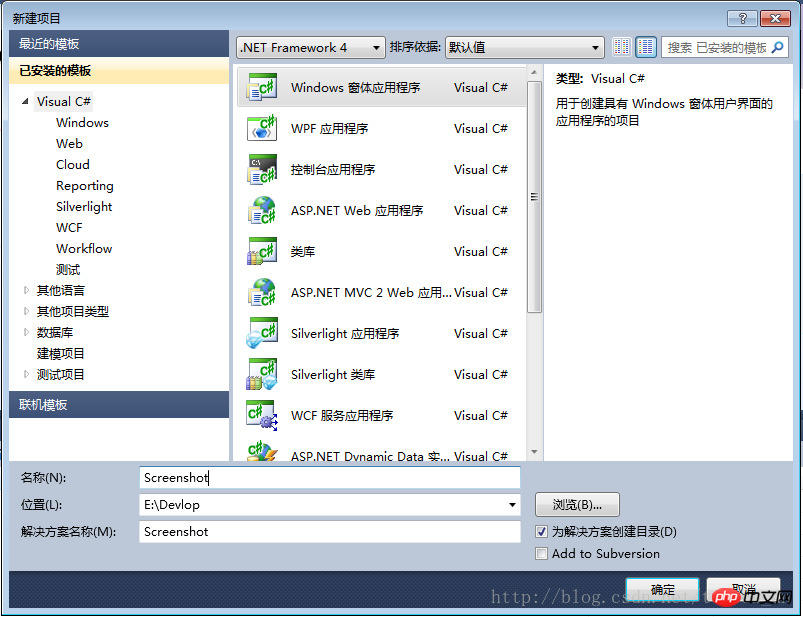
.NET Framework可以选择2.0版本,也可以选择4.0版本;
项目类型选择:Windows窗体应用程序
输入项目名称,确定
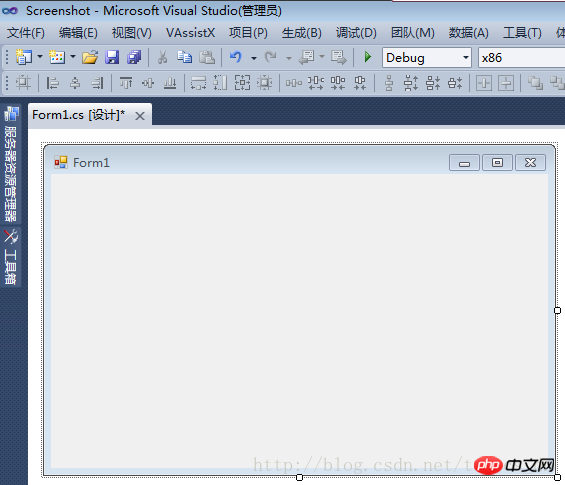
项目创建成功,如下图:
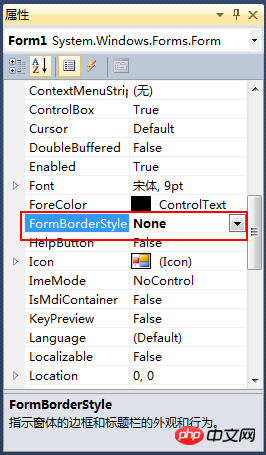
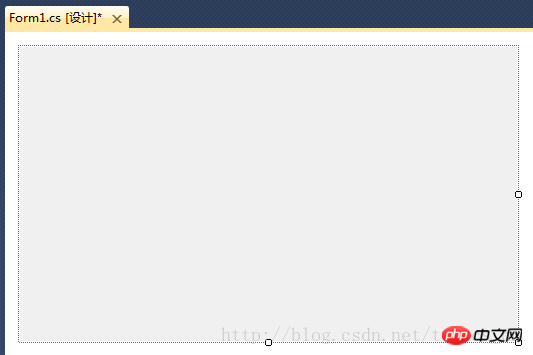
修改窗体的“FormBorderStyle”属性为“none”,实现一个没有边框的窗体
修改后窗口设计器中显示如下:
依次按下图修改其它属性,属性值黑体加粗的是修改过的
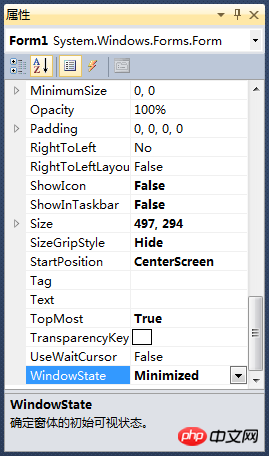
属性说明:
ShowIcon=False,不显示窗体的图标;
ShowInTaskbar=False,使窗体不在Windows任务栏中出现;
SizeGripStyle=Hide,禁用拖动窗体右下角可以改变大小的功能;
WindowsState=Minimized,窗口启动后最小化;
设置完这些属性后,编译,运行,程序是在运行状态,但是却看不到程序的窗口;
这里需要使用WindowsAPI
注册热键:RegisterHotKey
该函数定义一个系统范围的热键。函数原型:BOOL RegisterHotKey(HWND hWnd,int id,UINT fsModifiers,UINT vk);
取消热键注册:UnregisterHotKey
该函数释放调用线程先前登记的热键。
获取热键ID:GlobalAddAtom
只适用于桌面应用程序。
向全局原子表添加一个创建项目0,并返回这个字符串的唯一标识符(原子ATOM)。
        /// <summary>
        /// 向全局原子表添加一个字符串,并返回这个字符串的唯一标识符(原子ATOM)。
        /// </summary>
        /// <param name="lpString">自己设定的一个字符串</param>
        /// <returns></returns>
        [System.Runtime.InteropServices.DllImport("Kernel32.dll")]
        public static extern Int32 GlobalAddAtom(string lpString);

        /// <summary>
        /// 注册热键
        /// </summary>
        /// <param name="hWnd"></param>
        /// <param name="id"></param>
        /// <param name="fsModifiers"></param>
        /// <param name="vk"></param>
        /// <returns></returns>
        [System.Runtime.InteropServices.DllImport("user32.dll")]
        public static extern bool RegisterHotKey(IntPtr hWnd, int id, uint fsModifiers, Keys vk);

        /// <summary>
        /// 取消热键注册
        /// </summary>
        /// <param name="hWnd"></param>
        /// <param name="id"></param>
        /// <returns></returns>
        [System.Runtime.InteropServices.DllImport("user32.dll")]
        public static extern bool UnregisterHotKey(IntPtr hWnd, int id);

        /// <summary>
        /// 热键ID
        /// </summary>
        public int hotKeyId = 100;

        /// <summary>
        /// 热键模式:0=Ctrl + Alt + A, 1=Ctrl + Shift + A
        /// </summary>
        public int HotKeyMode = 1;

        /// <summary>
        /// 控制键的类型
        /// </summary>
        public enum KeyModifiers : uint
        {
            None = 0,
            Alt = 1,
            Control = 2,
            Shift = 4,
            Windows = 8
        }

        /// <summary>
        /// 用于保存截取的整个屏幕的图片
        /// </summary>
protected Bitmap screenImage; private void Form1_Load(object sender, EventArgs e)
{
//隐藏窗口
this.Hide();
//注册快捷键
//注:HotKeyId的合法取之范围是0x0000到0xBFFF之间,GlobalAddAtom函数得到的值在0xC000到0xFFFF之间,所以减掉0xC000来满足调用要求。
this.hotKeyId = GlobalAddAtom("Screenshot") - 0xC000;
if (this.hotKeyId == 0)
{
//如果获取失败,设定一个默认值;
this.hotKeyId = 0xBFFE;
}
if (this.HotKeyMode == 0)
{
RegisterHotKey(Handle, hotKeyId, (uint)KeyModifiers.Control | (uint)KeyModifiers.Alt, Keys.A);
}
else
{
RegisterHotKey(Handle, hotKeyId, (uint)KeyModifiers.Control | (uint)KeyModifiers.Shift, Keys.A);
}
} /// <summary>
/// 处理快捷键事件
/// </summary>
/// <param name="m"></param>
protected override void WndProc(ref Message m)
{
//if (m.Msg == 0x0014)
//{
// return; // 禁掉清除背景消息
//}
const int WM_HOTKEY = 0x0312;
switch (m.Msg)
{
case WM_HOTKEY:
ShowForm();
break;
default:
break;
}
base.WndProc(ref m);
}截图窗口实际是一个没有边框,没有菜单,没有工具栏的一个全屏顶层窗口。
当按下热键时,程序首先获取整个屏幕的图片,保存到“screenImage”变量中;然后添加遮罩层,将其设置为窗体的背景图,将窗口大小设置为主屏幕的大小,显示窗口;让人感觉是在桌面上加一个半透明的遮罩层一样。
代码如下:
        /// <summary>
        /// 如果窗口为可见状态,则隐藏窗口;
        /// 否则则显示窗口
        /// </summary>
        protected void ShowForm()
        {
            if (this.Visible)
            {
                this.Hide();
            }
            else
            {
                Bitmap bkImage = new Bitmap(Screen.AllScreens[0].Bounds.Width, Screen.AllScreens[0].Bounds.Height);
                Graphics g = Graphics.FromImage(bkImage);
                g.CopyFromScreen(new Point(0, 0), new Point(0, 0), Screen.AllScreens[0].Bounds.Size, CopyPixelOperation.SourceCopy);
                screenImage = (Bitmap)bkImage.Clone();
                g.FillRectangle(new SolidBrush(Color.FromArgb(64, Color.Gray)), Screen.PrimaryScreen.Bounds);
                this.BackgroundImage = bkImage;

                this.ShowInTaskbar = false;
                this.FormBorderStyle = System.Windows.Forms.FormBorderStyle.None;
                this.Width = Screen.PrimaryScreen.Bounds.Width;
                this.Height = Screen.PrimaryScreen.Bounds.Height;
                this.Location = Screen.PrimaryScreen.Bounds.Location;

                this.WindowState = FormWindowState.Maximized;
                this.Show();
            }
}关闭窗口时,要取消热键注册,代码如下:
        /// <summary>
        /// 当窗口正在关闭时进行验证
        /// </summary>
        /// <param name="sender"></param>
        /// <param name="e"></param>
        private void Form1_FormClosing(object sender, FormClosingEventArgs e)
        {
            if (e.CloseReason == CloseReason.ApplicationExitCall)
            {
                e.Cancel = false;
                UnregisterHotKey(this.Handle, hotKeyId);
            }
            else
            {
                this.Hide();
                e.Cancel = true;
            }
}到这里,热键注册,截图窗口的显示等功能已经基本完成。
注意:测试本代码时最好在窗体上添加一个创建项目2,用于关闭或隐藏截图窗口;因为截图窗口是全屏的,不能响应ESC键,所以只能通过任务管理器来结束进程创建项目3。创建项目4时最好是在窗体上添加一个Label创建项目5来显示需要的变量信息,因为截图窗口是顶层的全屏窗口,断点被命中时根本没办法操作VS。
以上就是C#开发实例-订制屏幕截图工具(二)创建项目、注册热键、显示截图主窗口的详细内容,更多请关注php中文网其它相关文章!

每个人都需要一台速度更快、更稳定的 PC。随着时间的推移,垃圾文件、旧注册表数据和不必要的后台进程会占用资源并降低性能。幸运的是,许多工具可以让 Windows 保持平稳运行。

 广告
广告Copyright 2014-2025 https://www.php.cn/ All Rights Reserved | php.cn | 湘ICP备2023035733号





 680
680


 收藏
收藏